
C# Testing Interview Questions and Answers (2026) – Unit Testing, Integration Testing, E2E, Performance Testing & Best Practices

Welcome to the our .NET Interview Questions and Answers series exploring the ins and outs of C# and .NET! This is Part 10 of our C#/.NET interview series, and it is entirely dedicated to testing — from the fundamentals to the hard problems that arise in distributed production systems. The questions are organized into nine sections that mirror how testing responsibilities grow as systems get more complex: core unit testing skills, integration test environments, HTTP and gRPC API testing, contract testing, distributed systems testing, resilience and fault injection, UI and E2E automation, and performance.
The Answers are split into sections: What 👼 Junior, 🎓 Middle, and 👑 Senior .NET engineers should know about a particular topic.
Also, please take a look at other articles in the series: C# / .NET Interview Questions and Answers
- Part 1: Core Language & Platform Fundamentals
- Part 2: Types and Type Features
- Part 3: Collections and Data Structures
- Part 4: Async & Parallel Programming
- Part 5: Design Patterns
- Part 6: ASP.NET Core
- Part 7: SQL Database
- Part 8: NoSQL Databases
- Part 9: Microservices and Distributed Systems
- Part 11: Desktop Development
- Part 12: Mobile Development
- Part 13: AI
- Part 14: Agile & Scrum
Testing Fundamentals

❓ What makes a test a “unit test” in C#, and what is usually mislabeled as unit?
A unit test checks a single unit of behavior in isolation. In C#, that usually means a single class or method, executed without touching the real infrastructure.
What makes a test a real unit test
- Tests one unit of logic, not a full flow.
- A unit test verifies a small unit of behavior in isolation. External infrastructure, such as databases, network calls, and file systems, should normally be replaced with test doubles.
- All dependencies are mocked, stubbed, or faked.
- Runs in milliseconds and is fully deterministic.
Typical unit test example in C#
public class PriceCalculator
{
    public decimal Calculate(decimal price, decimal taxRate)
        => price + price * taxRate;
}

[Fact]
public void Calculate_adds_tax_correctly()
{
    var calc = new PriceCalculator();

    var result = calc.Calculate(100, 0.2m);

    Assert.Equal(120, result);
}
What is usually mislabeled as a unit test
- Tests that hit a real database, even SQLite or LocalDB.
- Tests using EF Core with a real provider.
- Tests calling real HTTP APIs.
- Tests that start ASP.NET Core with
WebApplicationFactory. - Tests that require Docker, configuration files, or network access.
These are integration or component tests. They are useful, but they are not unit tests.
What .NET engineers should know
- 👼 Junior: A unit test checks one class or method without real dependencies.
- 🎓 Middle: Know how to isolate logic using interfaces, mocks, and dependency injection.
- 👑 Senior: Design code so business logic is testable without infrastructure and enforce correct test boundaries.
📚 Resources
❓ What do you test: behavior, state, or interactions, and why?
Behavior testing focuses on observable results. You verify inputs and outputs regardless of the internal implementation. This approach keeps tests stable during refactoring and clearly expresses business rules.
State testing checks the internal state after an operation. It is useful when the state itself is the outcome, such as domain entities or aggregates with invariants. The downside is tighter coupling to implementation details.
Interaction testing verifies how dependencies are called. It is applied when side effects matter, for example, sending emails, publishing events, or coordinating workflows. Overuse makes tests brittle because they mirror implementation structure.
Summary:
- Prefer behavior testing by default.
- Use state testing when the state represents business meaning.
- Use interaction testing only for side effects and orchestration.
What .NET engineers should know
- 👼 Junior: Behavior tests outputs, state tests data, interaction tests calls.
- 🎓 Middle: Prefer behavior testing and avoid asserting implementation details.
- 👑 Senior: Balance all three styles and keep tests refactor-friendly.
❓ Dummy vs Mock vs Stub vs Fake vs Spy: what is the difference, and when to use each?
Dummy
Dummies are used only for initialization and have no behavior. They act like placeholders, required to set up the system under test. With a dummy, we can convey that the object is not used directly in the test context.
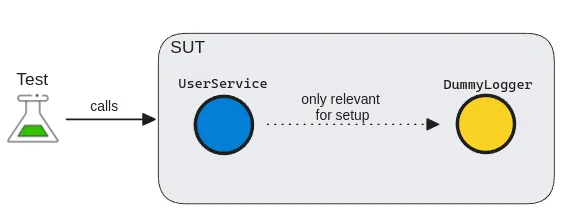
Dummies have two main forms:
- Dummy values: used as simple value replacements in data fields
- Dummy objects: used for more complex data types and dependencies.
Stub
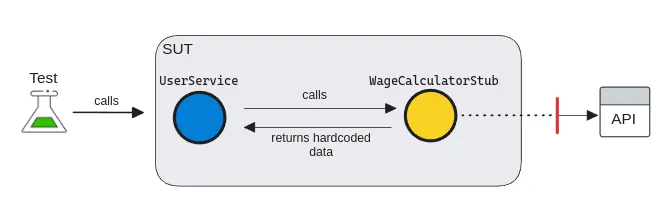
A stub is a slightly more sophisticated test double than a dummy, as it can return a value. They are used to simulate incoming interactions, such as returning hardcoded data to our SUT. A test stub is an implementation of an interface that provides a response to the system.
Spy
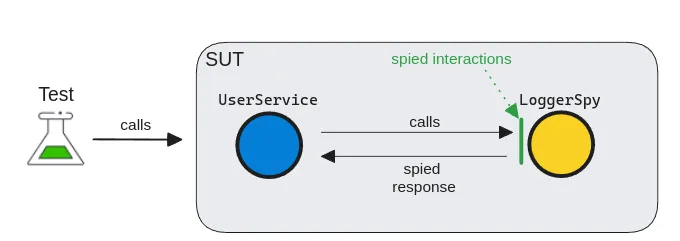
A test spy is almost like a real government spy, silently obtaining information. But instead of obtaining information from a competitor, a test spy gathers internal information from dependencies. A spy is a special kind of test double that can record and verify internal behaviors.
Mock
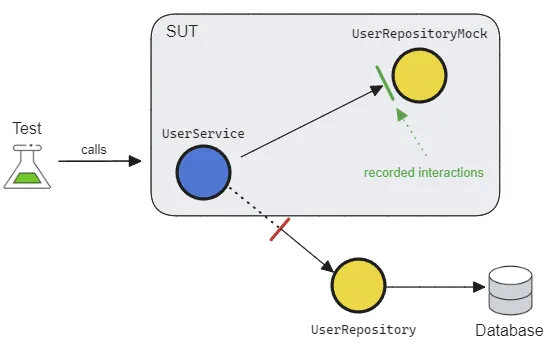
A Mock is a powerful beast, yet it is often the most misused. It can pre-record expectations and have configurable behaviors. Serving as a proxy for the dependency, it allows us to verify outgoing interactions, such as ensuring that a method is called with specific parameters.
Mocks can usually be created using 3rd-party libraries in most languages. Although they're flexible with many utilities, their syntax can be quite cryptic, making the tests less readable.
Fake
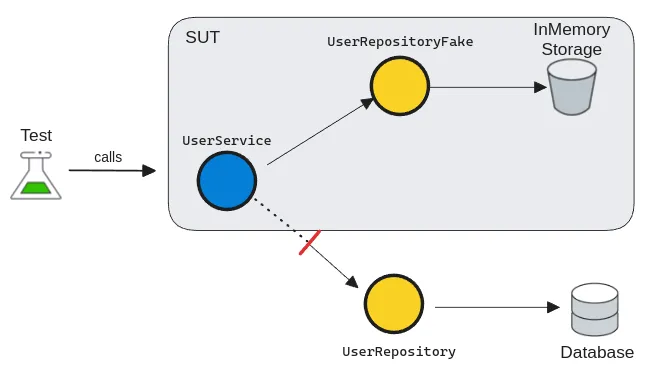
A fake is a simplified and lightweight implementation of a dependency. Seemingly, it behaves as a real dependency, but it just emulates business rules. Unlike mocks, they're used for verifying state rather than interactions. As they're the closest to real implementations, they're also the most powerful ones for simulating system behaviors.
What .NET engineers should know
- 👼 Junior: Know what each test double is used for and the basic differences.
- 🎓 Middle: Choose the simplest test double that solves the problem.
- 👑 Senior: Enforce clear test intent and prevent interaction-heavy test suites.
📚 Resources
❓ How do you avoid testing implementation details while still getting confidence?
To avoid testing implementation details, you must shift your focus from how the code works to what the code achieves. This is often called Behavior-Based or Outcome-Based testing.
1. Test the "Observable Behavior."
Only interact with the Public API of your class or module. If a piece of logic is private, don't change its access modifier just to test it. Instead, verify that the public method using that logic produces the correct output or state change.
- Bad: Asserting that a private
CalculateTax()method was called. - Good: Asserting that the
InvoiceTotalincludes the correct tax amount after callingFinalizeOrder().
2. Move from Solitary to "Sociable" Tests
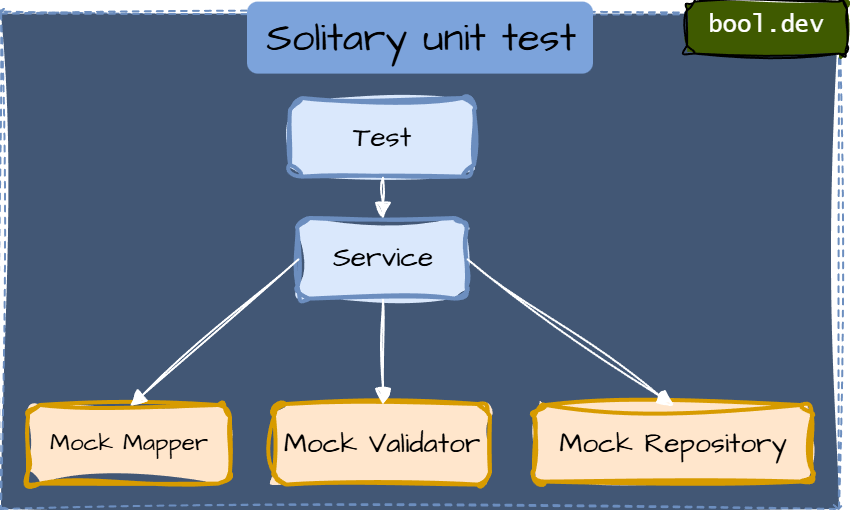
A "Solitary" test mocks every single dependency, which often forces you to mirror the internal code structure in your test setup. A Sociable Unit Test uses real versions of internal "helper" classes or domain objects, only mocking the true boundaries (Databases, External APIs).
3. Use State-Based Assertions
Whenever possible, check the final state (the "What") rather than the interaction (the "How").
Implementation Detail: mockRepo.Verify(r => r.Save(), Times.Once) — This breaks if you change your save logic to use a different method.
Behavior: Assert.Equal(expectedValue, database.GetValue()) — This ensures the data actually exists, regardless of which method saved it.
4. The Refactoring Litmus Test
The best way to know if you are testing the implementation is the Refactoring Test:
If I completely rewrite the internals of this method but keep the output exactly the same, do my tests stay green?
If they turn red because a mock setup failed or a private method disappeared, you are testing implementation details.
What .NET engineers should know
- 👼 Junior: Test outputs and visible effects, not private methods or internal calls.
- 🎓 Middle: Mock only external dependencies and keep assertions focused on behavior.
- 👑 Senior: Design boundaries so behavior testing is easy, and use a small set of integration tests for wiring confidence.
❓ What are the most common test smells in .NET codebases, and how do you fix them?
In .NET, "test smells," or antipatterns, are signs that your test suite is becoming a liability rather than an asset. Here are the most common ones and how to resolve them (detailed explanation you can check in a separate article):
Anti-Pattern 1: Testing Implementation Details
Smell
- Reflection to call private methods
InternalsVisibleToadded purely for tests- Asserting “private helper X was called.”
Fix
Test via public API
If private logic is complex, extract it into a separate class with a clear responsibility and test that class through its public surface.
Anti-Pattern 2: Over-Mocking (“Solitary Tests Everywhere”)
Smell
A test mocks every dependency—even simple domain objects and internal helpers—so the test setup mirrors the internal code structure. It's also calls solitary unit test
Fix: Prefer “Sociable” Unit Tests
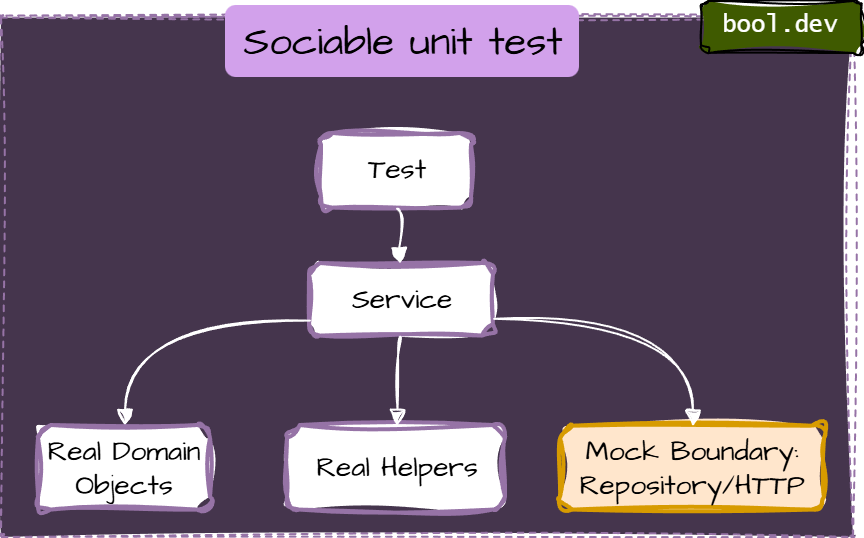
- Use real implementations for internal collaborators (domain models, value objects, simple calculators). Mock only true boundaries:
- database repositories (if you’re unit-testing application logic)
- external HTTP APIs
- message buses
- filesystem
- clock/time and randomness
Anti-Pattern 3: Interaction-only assertions (mock.Verify everywhere)
Smell
Interaction assertions are sometimes useful at boundaries (“did we call the HTTP client?”), but they become brittle when used to verify internal steps.
Fix: assert outcome/state:
[Fact]
public void Finalize_SetsStatusToFinalized()
{
    var order = new Order(subtotal: 100m, taxRate: 0.1m);

    order.Finalize();

    Assert.Equal(OrderStatus.Finalized, order.Status);
}
Anti-Pattern 4: Obscure tests (giant setup)
Smell
- 100+ lines of setup
- The important inputs are buried
- copying setup across tests
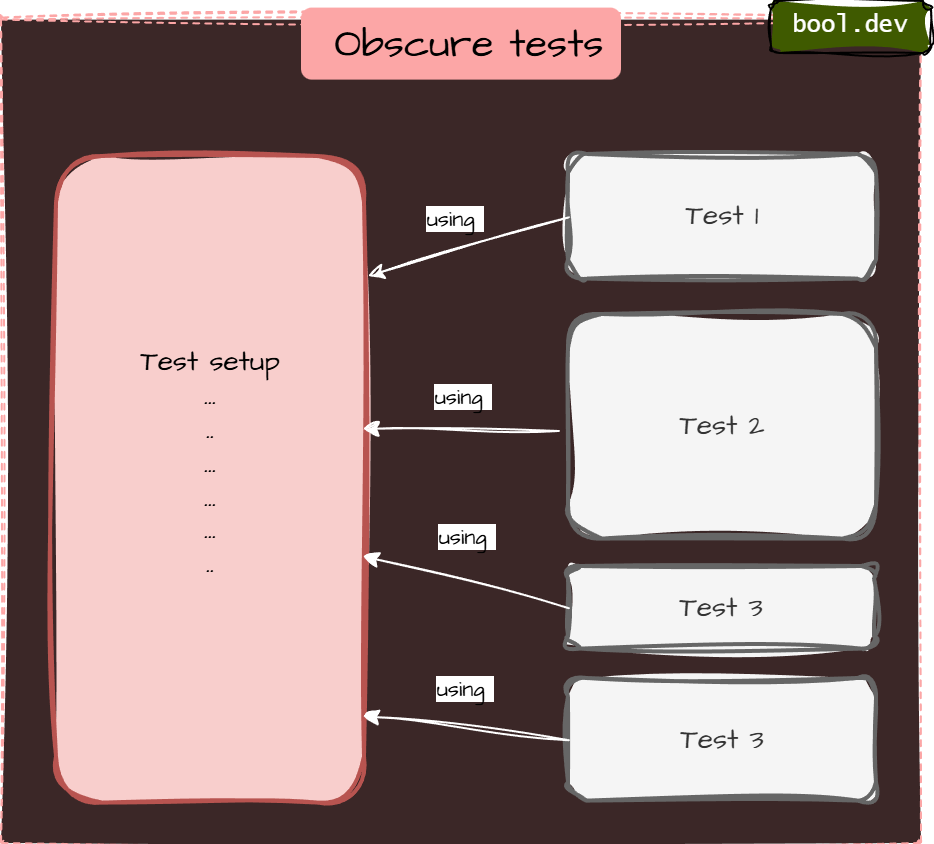
Fix: AAA + Test Data Builder
public sealed class OrderBuilder
{
    private decimal _subtotal = 100m;
    private decimal _taxRate = 0.1m;

    public OrderBuilder WithSubtotal(decimal value) { _subtotal = value; return this; }
    public OrderBuilder WithTaxRate(decimal value) { _taxRate = value; return this; }

    public Order Build() => new Order(_subtotal, _taxRate);
}

[Fact]
public void Finalize_ComputesTotal()
{
    var order = new OrderBuilder()
        .WithSubtotal(50m)
        .WithTaxRate(0.05m)
        .Build();

    order.Finalize();

    Assert.Equal(52.50m, order.Total);
}
Anti-Pattern 5: Logic in tests (loops/if/switch)
Smell
Tests contain branching logic. Now you’ve written code inside your test that also needs testing
Example:
[Fact]
public void DiscountRules_Work()
{
    foreach (var subtotal in new[] { 99m, 100m, 150m })
    {
        var order = new Order(subtotal, taxRate: 0m);
        order.ApplyDiscounts();

        if (subtotal >= 100m)
            Assert.True(order.HasDiscount);
        else
            Assert.False(order.HasDiscount);
    }
}
Fix: parameterized tests
- Keep tests linear and explicit.
- Use parameterized tests instead of loops:
- xUnit:
[Theory]+[InlineData] - NUnit:
[TestCase]
- xUnit:
Example (xUnit)
[Theory]
[InlineData( 99, false)]
[InlineData(100, true)]
[InlineData(150, true)]
public void ApplyDiscounts_SetsHasDiscount_WhenThresholdMet(decimal subtotal, bool expected)
{
    var order = new Order(subtotal, taxRate: 0m);

    order.ApplyDiscounts();

    Assert.Equal(expected, order.HasDiscount);
}
Anti-Pattern 6: Sleepy/flaky async tests (Thread.Sleep)
Smell
Using fixed delays to “wait for work”.
Fix A: await the work (best)
If the API can expose a Task, do it:
[Fact]
public async Task SendsEmail()
{
    var sut = new EmailDispatcher();

    await sut.DispatchAsync("a@b.com", "hi");

    Assert.True(sut.WasSent);
}
Fix B: poll with timeout (when you can’t await directly)
private static async Task Eventually(Func<bool> condition, TimeSpan timeout)
{
    var start = DateTime.UtcNow;
    while (DateTime.UtcNow - start < timeout)
    {
        if (condition()) return;
        await Task.Delay(20);
    }
    throw new TimeoutException("Condition was not met within the timeout.");
}

[Fact]
public async Task SendsEmail_Eventually()
{
    var sut = new EmailDispatcher();

    sut.Dispatch("a@b.com", "hi");

    await Eventually(() => sut.WasSent, TimeSpan.FromSeconds(2));
}
Anti-pattern 7: Shared mutable fixtures
Smell
Static/shared state reused across tests:
- shared in-memory list
- shared DB without reset
- singleton services holding state
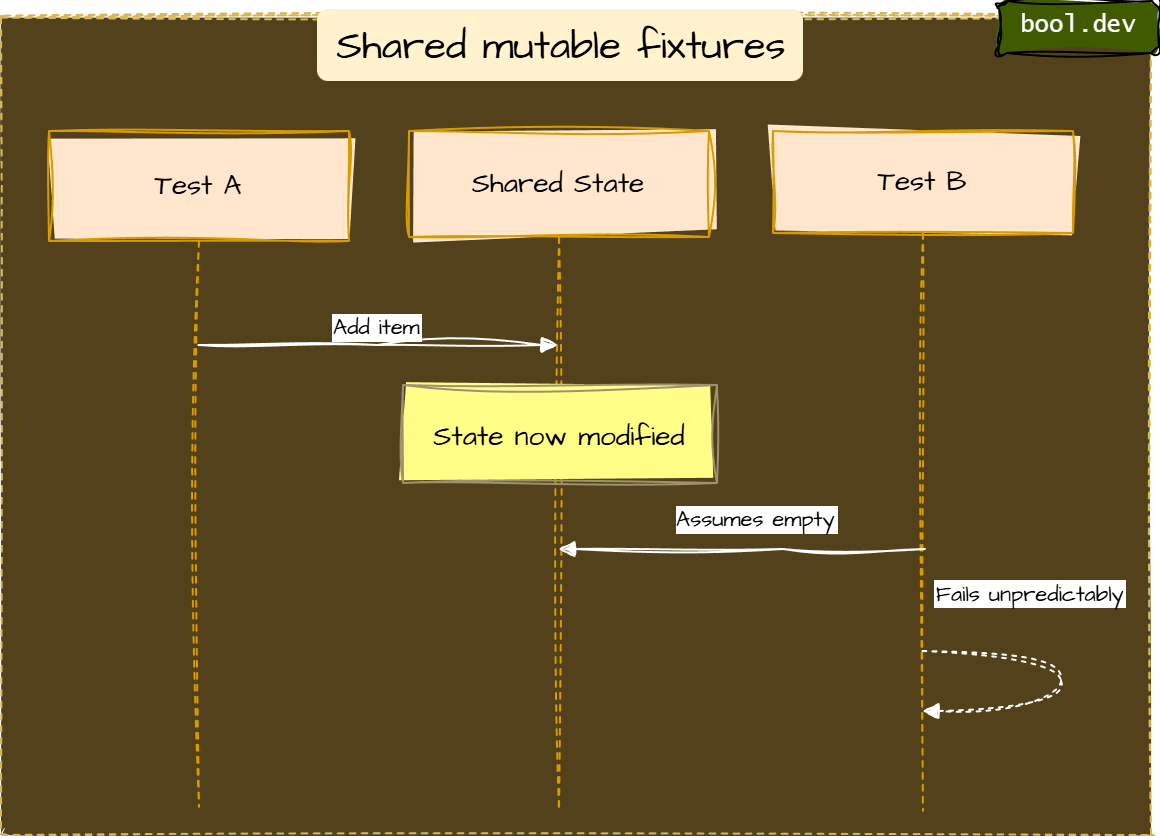
Fix
- Make each test independent (fresh instances per test)
- Avoid static mutable state
- If a DB is unavoidable, isolate:
- create schema per test run/class
- Run tests in a transaction and roll back
- Use containerized ephemeral DB in CI (integration layer)
Anti-Pattern 8: Non-Determinism (DateTime.Now, Random, Guid.NewGuid)
Smell
Tests depend on:
- current time (
DateTime.Now,DateTimeOffset.UtcNow) - time zones or culture settings (
CultureInfo.CurrentCulture) - randomness (
Random,Guid.NewGuid()) - machine-specific settings (environment variables, OS locale, file paths)
These tests pass on your machine but fail on CI, pass in January but fail in March, or pass 99 times and fail once — all without any code change.
Fix
- Fix A: Split by behavior
- Fix B: Use “assertion scopes” to improve failure signal
- Fix C: Prefer equivalence with explicit intent
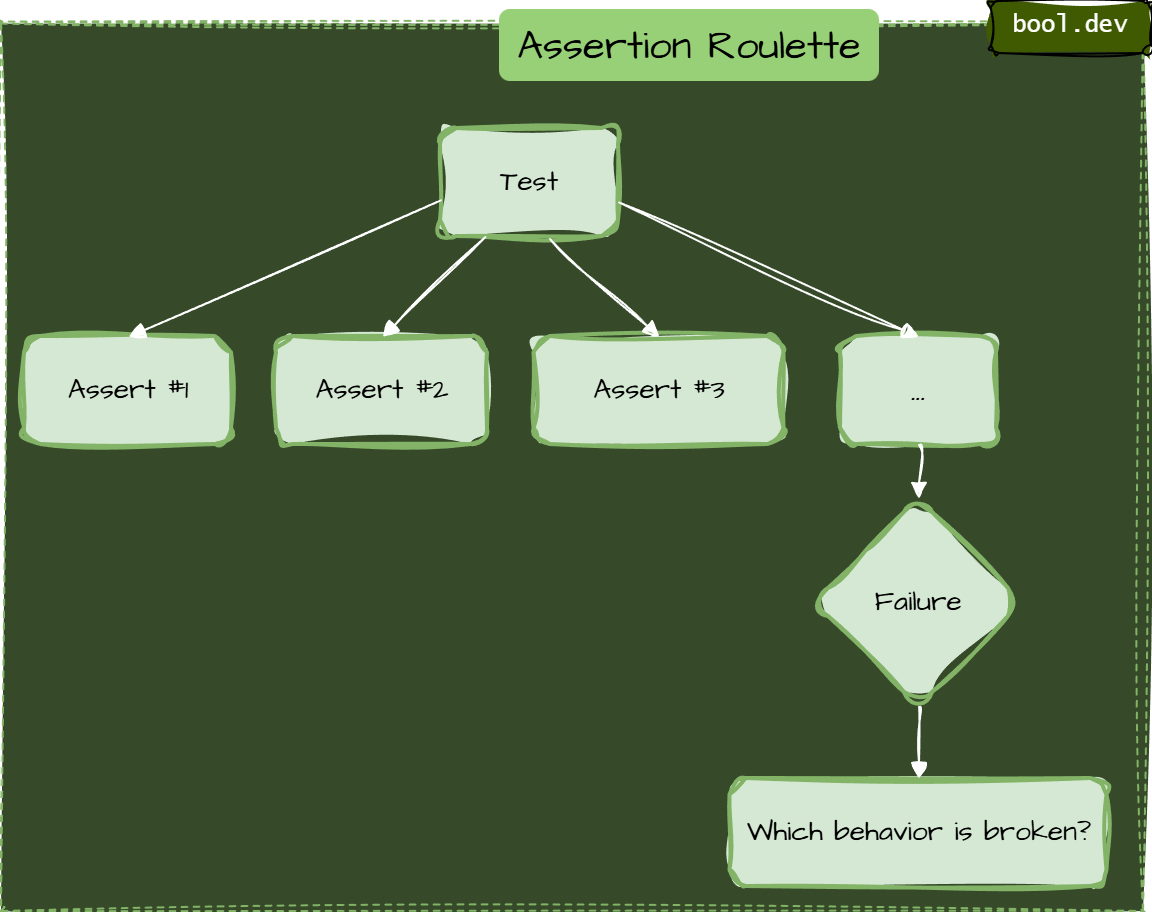
Anti-Pattern 9: Assertion Roulette (Many Asserts with No Clarity)
Smell
A single test contains a long list of assertions, and when it fails, you don’t immediately know which behavior broke.
Typical causes:
- testing multiple behaviors at once
- using plain
Assert.True(...)repeatedly without clear intent - validating an entire object graph in one go
Typical causes:
- testing multiple behaviors at once
- using plain
Assert.True(...)repeatedly without clear intent - validating an entire object graph in one go
Example:
[Fact]
public void Finalize_DoesEverything()
{
    var order = CreateTestOrder();
    order.Finalize();

    Assert.True(order.IsFinalized);
    Assert.Equal(110m, order.Total);
    Assert.NotNull(order.FinalizedAt);
    Assert.Equal("John", order.Customer.Name);
    Assert.Equal(2, order.Items.Count);
    Assert.True(order.Items.All(i => i.Price > 0));
    Assert.Equal(OrderStatus.Finalized, order.Status);
}
When this fails at line 5 with "Expected: 2, Actual: 3", you have no idea whether the bug is in item logic, finalization, or customer assignment. You also do not know if the other assertions would have passed or failed, because xUnit stops at the first failure.
Fix A:
Split by behavior. Write one test per meaningful rule
Fix B:
Use “assertion scopes” to improve the failure signal
Fix C:
Prefer equivalence with explicit intent
Anti-Pattern 10: Testing the Wrong Thing (Third-Party Libraries or Framework Internals)
Smell
You write unit tests that prove ASP.NET Core EF Core, Newtonsoft/System.Text.Json, or AutoMapper behave as documented — without asserting your business rule or configuration intent.
This is common when tests are created to “increase coverage” rather than to protect behavior.
Better: test your contract or mapping configuration (integration-ish)
If your API contract requires camelCase, test your endpoint (or your serialization settings) in a minimal integration test.
What .NET engineers should know
- 👼 Junior: Watch for slow and flaky tests first, then simplify setups and assertions.
- 🎓 Middle: Separate unit and integration tests, reduce over-mocking, and enforce deterministic tests.
- 👑 Senior: Treat test architecture as part of system design, enforce boundaries, and keep the suite fast and trustworthy.
📚 Resources: Top 10 Unit Testing Anti-Patterns in .NET and How to Avoid Them
❓ How do you structure tests for readability?
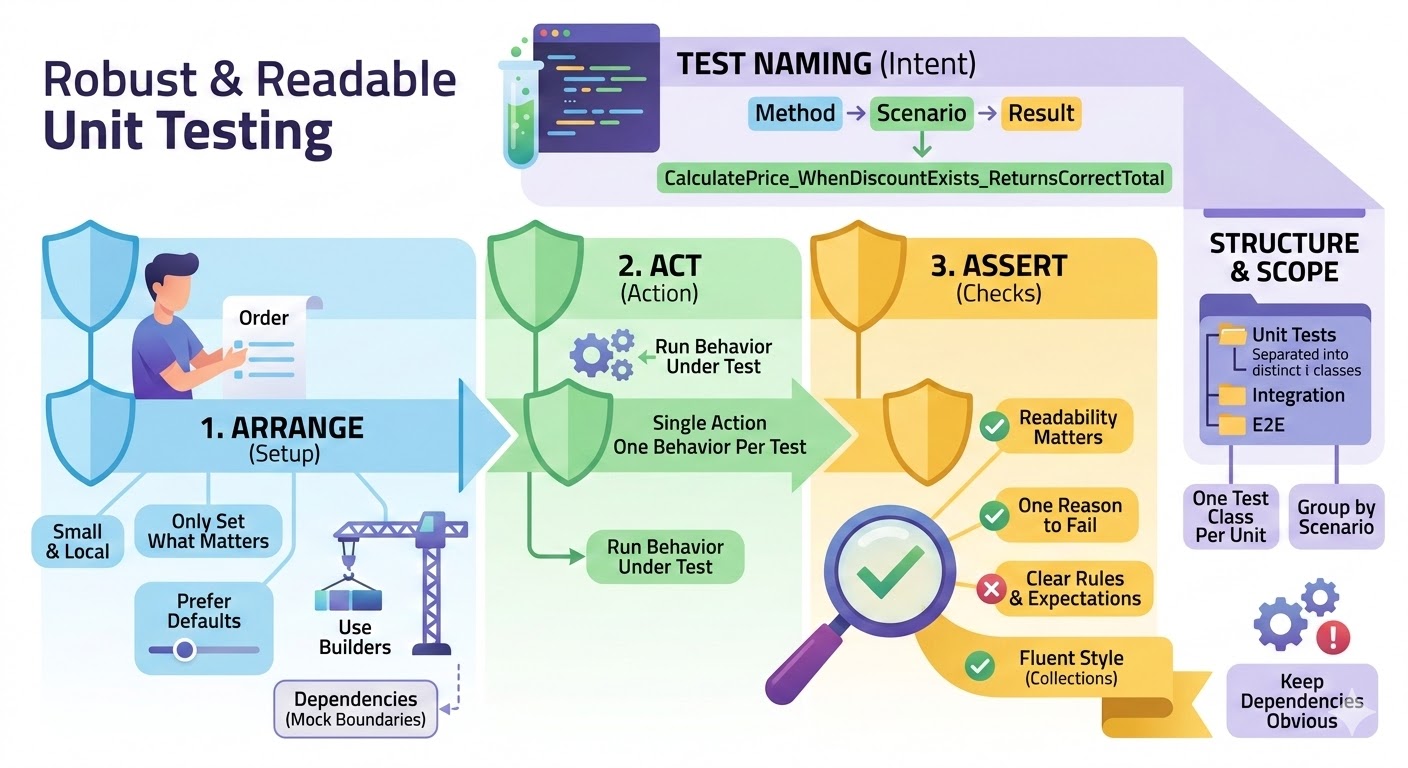
Use a consistent shape
- Arrange, Act, Assert (AAA)
Keep it visually obvious where the setup ends, and the action starts, and where the checks are. - One reason to fail
One behavior per test. If it fails, it should be obvious which rule was broken.
Write names that explain intent
- Method_Scenario_ExpectedResult
Example:PlaceOrder_WhenStockIsZero_ReturnsOutOfStock
Keep the setup small and local
- Only set what matters for this test.
- Prefer defaults with overrides (builders) over huge object graphs.
Use helpers, but don’t hide the story
- Builders for data creation are good.
- Avoid helper methods that hide the actual behavior under test.
Make assertions readable
- Prefer a few clear assertions over many vague ones.
- Use FluentAssertions when it improves clarity, especially for collections and object graphs.
Group tests by unit and behavior
- One test class per unit (service/class).
- Group by method or scenario.
- Separate Unit, Integration, and E2E at the folder or project level.
Keep dependencies obvious
- Constructor setup is fine, but don’t build a full application in a unit test.
- Mock only boundaries and name mocks clearly.
What .NET engineers should know
- 👼 Junior: Use AAA and clear names so tests read like a short story.
- 🎓 Middle: Keep setup minimal with builders and assert one behavior per test.
- 👑 Senior: Standardize conventions across the repo and prevent hidden complexity in test helpers.
❓ How do you test cancellation and verify cancellation is actually honored?
- Make cancellation observable. The code under test should either throw OperationCanceledException, return a canceled Task, or stop producing side effects when the token is canceled.
- Cancel the drive from the test, then await completion. Cancel the token, then await the task. Do not rely on sleep. Use a gate (TaskCompletionSource) to ensure the operation actually started.
- Verify both parts
- The task is canceled.
- Work stops, meaning no extra calls, no extra writes, no extra events after cancellation.
C# example
Business logic:
public interface IEmailSender
{
    Task SendAsync(string to, string subject, CancellationToken ct);
}

public sealed class NewsletterService
{
    private readonly IEmailSender _emailSender;

    public NewsletterService(IEmailSender emailSender) => _emailSender = emailSender;

    public async Task SendBatchAsync(IEnumerable<string> recipients, CancellationToken ct)
    {
        foreach (var r in recipients)
        {
            ct.ThrowIfCancellationRequested();
            await _emailSender.SendAsync(r, "Hello", ct);
        }
    }
}
Deterministic test:
public sealed class FakeEmailSender : IEmailSender
{
    private readonly TaskCompletionSource _firstCallStarted =
        new(TaskCreationOptions.RunContinuationsAsynchronously);

    private int _sent;

    public int SentCount => _sent;

    public Task FirstCallStarted => _firstCallStarted.Task;

    public async Task SendAsync(string to, string subject, CancellationToken ct)
    {
        _firstCallStarted.TrySetResult();

        // Cancellation-aware async point.
        await Task.Yield();
        ct.ThrowIfCancellationRequested();

        Interlocked.Increment(ref _sent);

        // Simulate real async work that honors cancellation.
        await Task.Delay(TimeSpan.FromSeconds(30), ct);
    }
}

public class NewsletterServiceTests
{
    [Fact]
    public async Task SendBatchAsync_honors_cancellation_and_stops_side_effects()
    {
        var sender = new FakeEmailSender();
        var sut = new NewsletterService(sender);

        using var cts = new CancellationTokenSource();

        var recipients = new List<string> { "a@x", "b@x", "c@x" };

        var task = sut.SendBatchAsync(recipients, cts.Token);

        // Ensure the operation started, deterministically.
        await sender.FirstCallStarted;

        // Cancel and assert the task is canceled.
        cts.Cancel();

        await Assert.ThrowsAsync<OperationCanceledException>(async () => await task);

        // Verify cancellation stopped the work (no full batch).
        Assert.True(sender.SentCount < recipients.Count);
    }
}
What .NET engineers should know
- 👼 Junior: Cancel via CancellationTokenSource and assert OperationCanceledException or a canceled Task.
- 🎓 Middle: Use gates (TaskCompletionSource) to make cancellation tests deterministic and verify side effects stop.
- 👑 Senior: Design APIs to propagate cancellation everywhere and enforce cancellation behavior in code reviews.
📚 Resources
❓ How do you test time and scheduling deterministically (timeouts, delays, cron-like logic)?
Testing time-based logic is notoriously difficult because standard system clocks are non-deterministic. To test them reliably, you must decouple your code from the real-time clock.
Never use DateTime.Now, Task.Delay, or CancellationTokenSource(timeout) directly in your business logic. Instead, inject a Time Provider.
Since .NET 8, Microsoft has provided a built-in TimeProvider abstraction specifically for this purpose.
Example: Testing Delays and Timeouts
With a FakeTimeProvider, you can "teleport" time forward. The test executes instantly, but the code thinks minutes or hours have passed.
[Fact]
public async Task Should_Timeout_After_Five_Seconds()
{
    // Arrange
    var fakeTime = new FakeTimeProvider();
    var sut = new OrderProcessor(fakeTime);

    // Act
    var task = sut.ProcessAsync(orderId);

    // Fast-forward time manually
    fakeTime.Advance(TimeSpan.FromSeconds(5.1));

    // Assert
    await Assert.ThrowsAsync<TimeoutException>(() => task);
}
Example: Handling CancellationToken Timeouts
Standard CancellationTokenSource with a delay is hard to test. Instead, pass your TimeProvider when creating the token (available in .NET 8+).
// Logic code
using var cts = _timeProvider.CreateCancellationTokenSource(TimeSpan.FromMinutes(10));

// Test code
fakeTime.Advance(TimeSpan.FromMinutes(11));
Assert.True(cts.IsCancellationRequested);
What .NET engineers should know
- 👼 Junior: Inject time instead of using DateTime.Now, avoid sleeping in tests.
- 🎓 Middle: Use TimeProvider and FakeTimeProvider, and keep scheduling logic pure and testable.
- 👑 Senior: Design background services so that time, timers, and scheduling are replaceable and tests can drive time deterministically.
❓ If code is hard to test, what do you refactor first to make it testable?
- Separate logic from side effects. Pull pure business rules out of controllers, handlers, and background services into small classes or functions. Leave IO at the edges.
- Introduce clear seams. Replace direct calls to infrastructure with interfaces: HTTP clients, database access, message bus, file system, clock, and randomness.
- Remove hidden dependencies. Get rid of static access, singletons, service locator,
DateTime.Now, Environment, and global state. Pass dependencies explicitly. - Reduce responsibilities. If one class does everything, split it into multiple classes. A testable unit has one reason to change and one clear behavior to verify.
- Make inputs explicit. Replace “read from everywhere” with parameters. Build a request object if needed, but keep it simple and focused.
- Make outputs observable. Return values, domain events, or clear state changes. Avoid void methods that only do hidden work.
- Push orchestration up, keep units dumb. Keep complex flows in an orchestrator, and move rules into small composable components that are easy to test.
What .NET engineers should know
- 👼 Junior: Extract business logic into small methods and avoid static time and globals.
- 🎓 Middle: Introduce interfaces for external dependencies and split large classes into focused units.
- 👑 Senior: Design boundaries and architecture so most logic is testable without infrastructure.
📚 Resources
Integration testing and environments

❓ How do you test EF Core migrations and schema changes?
EF Core migrations are code that modifies production databases — they deserve the same test coverage as application logic. The failure modes are silent and expensive: a migration that runs without error but leaves the schema in a state the application cannot use, a rollback that does not fully restore the previous state, or a new migration that conflicts with data already in the database. None of these are caught by unit tests or by running the application against a fresh database.
The first test to write is migration idempotency — applying all pending migrations to a real database (Postgres, SQL Server via Testcontainers) and then verifying the resulting schema matches the EF Core model. context.Database.EnsureCreated() bypasses migrations entirely, so always use MigrateAsync() in tests. The IRelationalDatabaseCreator can then compare the applied schema against the current model to detect drift.
// Testcontainers — real SQL Server, real migrations
public class MigrationTests : IAsyncLifetime
{
    private readonly MsSqlContainer _container = new MsSqlBuilder().Build();

    public async Task InitializeAsync() => await _container.StartAsync();
    public async Task DisposeAsync() => await _container.DisposeAsync();

    [Fact]
    public async Task Migrations_ApplyCleanly_AndMatchModel()
    {
        var options = new DbContextOptionsBuilder<AppDbContext>()
            .UseSqlServer(_container.GetConnectionString())
            .Options;

        await using var context = new AppDbContext(options);

        // Apply all migrations — never EnsureCreated in migration tests
        await context.Database.MigrateAsync();

        // Verify schema matches current EF model — catches drift
        var creator = context.GetService<IRelationalDatabaseCreator>();
        Assert.True(await creator.HasTablesAsync(),
            "Schema missing tables after migration");
    }
}
What .NET engineers should know:
- 👼 Junior: Always test migrations against a real database via Testcontainers — never EnsureCreated, never an in-memory provider — because migration behavior depends on the actual database engine.
- 🎓 Middle: Test destructive migrations with pre-seeded data that mirrors production shape; assert that existing rows survive schema changes with correct defaults and that rollback restores the previous schema cleanly.
- 👑 Senior: Treat migration tests as a mandatory CI gate with three layers — clean apply against a real engine, destructive change with data fixtures, and schema drift detection that fails the build when entity changes have no corresponding migration; for large tables, test migration performance under realistic data volume since a migration that runs in 50ms on an empty database can lock a 50M row table for minutes.
❓ What do you consider an integration test in .NET, and what is still unit-level?
In .NET, the line between unit and integration testing isn't about the tool (both use xUnit/NUnit) or the language, but about boundaries.
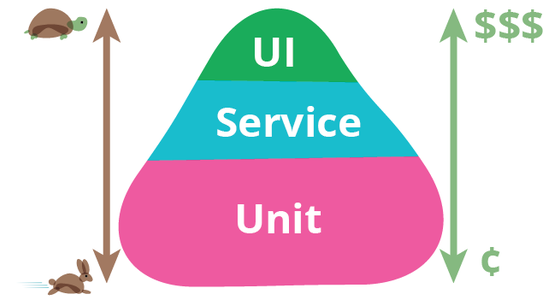
Unit-level tests
A test is unit-level when it verifies a single unit of logic in isolation, without real infrastructure.
Typical unit-level tests in .NET:
- Business logic classes with mocked or fake dependencies.
- Domain services, validators, calculators, parsers.
- Code using in-memory fakes instead of real DB, HTTP, or messaging.
- EF Core InMemory tests behave more like component tests because they execute the EF infrastructure but not against a real relational database.
- ASP.NET controllers tested by calling actions directly, without hosting the app.
Key signal: If the test runs quickly, has no external dependencies, and fails only due to changes in logic, it is a unit-level test.
Integration tests
A test is an integration test when it verifies how multiple components work together using real implementations.
Typical integration tests in .NET:
- EF Core with a real provider (SQL Server, PostgreSQL, SQLite).
- ASP.NET Core hosted with WebApplicationFactory.
- Real HTTP clients calling in-process APIs.
- Serialization and deserialization using real JSON options.
- Dependency Injection container wiring.
- Message handlers tested against real queues or brokers (often via Testcontainers).
Key signal: If the test validates wiring, configuration, or infrastructure behavior, it is an integration test.
Common confusion points
- EF Core InMemory provider. Still unit-level. It does not behave like a real relational database.
- WebApplicationFactory with mocked DB. Integration tests of HTTP pipeline, routing, filters, and middleware, even if the DB is mocked.
- Repository tests with real DB. Integration tests, not unit tests.
- “Fast integration tests” are still integration tests. Speed does not change the category.
What .NET engineers should know
- 👼 Junior: Unit tests isolate logic, integration tests use real implementations.
- 🎓 Middle: Know which dependencies turn a test into integration and structure projects accordingly.
- 👑 Senior: Design test strategy with clear boundaries and balance unit and integration coverage.
❓ What do you run “real” in integration tests (DB, cache, queue), and what do you fake?
Run real components where behavior, configuration, or contracts matter, and mocks would lie.
Typically, real in .NET integration tests:
- Database. Real DB engine and provider. This catches migrations, indexes, transactions, isolation levels, and SQL behavior that would otherwise be missed.
- ORM and mappings. EF Core with a real provider to validate LINQ translation, value converters, owned types, and constraints.
- Serialization. Real JSON or Protobuf serializers with production options. This prevents contract drift.
- Dependency Injection and configuration. Real DI container and app configuration to catch missing registrations and lifetime issues.
- HTTP pipeline. Real ASP.NET Core hosting with routing, middleware, filters, and auth handlers (often stubbed auth).
- Message contracts. Real message serialization and handlers, even if the broker is replaced.
Typically faked in integration tests:
You should fake anything that is outside your control, has a usage cost, or is non-deterministic.
- External third-party APIs
- Use HTTP stubs or in-memory test servers. Do not depend on the internet or partner systems.
- Email, SMS, push notifications
- Replace with fakes that capture intent, not delivery.
- Time and randomness
- Inject TimeProvider and deterministic generators.
- Authentication and identity providers
- Fake or stub auth to focus on your app’s behavior, not OAuth correctness.
Queues and caches: case by case
- Cache (Redis). Real when eviction, TTL, or serialization matters. Fake when cache is just a performance optimization.
- Message queues. Real-time ordering, retries, and at least-once delivery matter. Fake when testing handler logic only.
- Background workers. Real execution for integration tests, but controlled lifecycle and short runs.
What .NET engineers should know
- 👼 Junior: Real DB and serialization, fake external services.
- 🎓 Middle: Choose real components where behavior affects correctness, fake the rest.
- 👑 Senior: Define system boundaries and standardize what runs in real integration tests.
📚 Resources
❓ Why is an in-memory DB often a bad choice compared to a real database for integration testing?
While the EF Core In-Memory provider or SQLite In-Memory are tempting because they are fast and require zero setup, they often create a "false sense of security." They are not true databases; they are collections of objects in memory that happen to share a similar API.
Here is why they often fail as a substitute for a real database in integration tests:
- No real SQL translation. EF Core InMemory does not execute SQL. It evaluates queries in memory, so you do not catch LINQ translation issues that a real provider would fail on.
- Different relational behavior. Constraints, indexes, foreign keys, unique rules, cascade deletes, transactions, and isolation levels are not equivalent.
- Different null and comparison semantics. Case sensitivity, collation, string comparisons, datetime handling, and ordering can differ from SQL Server or PostgreSQL.
- Different concurrency behavior. Real DB locking, deadlocks, optimistic concurrency tokens, and transaction boundaries are not represented correctly.
- False performance assumptions. In-memory tests hide slow queries, missing indexes, N+1 patterns, and bad execution plans.
The Modern Alternative: Testcontainers
Instead of compromising with an in-memory fake, use Testcontainers for .NET. It allows you to spin up a real Docker container of your production database (SQL Server, PostgreSQL, etc.) specifically for the duration of the test.
What .NET engineers should know
- 👼 Junior: In-memory DB can pass tests while real DB fails due to different behavior.
- 🎓 Middle: Use real providers for EF Core integration tests to validate SQL translation and constraints.
- 👑 Senior: Standardize on real databases for integration testing and keep in-memory only for unit-level speed.
❓ How do you seed data for integration tests without making tests slow and coupled?
Seeding data is the "Goldilocks" problem of integration testing: too little data and you aren't testing real scenarios; too much data and your tests become slow and "brittle" (where changing one test breaks ten others).
To keep tests fast and decoupled, you should move away from a single "Global Seed" toward Localized, Scenario-Based Seeding.
1. Avoid the "Global Seed" Trap
Many developers use a single script to populate thousands of rows across the entire test suite.
Problem: If Test A needs "User 1" to be an Admin, but Test B needs "User 1" to be a Guest, you have a conflict. This leads to "Mystery Guest" bugs, where tests fail because of data they didn't create.
Fix: Start with an empty (or minimally static) database and let each test "Arrange" its own specific data.
2. Use "Object Mothers" or "Builders" for Data
Instead of raw SQL scripts, use C# classes to generate your entities. This ensures that if you add a required column to your database, you only have to update your Builder class once, rather than 50 SQL scripts.
// Example using a Builder
var order = new OrderBuilder()
    .WithItems(3)
    .ForCustomer(existingCustomer)
    .Build();

await dbContext.Orders.AddAsync(order);
await dbContext.SaveChangesAsync();
To keep tests fast and decoupled, you should move away from a single "Global Seed" toward Localized, Scenario-Based Seeding.
3. Strategy: The "Respawn" approach
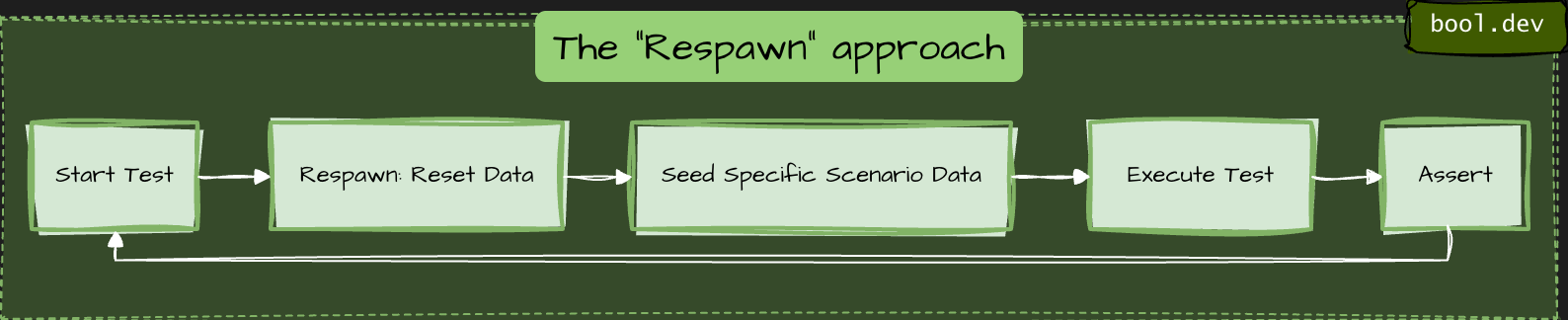
To keep tests fast, you don't want to delete and recreate the database schema for every test. Instead, 'respawn' your data.
How it works: It uses smart SQL commands (TRUNCATE or DELETE) to clear only the data in your tables while keeping the schema intact. It is significantly faster than running migrations or dropping the DB.
4. Shared vs. Fresh Databases
| Approach | Speed | Isolation | Best For |
|---|---|---|---|
| One DB per Test | Slow | Perfect | Parallel tests that modify global settings. |
| Shared DB (Respawn) | Fast | Careful | Standard CRUD and business logic tests. |
| Static Reference Data | Instant | High | Things that never change (Countries, Currencies). |
5. Efficient Seeding Techniques
- Batching: If you need to seed 100 records, use
AddRange()and a singleSaveChangesAsync()call to minimize round-trips to the database. - Respawn Checkpointing: Respawn can "checkpoint" a base state. You can seed your static lookup data once, checkpoint it, and then only reset the transactional data (Orders, Users) between tests.
- Unique IDs: Always use unique values for names or emails (e.g.,
$"test-{Guid.NewGuid()}@example.com") to prevent collision if tests run in parallel.
What .NET engineers should know
- 👼 Junior: Seed minimal data per test and keep it deterministic.
- 🎓 Middle: Use builders/factories and isolate tests with transactions or fresh databases.
- 👑 Senior: Standardize seeding and isolation strategy to keep integration tests fast and maintainable.
❓ How do you isolate the state between tests?
Isolating the state is the hardest part of integration testing. If tests leak data into one another, you get "flaky" results where tests pass individually but fail when run in a different order.
Here are the three primary strategies for .NET, ranked from fastest to most isolated:
The Transactional Rollback
The test opens a transaction at the start, performs all operations, and then rolls it back rather than committing.
- How: In EF Core, you use
_context.Database.BeginTransaction(). - Pros: Extremely fast; the database never actually changes.
- Cons: Doesn't work if your code handles its own transactions (nested transactions can be tricky) or if you are testing multi-threaded scenarios where different connections need to see the data.
2. The "Clean Slate" (Respawn)
You share a single database across the entire run, but you nuke the data between every test.
- How: Use the Respawn. It checkpoints the database and uses
TRUNCATEorDELETEcommands to reset tables to a blank state in milliseconds. - Pros: High fidelity; works with real multi-connection scenarios.
- Cons: You cannot run tests in parallel against the same database instance.
3. Database-per-Test / Schema-per-Test (Most Isolated)
Every test gets its own completely isolated sandbox.
- Schema-per-test: You create a unique schema name (e.g.,
test_guid_1) for each test within the same database instance. - Database-per-test: You spin up a fresh Docker container for every test using Testcontainers.
- Pros: Provides perfect isolation; enables true parallel execution.
- Cons: Slower. Spinning up a container or running migrations 500 times adds significant overhead to your CI/CD pipeline.
The Recommended Hybrid Approach
Most high-performing .NET teams use this combination:
- Shared Container: Spin up one database container for the entire test collection (Database-per-run).
- Respawn Reset: Use Respawn to clear data between each test.
- Unique Data: Use
Guidor unique prefixes for entities to prevent rare collisions.
What .NET engineers should know
- 👼 Junior: Each test must run independently with no shared state.
- 🎓 Middle: Know tradeoffs of transactions vs reset vs per-test DB and choose based on speed and realism.
- 👑 Senior: Standardize isolation strategy, ensure parallel safety, and prevent leaks from background processing.
❓ How do you use Testcontainers.NET for SQL Server/Postgres/Redis/Kafka in tests?
To use Testcontainers for .NET, you leverage the Docker API to spin up real infrastructure instances as part of your test lifecycle. It replaces "In-Memory" fakes with actual binaries running in lightweight containers.
Setup:
You generally define your containers in an xUnit IAsyncLifetime or a shared CollectionFixture so they start before the tests and dispose of themselves afterward.
public class DatabaseFixture : IAsyncLifetime
{
    // Define the specific container
    private readonly PostgreSqlContainer _dbContainer = new PostgreSqlBuilder()
        .WithImage("postgres:15-alpine")
        .WithDatabase("testdb")
        .WithUsername("admin")
        .WithPassword("password")
        .Build();

    public async Task InitializeAsync() => await _dbContainer.StartAsync();

    public async Task DisposeAsync() => await _dbContainer.DisposeAsync();

    // Use this to configure your DbContext
    public string ConnectionString => _dbContainer.GetConnectionString();
}
To run a full API integration test, you inject the container's connection string into your SUT (System Under Test) during the host building phase.
public class MyApiTests : IClassFixture<DatabaseFixture>
{
    private readonly DatabaseFixture _fixture;

    public MyApiTests(DatabaseFixture fixture) => _fixture = fixture;

    [Fact]
    public async Task GetUser_ReturnsSuccess()
    {
        var factory = new WebApplicationFactory<Program>()
            .WithWebHostBuilder(builder =>
            {
                builder.ConfigureServices(services =>
                {
                    // Overwrite the real DB with the container connection string
                    services.AddDbContext<MyDbContext>(options =>
                        options.UseNpgsql(_fixture.ConnectionString));
                });
            });

        var client = factory.CreateClient();
        // ... execute test
    }
}
Recommendation
- If your test suite is large, spinning up a container for every test class is slow. You can use the Singleton Pattern or xUnit Collection Fixtures to share one container instance across multiple test files, using a "Respawn" to clear the data between individual tests.
- Seed minimal data per test, not a huge baseline dataset.
- Use timeouts as safety nets so tests never hang.
What .NET engineers should know
- 👼 Junior: Use Testcontainers to run real dependencies and keep tests isolated.
- 🎓 Middle: Reuse containers with fixtures, apply migrations once, seed minimal data.
- 👑 Senior: Standardize container lifecycle, speed strategy, and failure diagnostics across the repo.
📚 Resources
❓ What are the challenges of running test containers on Windows agents?
- Most official images used in tests are Linux-based. On Windows agents, you either need Linux container support or you are forced to use Windows container images, which are fewer, heavier, and sometimes behave differently.
- Many Windows CI agents run Windows Server without Docker Desktop. You rely on the Docker Engine setup, which can vary widely across runners. Features such as Linux containers via WSL2 are typically unavailable on Windows Server agents.
- Windows containers usually start more slowly and consume more resources. CI Windows runners are often slower on disk IO, too. This increases flakiness if timeouts are tight.
- Port mapping and DNS can be less predictable, especially with NAT networking. “localhost” assumptions break more often. Always use mapped ports and connection strings from Testcontainers.
- Volume mounts and path handling differ (e.g., C:\ paths, permissions, and file locking). Some images and tooling assume POSIX paths. Windows file locks can cause cleanup issues.
- Windows agents can experience memory pressure more quickly with multiple containers. Parallel test runs are more likely to cause timeouts.
- For Windows containers, image tags are tied to Windows build numbers. You can get “image not compatible with this host” errors if the host build and image build do not match.
- Capturing logs and doing quick “exec into container” is still possible, but scripts used in Linux pipelines often do not work as-is on Windows (shell, path, quoting).
What .NET engineers should know
- 👼 Junior: Windows agents often struggle because most test images are Linux-based, and startup is slower.
- 🎓 Middle: Plan for container mode, networking differences, and slower performance, and tune timeouts and parallelism.
- 👑 Senior: Separate pipelines so container integration tests run on Linux agents, keep Windows agents for Windows-specific value.
HTTP / REST API testing
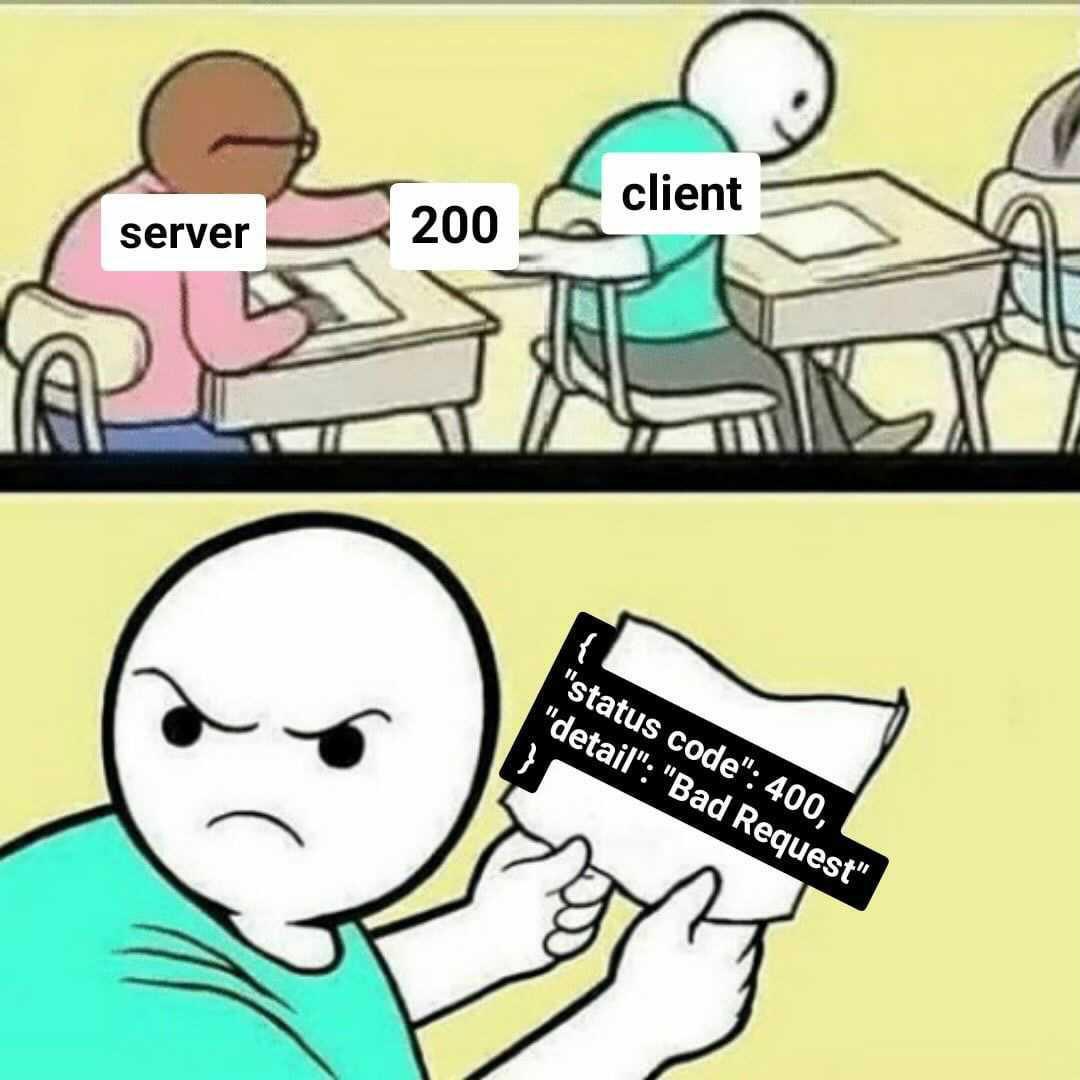
❓ How do you test file upload/download endpoints?
File upload and download endpoints have a different failure surface than JSON APIs — content-type negotiation, multipart boundary parsing, stream handling, size limits, and storage backend integration all sit outside what unit tests reach. The meaningful tests drive real HTTP through a test host with real file content and assert on both the HTTP contract and the storage side effect.
Upload testing means constructing a real MultipartFormDataContent request with actual file bytes and sending it through WebApplicationFactory. The test asserts on the HTTP response, then queries the storage backend directly to verify the file was persisted correctly — name, size, content type, and content. Asserting only on the HTTP response misses the case where the endpoint returns 200 but writes corrupt or empty content to storage.
[Fact]
public async Task UploadEndpoint_StoresFile_WithCorrectMetadata()
{
    // Arrange — real file content, not empty bytes
    var fileContent = "order-id,product-id,quantity\n1,SKU-001,2"u8.ToArray();
    using var content = new MultipartFormDataContent();
    content.Add(
        new ByteArrayContent(fileContent) { Headers = { ContentType = new("text/csv") } },
        name: "file",
        fileName: "orders.csv");

    // Act — drive through real test host
    var response = await _client.PostAsync("/api/files/upload", content);
    Assert.Equal(HttpStatusCode.Created, response.StatusCode);

    var result = await response.Content.ReadFromJsonAsync<UploadResponse>();

    // Assert storage side effect — not just HTTP response
    var stored = await _storageClient.GetAsync(result!.FileId);
    Assert.Equal("orders.csv", stored.FileName);
    Assert.Equal("text/csv", stored.ContentType);
    Assert.Equal(fileContent.Length, stored.SizeBytes);
    Assert.Equal(fileContent, stored.Content);
}
Download testing requires asserting on the full HTTP response contract — status code, Content-Type header, Content-Disposition header, and the actual byte content of the response body. A common gap is testing that the file downloads correctly but not verifying the Content-Disposition filename, which controls how browsers name the saved file. Use response.Content.ReadAsByteArrayAsync() and compare against the known source bytes.
[Fact]
public async Task DownloadEndpoint_ReturnsCorrectFile_WithHeaders()
{
    // Arrange — seed a known file into storage
    var fileId = await _storageClient.StoreAsync("orders.csv", "text/csv",
        "order-id,product-id\n1,SKU-001"u8.ToArray());

    // Act
    var response = await _client.GetAsync($"/api/files/{fileId}/download");

    // Assert HTTP contract
    Assert.Equal(HttpStatusCode.OK, response.StatusCode);
    Assert.Equal("text/csv", response.Content.Headers.ContentType?.MediaType);
    Assert.Equal("attachment; filename=\"orders.csv\"",
        response.Content.Headers.ContentDisposition?.ToString());

    // Assert content integrity — byte-for-byte match
    var bytes = await response.Content.ReadAsByteArrayAsync();
    Assert.Equal("order-id,product-id\n1,SKU-001"u8.ToArray(), bytes);
}
What .NET engineers should know:
- 👼 Junior: Test both the HTTP response and the storage side effect — a 200 response that writes empty bytes to storage is a passing test covering a real bug.
- 🎓 Middle: Assert the full download response contract, including Content-Type and Content-Disposition headers; test size limits, empty files, and rejected content types as explicit cases rather than relying on framework defaults to behave correctly.
- 👑 Senior: Use Azurite or LocalStack via Testcontainers instead of mocking storage interfaces — real SDK behavior around streams, retry policies, and content negotiation is exactly what file endpoint tests need to cover; treat content integrity (byte-for-byte round-trip verification) as a mandatory assertion for any upload/download flow.
❓ How do you test ASP.NET Core endpoints without duplicating implementation logic in tests?
The recommended approach is to use WebApplicationFactory<T> from the Microsoft.AspNetCore.Mvc.Testing package. It spins up your real application in-memory — with the actual middleware pipeline, routing, dependency injection, and configuration — and exposes an HttpClient to make requests against it. This means you are testing the full HTTP contract of your endpoint (status codes, response bodies, headers) without copying or re-implementing any of the logic that lives inside it.
This approach sits between a unit test and a full E2E test, often called an integration test or functional test, and is the standard way to test ASP.NET Core controllers, minimal API endpoints, middleware, and filters together as a cohesive unit.
Code example
minimal API:
app.MapGet("/products/{id}", async (int id, IProductService service) =>
{
    var product = await service.GetByIdAsync(id);
    return product is null ? Results.NotFound() : Results.Ok(product);
});
test:
public class ProductsEndpointTests : IClassFixture<WebApplicationFactory<Program>>
{
    private readonly HttpClient _client;

    public ProductsEndpointTests(WebApplicationFactory<Program> factory)
    {
        _client = factory.CreateClient();
    }

    [Fact]
    public async Task GetProduct_WhenExists_ReturnsOkWithProduct()
    {
        var response = await _client.GetAsync("/products/1");

        response.EnsureSuccessStatusCode();
        var product = await response.Content.ReadFromJsonAsync<ProductDto>();
        Assert.NotNull(product);
        Assert.Equal(1, product.Id);
    }

    [Fact]
    public async Task GetProduct_WhenNotFound_Returns404()
    {
        var response = await _client.GetAsync("/products/9999");
        Assert.Equal(HttpStatusCode.NotFound, response.StatusCode);
    }
}
When you need to replace real infrastructure with test doubles, use WithWebHostBuilder to swap out specific DI registrations:
var factory = factory.WithWebHostBuilder(builder =>
{
    builder.ConfigureServices(services =>
    {
        services.RemoveAll<IProductService>();
        services.AddScoped<IProductService, FakeProductService>();
    });
});
What .NET engineers should know:
- 👼 Junior: Should understand that
WebApplicationFactory<T>starts the real app in-memory, and thatCreateClient()returns anHttpClientyou can use it to call endpoints. Know how to write a basic test that checks a status code and response body. - 🎓 Middle: Expected to customize the factory with
WithWebHostBuilderto replace database contexts or external services with test doubles. Should know how to configure test-specific settings, seed a test database using EF Core with an in-memory or SQLite provider, and share the factory across tests usingIClassFixture<T>to avoid restarting the app for every test. - 👑 Senior: Should design a reusable
CustomWebApplicationFactorybase class shared across the test suite, handling concerns like database seeding, authentication bypass, and time abstraction. Understands the trade-offs between testing at the HTTP layer and testing services directly, and can integrate this approach into CI pipelines to ensure tests remain fast and deterministic by using transactions or database resets between runs.
📚 Resources: Integration tests in ASP.NET Core
❓ How do you test authentication and authorization policies reliably?
Testing authentication and authorization in ASP.NET Core is best done at two levels. First, you test the policy logic itself in isolation — verifying that a given policy behaves correctly for specific claims, roles, or requirements. Second, you test the full HTTP behavior — verifying that protected endpoints return 401 Unauthorized or 403 Forbidden for the right scenarios. Mixing both levels into a single approach results in brittle tests that are hard to diagnose when they fail.
For HTTP-level tests using WebApplicationFactory<T>, ASP.NET Core provides AddAuthentication test helpers that let you inject a fake authenticated user with any claims you need, without dealing with real tokens or cookies.
Example:
Custom test auth handler:
public class TestAuthHandler : AuthenticationHandler<AuthenticationSchemeOptions>
{
    public TestAuthHandler(IOptionsMonitor<AuthenticationSchemeOptions> options,
        ILoggerFactory logger, UrlEncoder encoder)
        : base(options, logger, encoder) { }

    protected override Task<AuthenticateResult> HandleAuthenticateAsync()
    {
        var claims = new[]
        {
            new Claim(ClaimTypes.Name, "testuser"),
            new Claim(ClaimTypes.Role, "Admin")
        };
        var identity = new ClaimsIdentity(claims, "Test");
        var principal = new ClaimsPrincipal(identity);
        var ticket = new AuthenticationTicket(principal, "Test");

        return Task.FromResult(AuthenticateResult.Success(ticket));
    }
}
Wiring it into the factory:
var factory = factory.WithWebHostBuilder(builder =>
{
    builder.ConfigureServices(services =>
    {
        services.AddAuthentication("Test")
            .AddScheme<AuthenticationSchemeOptions, TestAuthHandler>("Test", _ => { });
    });
});
Testing authorization policies in isolation:
[Fact]
public async Task AdminPolicy_ShouldFail_WhenUserHasNoAdminRole()
{
    // Arrange
    var authService = _serviceProvider.GetRequiredService<IAuthorizationService>();
    var user = new ClaimsPrincipal(new ClaimsIdentity(new[]
    {
        new Claim(ClaimTypes.Name, "regularuser")
    }, "Test"));

    // Act
    var result = await authService.AuthorizeAsync(user, null, "AdminPolicy");

    // Assert
    Assert.False(result.Succeeded);
}
Testing that an endpoint returns 401 for unauthenticated requests:
[Fact]
public async Task SecureEndpoint_WithoutAuth_Returns401()
{
    var client = factory.CreateClient(new WebApplicationFactoryClientOptions
    {
        AllowAutoRedirect = false
    });

    var response = await client.GetAsync("/admin/dashboard");

    Assert.Equal(HttpStatusCode.Unauthorized, response.StatusCode);
}

[Fact]
public async Task SecureEndpoint_WithWrongRole_Returns403()
{
    // client configured with TestAuthHandler that has no Admin role
    var response = await _client.GetAsync("/admin/dashboard");

    Assert.Equal(HttpStatusCode.Forbidden, response.StatusCode);
}
What .NET engineers should know:
- 👼 Junior: Should understand the difference between
401 Unauthorized(not authenticated — no valid identity) and403 Forbidden(authenticated but not authorized — wrong role or policy). Know how to disable authentication in tests usingAllowAnonymousor a fake scheme to isolate endpoint logic from auth concerns. - 🎓 Middle: Expected to implement a
TestAuthHandlerto inject specific users with chosen claims and roles into integration tests. Should know how to test both the happy path (authorized user gets 200) and the failure paths (unauthenticated gets 401, wrong role gets 403). Should also know how to testIAuthorizationServicepolicy logic directly in unit tests without spinning up the full HTTP stack. - 👑 Senior: Should design a flexible test infrastructure that makes it easy to run any integration test as different user personas (anonymous, regular user, admin, etc.) without duplicating setup code. Understands how to test custom
IAuthorizationRequirementandIAuthorizationHandlerimplementations in isolation, how to test resource-based authorization, and how to avoid tests that pass because auth is accidentally disabled rather than properly configured.
📚 Resources:
❓ How do you test middleware behavior?
Middleware testing in ASP.NET Core can be approached at two levels. The first is testing the middleware in complete isolation using TestServer or a minimal RequestDelegate pipeline — useful when the middleware has no dependency on the rest of the application. The second is testing it through WebApplicationFactory<T> as part of the full pipeline — useful when you want to verify that the middleware integrates correctly with routing, exception handling, and other middleware in the chain.
For most real-world scenarios, the WebApplicationFactory<T> The approach is preferred because it tests the middleware exactly as it runs in production, including its registration order in the pipeline.
Code example
The middleware under test (correlation ID):
public class CorrelationIdMiddleware
{
    private const string CorrelationIdHeader = "X-Correlation-ID";
    private readonly RequestDelegate _next;

    public CorrelationIdMiddleware(RequestDelegate next) => _next = next;

    public async Task InvokeAsync(HttpContext context)
    {
        if (!context.Request.Headers.TryGetValue(CorrelationIdHeader, out var correlationId))
        {
            correlationId = Guid.NewGuid().ToString();
        }

        context.Response.Headers[CorrelationIdHeader] = correlationId.ToString();
        await _next(context);
    }
}
Testing middleware in isolation using a minimal pipeline:
[Fact]
public async Task CorrelationIdMiddleware_WhenNoHeaderProvided_GeneratesNewCorrelationId()
{
    // Arrange
    var builder = WebApplication.CreateBuilder();
    await using var app = builder.Build();

    app.Use(async (context, next) =>
    {
        var middleware = new CorrelationIdMiddleware(next.Invoke);
        await middleware.InvokeAsync(context);
    });

    app.MapGet("/test", () => Results.Ok());

    var testServer = new TestServer(app);
    var client = testServer.CreateClient();

    // Act
    var response = await client.GetAsync("/test");

    // Assert
    Assert.True(response.Headers.Contains("X-Correlation-ID"));
    Assert.NotEmpty(response.Headers.GetValues("X-Correlation-ID").First());
}

[Fact]
public async Task CorrelationIdMiddleware_WhenHeaderProvided_PropagatesExistingId()
{
    var expectedId = "my-correlation-id-123";
    var request = new HttpRequestMessage(HttpMethod.Get, "/test");
    request.Headers.Add("X-Correlation-ID", expectedId);

    var response = await _client.SendAsync(request);

    Assert.Equal(expectedId, response.Headers.GetValues("X-Correlation-ID").First());
}
Testing error mapping middleware (ProblemDetails):
[Fact]
public async Task ErrorMiddleware_WhenUnhandledExceptionOccurs_ReturnsProblemDetails()
{
    // Arrange — factory configured to throw from a test endpoint
    var factory = _factory.WithWebHostBuilder(builder =>
    {
        builder.ConfigureServices(services =>
        {
            services.AddProblemDetails();
        });

        builder.Configure(app =>
        {
            app.UseExceptionHandler();
            app.MapGet("/error-test", () =>
            {
                throw new InvalidOperationException("Something went wrong");
            });
        });
    });

    var client = factory.CreateClient();

    // Act
    var response = await client.GetAsync("/error-test");

    // Assert
    Assert.Equal(HttpStatusCode.InternalServerError, response.StatusCode);
    Assert.Equal("application/problem+json", response.Content.Headers.ContentType?.MediaType);

    var problem = await response.Content.ReadFromJsonAsync<ProblemDetails>();
    Assert.NotNull(problem);
    Assert.Equal(500, problem.Status);
}
Testing response headers middleware:
[Fact]
public async Task SecurityHeadersMiddleware_AddsExpectedHeaders()
{
    var response = await _client.GetAsync("/");

    Assert.Equal("nosniff",
        response.Headers.GetValues("X-Content-Type-Options").First());
    Assert.Equal("DENY",
        response.Headers.GetValues("X-Frame-Options").First());
    Assert.Equal("max-age=31536000",
        response.Headers.GetValues("Strict-Transport-Security").First());
}
What .NET engineers should know:
- 👼 Junior: Should understand that middleware can be tested through the HTTP layer using
WebApplicationFactory<T>by checking response headers, status codes, and response bodies. Know how to inspectresponse.Headersin a test and understand what correlation IDs are used for — tracing a single request across multiple services or log entries. - 🎓 Middle: Expected to test middleware both in isolation (using a minimal
RequestDelegatepipeline orTestServer) and as part of the full application pipeline. Should know how to set up test endpoints specifically designed to trigger certain middleware behavior (e.g., an endpoint that throws to test error mapping, or one that returns a specific status code to test response transformation). Should understandProblemDetailsand how to assert on its structure in tests. - 👑 Senior: Should design middleware that is inherently easy to test — stateless, with dependencies injected rather than resolved directly from
HttpContext.RequestServices. Understands the ordering implications of middleware registration and writes tests that verify middleware executes in the correct sequence. Can test middleware that short-circuits the pipeline (e.g., rate limiters, auth middleware) and verify it does not call_nextunder specific conditions. Integrates middleware tests into the CI pipeline to catch regressions across cross-cutting concerns, such as security headers and error response formats.
📚 Resources:
❓ How do you test versioning behavior (URL/header/query) and deprecation responses?
API versioning has three failure modes worth testing: the wrong version resolves to the wrong handler, an unsupported version returns the wrong status code, and a deprecated version stops returning deprecation signals. None of these are caught by testing a single version in isolation — versioning tests must explicitly exercise the routing and negotiation layer.
For each versioning strategy — URL segment (/v1/orders), header (api-version: 1.0), query string (?api-version=1.0) — write a test that sends the version identifier and asserts the correct handler responded. The fastest way to verify this is to include a version discriminator in the response body or a custom header, so the test does not have to infer which handler ran from the response shape alone.
[Theory]
[InlineData("/api/v1/orders", null, null)]           // URL versioning
[InlineData("/api/orders", "api-version: 1.0", null)] // header versioning
[InlineData("/api/orders?api-version=1.0", null, "1.0")] // query versioning
public async Task VersionRouting_ResolvesCorrectHandler(
    string path, string? header, string? query)
{
    var request = new HttpRequestMessage(HttpMethod.Get, path);
    if (header != null) request.Headers.Add("api-version", "1.0");

    var response = await _client.SendAsync(request);

    Assert.Equal(HttpStatusCode.OK, response.StatusCode);
    Assert.Equal("1.0", response.Headers.GetValues("api-supported-versions").First());
}
Deprecation responses need two explicit tests: that the deprecated version still works (returns 200) and that it signals deprecation correctly via the Sunset header (RFC 8594) or Deprecation header. A deprecated version that silently returns 200 without signaling gives consumers no reason to migrate.
[Fact]
public async Task DeprecatedVersion_Returns200_WithSunsetHeader()
{
    var response = await _client.GetAsync("/api/v1/orders");

    Assert.Equal(HttpStatusCode.OK, response.StatusCode);
    Assert.True(response.Headers.Contains("Sunset"),
        "Deprecated version must include Sunset header");
}

[Fact]
public async Task UnsupportedVersion_Returns400_WithProblemDetails()
{
    var response = await _client.GetAsync("/api/v99/orders");

    Assert.Equal(HttpStatusCode.BadRequest, response.StatusCode);
    var body = await response.Content.ReadFromJsonAsync<ProblemDetails>();
    Assert.Contains("unsupported", body!.Detail, StringComparison.OrdinalIgnoreCase);
}
What .NET engineers should know:
- 👼 Junior: Test each versioning strategy explicitly — do not assume URL, header, and query routing all work because one of them does.
- 🎓 Middle: Assert deprecation headers on deprecated versions and verify unsupported versions return structured error responses, not 404s or unhandled exceptions.
- 👑 Senior: Treat versioning as a contract test — each version's response shape, deprecation signals, and sunset dates are commitments to consumers; version contract tests should run in CI and fail when a version's behavior changes unexpectedly.
📚 Resources: The Sunset HTTP Header Field
gRPC API testing

❓ How do you integration-test a gRPC service in .NET without going “full E2E”?
gRPC services in .NET can be integration-tested in-memory using the same WebApplicationFactory<T> approach used for REST APIs, combined with a gRPC channel configured to communicate over the in-memory test server rather than a real network socket. This gives you the full gRPC pipeline — interceptors, authentication, serialization, and service logic — without deploying anything or opening real ports.
The key is using GrpcChannel.ForAddress with a custom HttpHandler that routes requests through the WebApplicationFactory's internal HttpClient. This is provided by the Grpc.AspNetCore and Grpc.Net.Client packages, and the Microsoft.AspNetCore.Mvc.Testing package ties it all together.
Example:
The gRPC service under test:
public class GreeterService : Greeter.GreeterBase
{
    private readonly IGreetingService _greetingService;

    public GreeterService(IGreetingService greetingService)
    {
        _greetingService = greetingService;
    }

    public override async Task<HelloReply> SayHello(
        HelloRequest request, ServerCallContext context)
    {
        var message = await _greetingService.BuildGreetingAsync(request.Name);
        return new HelloReply { Message = message };
    }
}
Setting up the in-memory gRPC channel:
public class GrpcIntegrationTests : IClassFixture<WebApplicationFactory<Program>>
{
    private readonly WebApplicationFactory<Program> _factory;

    public GrpcIntegrationTests(WebApplicationFactory<Program> factory)
    {
        _factory = factory;
    }

    private GrpcChannel CreateChannel()
    {
        // Route the gRPC channel through the in-memory test server
        var handler = factory.Server.CreateHandler();
  		return GrpcChannel.ForAddress("http://localhost", new GrpcChannelOptions
  		{
      		HttpHandler = handler
  		});
    }
}
Testing a unary RPC call:
[Fact]
public async Task SayHello_WithValidName_ReturnsGreeting()
{
    // Arrange
    var channel = CreateChannel();
    var client = new Greeter.GreeterClient(channel);

    // Act
    var reply = await client.SayHelloAsync(new HelloRequest { Name = "Alice" });

    // Assert
    Assert.Equal("Hello, Alice!", reply.Message);
}

[Fact]
public async Task SayHello_WithEmptyName_ThrowsRpcException()
{
    var channel = CreateChannel();
    var client = new Greeter.GreeterClient(channel);

    var ex = await Assert.ThrowsAsync<RpcException>(() =>
        client.SayHelloAsync(new HelloRequest { Name = "" }).ResponseAsync);

    Assert.Equal(StatusCode.InvalidArgument, ex.StatusCode);
}
Testing a server-streaming RPC:
[Fact]
public async Task GetUpdates_StreamsExpectedMessages()
{
    var channel = CreateChannel();
    var client = new UpdateService.UpdateServiceClient(channel);

    var streamingCall = client.GetUpdates(new UpdateRequest { Topic = "news" });

    var messages = new List<UpdateReply>();
    await foreach (var message in streamingCall.ResponseStream.ReadAllAsync())
    {
        messages.Add(message);
    }

    Assert.NotEmpty(messages);
    Assert.All(messages, m => Assert.Equal("news", m.Topic));
}
Replacing dependencies in the factory for controlled scenarios:
private GrpcChannel CreateChannelWithFakes()
{
    var factory = _factory.WithWebHostBuilder(builder =>
    {
        builder.ConfigureServices(services =>
        {
            services.RemoveAll<IGreetingService>();
            services.AddScoped<IGreetingService, FakeGreetingService>();
        });
    });

    var httpClient = factory.CreateClient();
    return GrpcChannel.ForAddress(httpClient.BaseAddress!, new GrpcChannelOptions
    {
        HttpClient = httpClient
    });
}
Testing gRPC interceptors (e.g., logging or auth):
[Fact]
public async Task AuthInterceptor_WithoutMetadata_ReturnsUnauthenticated()
{
    var channel = CreateChannel(); // no auth headers injected
    var client = new SecureService.SecureServiceClient(channel);

    var ex = await Assert.ThrowsAsync<RpcException>(() =>
        client.GetSecretAsync(new SecretRequest()).ResponseAsync);

    Assert.Equal(StatusCode.Unauthenticated, ex.StatusCode);
}

[Fact]
public async Task AuthInterceptor_WithValidToken_ReturnsOk()
{
    var channel = CreateChannel();
    var headers = new Metadata { { "Authorization", "Bearer valid-test-token" } };
    var client = new SecureService.SecureServiceClient(channel);

    var reply = await client.GetSecretAsync(new SecretRequest(), headers);

    Assert.NotNull(reply);
}
What .NET engineers should know:
- 👼 Junior: Should understand that gRPC services can be tested in-memory without a real server or network by routing a
GrpcChannelthrough theWebApplicationFactory'sHttpClient. Know how to create a typed gRPC client from the channel and make basic unary calls. Should understand thatRpcExceptionis the gRPC equivalent of an HTTP error response and know how to assert on itsStatusCode. - 🎓 Middle: Expected to set up the in-memory gRPC channel correctly, including configuring
GrpcChannelOptionswith the testHttpClient. Should know how to test all four gRPC communication patterns — unary, server streaming, client streaming, and bidirectional streaming — and how to useWithWebHostBuilderto replace infrastructure dependencies with fakes for controlled test scenarios. Should also know how to pass metadata headers in test calls to simulate authentication or tracing. - 👑 Senior: Should design a shared test base class or fixture that encapsulates channel creation, fake registration, and authentication setup so individual tests stay focused on behavior rather than infrastructure. Understands how to test gRPC interceptors in isolation by registering them explicitly in a minimal pipeline and verifying they correctly modify request/response metadata or short-circuit calls. Can identify when in-memory tests are sufficient versus when a real network test against a containerized service (e.g., using Testcontainers) is necessary — for example, when testing TLS configuration or HTTP/2 framing behavior that the in-memory transport abstracts away.
📚 Resources:
❓ How do you test gRPC status codes and error details?
In gRPC, errors are not HTTP status codes — they are RpcException instances carrying a StatusCode enum value and an optional detail message. Testing them means asserting that the right StatusCode is thrown for the right scenario, and optionally that the Status.Detail message contains meaningful information for the caller.
The most important status codes to cover in tests are OK (implicit on success), NotFound, InvalidArgument, AlreadyExists, PermissionDenied, and Internal. Each maps to a specific failure scenario in your service logic.
Code example:
[Fact]
public async Task GetProduct_WhenNotFound_ThrowsNotFoundStatus()
{
    var client = new ProductService.ProductServiceClient(CreateChannel());

    var ex = await Assert.ThrowsAsync<RpcException>(() =>
        client.GetProductAsync(new GetProductRequest { Id = 999 }).ResponseAsync);

    Assert.Equal(StatusCode.NotFound, ex.StatusCode);
    Assert.Contains("999", ex.Status.Detail);
}

[Fact]
public async Task CreateProduct_WithEmptyName_ThrowsInvalidArgument()
{
    var client = new ProductService.ProductServiceClient(CreateChannel());

    var ex = await Assert.ThrowsAsync<RpcException>(() =>
        client.CreateProductAsync(new CreateProductRequest { Name = "" }).ResponseAsync);

    Assert.Equal(StatusCode.InvalidArgument, ex.StatusCode);
}
What .NET engineers should know:
- 👼 Junior: Should know that gRPC errors surface as
RpcExceptionand thatex.StatusCodeis how you assert on the error type. Understand the most common status codes —NotFound,InvalidArgument,Unauthenticated,PermissionDenied, andInternal— and what scenario each represents. - 🎓 Middle: Expected to assert on both
StatusCodeandStatus.Detailto verify that the error message is meaningful and does not leak internal implementation details. Should know how to throw the correctRpcExceptionfrom service code usingnew RpcException(new Status(StatusCode.NotFound, "Product 999 not found"))and test that contract explicitly. - 👑 Senior: Should enforce a consistent error mapping strategy across all gRPC services — typically using an interceptor that catches domain exceptions and maps them to the appropriate
StatusCode— and write tests that verify the interceptor mapping rather than testing error throwing in every individual service method. Can also leveragegoogle.rpc.Statusrich error details (viaGrpc.StatusProto) for structured error payloads when clients need machine-readable error information beyond a status code and message string.
📚 Resources: Error handling
❓ How do you validate metadata/headers in gRPC calls?
In gRPC, HTTP headers are called metadata — key/value pairs sent alongside a request via the Metadata class. Testing metadata validation means verifying two things: that your service correctly rejects calls with missing or invalid metadata, and that your interceptors or middleware correctly read, propagate, or enrich metadata before it reaches service logic.
The cleanest way to test this is through the in-memory channel approach — passing metadata explicitly in test calls and asserting on the resulting RpcException status code or response behavior.
Code example:
[Fact]
public async Task Call_WithoutAuthToken_ReturnsUnauthenticated()
{
    var client = new OrderService.OrderServiceClient(CreateChannel());

    var ex = await Assert.ThrowsAsync<RpcException>(() =>
        client.GetOrderAsync(new GetOrderRequest { Id = 1 }).ResponseAsync);

    Assert.Equal(StatusCode.Unauthenticated, ex.StatusCode);
}

[Fact]
public async Task Call_WithValidToken_PropagatesCorrelationId()
{
    var client = new OrderService.OrderServiceClient(CreateChannel());
    var headers = new Metadata
    {
        { "Authorization", "Bearer valid-test-token" },
        { "X-Correlation-ID", "test-correlation-123" }
    };

    var reply = await client.GetOrderAsync(new GetOrderRequest { Id = 1 }, headers);

    Assert.NotNull(reply);
}
What .NET engineers should know:
- 👼 Junior: Should know that gRPC metadata is the equivalent of HTTP headers and is passed as a
Metadataobject in each client call. Understand how to add entries toMetadataand pass them as the second argument to a gRPC client method. Know that missing auth metadata typically results inStatusCode.Unauthenticated. - 🎓 Middle: Expected to test interceptors that read and validate metadata in isolation — injecting a fake
ServerCallContextor using the in-memory pipeline to verify the interceptor short-circuits correctly when required metadata is absent or malformed. Should know how to test that correlation IDs are read from incoming metadata and written to outgoing response metadata or propagated to downstream calls viaIHttpContextAccessor. - 👑 Senior: Should design a metadata validation interceptor that centralizes header concerns — auth token extraction, correlation ID propagation, tenant resolution — and write focused tests against that interceptor rather than duplicating metadata assertions across every service test. Understands how to use
CallCredentialsfor token-based auth in production gRPC clients and how to stub that in tests cleanly without coupling tests to the token generation mechanism.
❓ How do you test deadlines and cancellation in gRPC?
gRPC has first-class support for two related but distinct cancellation concepts. A deadline is set by the client and tells the server "complete this call before this point in time or I will stop waiting." A cancellation is an explicit signal — either from the client abandoning the call or from the server deciding to stop processing. Both surface as RpcException with StatusCode.DeadlineExceeded or StatusCode.Cancelled respectively.
Testing these reliably requires either controlling time or introducing deliberate server-side delays to trigger the condition without slowing down or making tests flaky.
Example:
[Fact]
public async Task Call_WhenDeadlineExceeded_ThrowsDeadlineExceeded()
{
    var client = new ReportService.ReportServiceClient(CreateChannel());

    var ex = await Assert.ThrowsAsync<RpcException>(() =>
        client.GenerateReportAsync(
            new ReportRequest { Type = "heavy" },
            deadline: DateTime.UtcNow.AddMilliseconds(1) // extremely tight deadline
        ).ResponseAsync);

    Assert.Equal(StatusCode.DeadlineExceeded, ex.StatusCode);
}

[Fact]
public async Task Call_WhenClientCancels_ThrowsCancelled()
{
    var client = new ReportService.ReportServiceClient(CreateChannel());
    using var cts = new CancellationTokenSource();

    var call = client.GenerateReportAsync(
        new ReportRequest { Type = "heavy" },
        cancellationToken: cts.Token);

    cts.Cancel(); // cancel before server responds

    var ex = await Assert.ThrowsAsync<RpcException>(() => call.ResponseAsync);
    Assert.Equal(StatusCode.Cancelled, ex.StatusCode);
}
For the server side, you want to verify that your service actually respects the cancellation token from ServerCallContext and stops processing early rather than running to completion unnecessarily:
public override async Task<ReportReply> GenerateReport(
    ReportRequest request, ServerCallContext context)
{
    // Correctly passing cancellation token through to async work
    await _reportBuilder.BuildAsync(request.Type, context.CancellationToken);
    return new ReportReply { Url = "..." };
}
What .NET engineers should know:
- 👼 Junior: Should understand the difference between a deadline (absolute point in time set by the client) and a cancellation (explicit signal). Know that both result in
RpcExceptionand how to distinguish them byStatusCode. Know how to pass adeadlineorCancellationTokenin a gRPC client call. - 🎓 Middle: Expected to write tests that trigger both deadline and cancellation scenarios and assert on the correct
StatusCode. Should know that tests relying on real-time delays are flaky by nature — prefer injecting an artificial delay on the server side via a fake dependency rather than relying onTask.Delayin tests. Should also verify that server-side code correctly propagatescontext.CancellationTokento all async operations so cancellation actually stops work rather than being silently ignored. - 👑 Senior: Should recognize that deadline and cancellation handling is a cross-cutting concern best enforced through interceptors or a base service class rather than repeated in every method. Understands the subtle difference between
DeadlineExceeded(deadline passed before response arrived) andCancelled(explicit cancellation signal) and designs tests that cover both client-initiated and server-initiated cancellation paths. Considers the observability angle — ensuring cancellations are logged and traced correctly so they are distinguishable from real errors in production monitoring.
📚 Resources:
❓ How do you test streaming gRPC methods (server streaming, client streaming, duplex)?
Streaming gRPC methods are more complex to test than unary calls because you need to drive the stream from both ends — writing messages, completing the stream, and reading responses — all in a controlled, sequential way. The good news is that the in-memory channel approach works for all four gRPC communication patterns, with no special setup beyond what you already use for unary tests.
The key mental model is that each streaming call gives you a RequestStream (to write to) and/or a ResponseStream (to read from), And your test needs to explicitly complete the request stream with CompleteAsync() when done sending, otherwise the server waits forever.
Server streaming — server sends multiple messages, client reads them:
[Fact]
public async Task GetPriceUpdates_StreamsMessagesForTopic()
{
    var client = new MarketService.MarketServiceClient(CreateChannel());
    var call = client.GetPriceUpdates(new SubscribeRequest { Symbol = "AAPL" });

    var received = new List<PriceUpdate>();
    await foreach (var update in call.ResponseStream.ReadAllAsync())
    {
        received.Add(update);
        if (received.Count >= 3) break; // avoid hanging if stream is infinite
    }

    Assert.Equal(3, received.Count);
    Assert.All(received, u => Assert.Equal("AAPL", u.Symbol));
}
Client streaming — client sends multiple messages, server responds once:
[Fact]
public async Task UploadReadings_SendsMultipleReadings_ReturnsAggregatedResult()
{
    var client = new SensorService.SensorServiceClient(CreateChannel());
    using var call = client.UploadReadings();

    await call.RequestStream.WriteAsync(new SensorReading { Value = 10 });
    await call.RequestStream.WriteAsync(new SensorReading { Value = 20 });
    await call.RequestStream.WriteAsync(new SensorReading { Value = 30 });
    await call.RequestStream.CompleteAsync(); // signal end of stream

    var response = await call.ResponseAsync;

    Assert.Equal(60, response.Total);
    Assert.Equal(3, response.Count);
}
Duplex streaming — both sides send and receive concurrently:
[Fact]
public async Task Chat_DuplexStream_EchoesMessagesBack()
{
    var client = new ChatService.ChatServiceClient(CreateChannel());
    using var call = client.Chat();

    // Write and read concurrently
    var readTask = Task.Run(async () =>
    {
        var replies = new List<ChatMessage>();
        await foreach (var msg in call.ResponseStream.ReadAllAsync())
        {
            replies.Add(msg);
        }
        return replies;
    });

    await call.RequestStream.WriteAsync(new ChatMessage { Text = "Hello" });
    await call.RequestStream.WriteAsync(new ChatMessage { Text = "World" });
    await call.RequestStream.CompleteAsync();

    var replies = await readTask;

    Assert.Equal(2, replies.Count);
}
What .NET engineers should know:
- 👼 Junior: Should understand the three streaming patterns and how they differ from unary calls. Know that
ReadAllAsync()is the idiomatic way to consume a response stream in C#, and that forgettingCompleteAsync()on the request stream is the most common cause of tests hanging indefinitely. - 🎓 Middle: Expected to handle the concurrent nature of duplex streams correctly in tests — using
Task.RunorTask.WhenAllto drive both sides simultaneously without deadlocking. Should know how to test error scenarios in streams, such as the server throwing mid-stream, which surfaces as anRpcExceptionduring iteration, and how to set aCancellationTokenas a safety net to prevent hanging tests indefinitely. - 👑 Senior: Should recognize that duplex streaming tests are inherently harder to make deterministic and design the server-side streaming API to emit a known, finite number of messages in test mode, typically by swapping the real stream source with a fake via dependency injection. Understands the implications of backpressure in high-throughput streaming scenarios and writes tests to verify that the service handles slow consumers gracefully rather than buffering indefinitely.
❓ How do you test retry behavior safely for gRPC calls?
Retry testing has two distinct concerns that are easy to conflate. The first is verifying that your retry policy actually triggers — that a transient failure causes the client to retry the correct number of times with the correct backoff. The second, and more important, is verifying that retried operations do not cause duplicate side effects—such as creating the same order twice or charging a customer multiple times. These two concerns require different testing strategies.
gRPC retries in .NET are configured via GrpcChannelOptions using a ServiceConfig with a RetryPolicy, or via Polly when using HttpClientFactory. Testing them requires a fake or interceptor that can simulate transient failures on the first N attempts before succeeding.
Simulating transient failures with a counting fake:
public class FlakyGreetingService : IGreetingService
{
    private int _callCount = 0;

    public Task<string> BuildGreetingAsync(string name)
    {
        _callCount++;
        if (_callCount < 3)
            throw new RpcException(new Status(StatusCode.Unavailable, "transient error"));

        return Task.FromResult($"Hello, {name}!");
    }
}
[Fact]
public async Task SayHello_WithTransientFailures_RetriesAndSucceeds()
{
var flakyService = new FlakyGreetingService();
var factory = _factory.WithWebHostBuilder(builder =>
{
builder.ConfigureServices(services =>
{
services.RemoveAll<IGreetingService>();
services.AddSingleton<IGreetingService>(flakyService);
});
});
var channel = CreateChannelWithRetryPolicy(factory, maxRetries: 3);
var client = new Greeter.GreeterClient(channel);
var reply = await client.SayHelloAsync(new HelloRequest { Name = "Alice" });
Assert.Equal("Hello, Alice!", reply.Message);
Assert.Equal(3, flakyService.CallCount); // failed twice, succeeded on third
}Сonfiguring the retry policy on the channel:
private GrpcChannel CreateChannelWithRetryPolicy(
    WebApplicationFactory<Program> factory, int maxRetries)
{
    var httpClient = factory.CreateClient();

    return GrpcChannel.ForAddress(httpClient.BaseAddress!, new GrpcChannelOptions
    {
        HttpClient = httpClient,
        ServiceConfig = new ServiceConfig
        {
            MethodConfigs =
            {
                new MethodConfig
                {
                    Names = { MethodName.Default },
                    RetryPolicy = new RetryPolicy
                    {
                        MaxAttempts = maxRetries,
                        InitialBackoff = TimeSpan.FromMilliseconds(10),
                        MaxBackoff = TimeSpan.FromMilliseconds(50),
                        BackoffMultiplier = 1.5,
                        RetryableStatusCodes = { StatusCode.Unavailable }
                    }
                }
            }
        }
    });
}
What .NET engineers should know:
- 👼 Junior: Should understand that retries are only safe for idempotent operations — ones where calling the same operation multiple times produces the same result, such as a GET or a DELETE. Know that
StatusCode.UnavailableandStatusCode.DeadlineExceededare the typical retryable status codes in gRPC and thatStatusCode.InvalidArgumentorStatusCode.NotFoundshould never be retried because retrying will not change the outcome. - 🎓 Middle: Expected to test retry behavior using a counting fake that fails a configurable number of times before succeeding, and assert both that the final call succeeded and that the correct number of attempts were made. Should understand the difference between retries at the gRPC channel level (via
ServiceConfig) and retries at the HTTP level (via Polly), and know which layer is appropriate for which scenario. Should also know how to test that the retry limit is respected — that the client gives up and throws after exhausting all attempts. - 👑 Senior: Should treat idempotency as a first-class design concern and enforce it through idempotency keys — a unique ID sent with each request that the server uses to deduplicate retried calls. Writes tests that verify the server correctly handles a retried request carrying the same idempotency key by returning the cached result rather than executing the operation again. Understands that retry tests with real backoff timings are inherently slow, and designs fakes to bypass backoff delays in tests while keeping the production configuration realistic. Also considers the observability angle—ensuring retry attempts are logged and distinguishable from initial attempts in production traces.
📚 Resources:
❓ How do you test the backward compatibility of protobuf contracts?
Protobuf backward compatibility is one of those things that feels fine until it suddenly breaks a production client that you forgot was still running an older version. The core rule is simple: never change or reuse field numbers, never rename fields if you rely on JSON serialization, and never change a field's type. But rules alone are not enough — you need tests that enforce them automatically so that a well-intentioned refactor does not silently break a contract.
Testing protobuf compatibility happens at three levels. First, schema-level checks that catch breaking changes in .proto files before they ship. Second, serialization round-trip tests that verify old binary payloads can still be deserialized by new code. Third, wire compatibility tests that simulate an old client talking to a new service or vice versa.
The most practical approach for most teams is a golden file test — you serialize a known message to binary or JSON, commit that file to the repository, and then assert on every build that the current code can still deserialize it correctly. If someone changes a field number or removes a required field, the test fails immediately.
[Fact]
public void ProductMessage_CanDeserialize_GoldenBinaryFile()
{
    // golden.bin was generated from a previous version of the proto
    var goldenBytes = File.ReadAllBytes("TestData/product_v1_golden.bin");

    var product = Product.Parser.ParseFrom(goldenBytes);

    Assert.Equal(42, product.Id);
    Assert.Equal("Widget", product.Name);
    Assert.Equal(9.99m, (decimal)product.Price);
}

[Fact]
public void ProductMessage_NewOptionalField_DefaultsGracefullyOnOldPayload()
{
    // old payload does not contain the new "Category" field (added in v2)
    var goldenBytes = File.ReadAllBytes("TestData/product_v1_golden.bin");

    var product = Product.Parser.ParseFrom(goldenBytes);

    // new field should default to empty string, not throw
    Assert.Equal(string.Empty, product.Category);
}
For forward compatibility — new clients sending messages to old servers — you want to verify that unknown fields are preserved rather than dropped:
[Fact]
public void UnknownFields_ArePreserved_WhenRoundTripped()
{
    // simulate a newer client message with an extra field the old parser doesn't know
    var newMessage = new ProductV2 { Id = 1, Name = "Widget", Tags = { "sale" } };
    var bytes = newMessage.ToByteArray();

    // parse with old schema (ProductV1 has no Tags field)
    var oldMessage = ProductV1.Parser.ParseFrom(bytes);
    Assert.Equal(1, oldMessage.Id);

    // re-serialize with old schema — unknown fields should survive
    var reBytes = oldMessage.ToByteArray();
    var recovered = ProductV2.Parser.ParseFrom(reBytes);
    Assert.Contains("sale", recovered.Tags);
}
What .NET engineers should know:
- 👼 Junior: Should understand the fundamental protobuf compatibility rules — field numbers are the actual identity of a field (not the name), never reuse a deleted field number, and use
reservedto prevent accidental reuse. Know that adding new fields is safe because old parsers ignore unknown field numbers, but removing or renumbering fields silently corrupts data for clients still using the old schema. - 🎓 Middle: Expected to implement golden file tests as part of the CI pipeline to catch breaking schema changes automatically. Should know how to generate a golden binary file from a known message state, commit it to the repository, and write a deserialization assertion against it. Should also understand the difference between backward compatibility (new code reads old data) and forward compatibility (old code reads new data), and test both directions for services that have multiple concurrent client versions.
- 👑 Senior: Should treat the
.protofile as a public API contract and enforce compatibility through tooling — for example usingbuf breakingfrom the Buf CLI to automatically detect breaking changes in CI before any code is even generated. Understands the nuances ofoptionalvsproto3implicit optionality, when to useoneoffor safe field evolution, and how JSON serialization compatibility (field names vs field numbers) adds an extra layer of concern for services that expose both gRPC and HTTP/JSON via transcoding. Designs a versioning strategy — either parallel proto versions (v1,v2) or a single evolving schema with careful deprecation — and documents it so the whole team applies it consistently.
📚 Resources:
❓ How do you test gRPC JSON transcoding (if you expose REST endpoints over gRPC services)?
gRPC JSON transcoding allows a single gRPC service implementation to be exposed simultaneously as a REST/JSON API by annotating .proto methods with HTTP bindings via google.api.http. Testing it means verifying both surfaces independently — the gRPC contract and the REST contract — because a bug can exist in one without affecting the other. The transcoding layer itself (field name mapping, HTTP verb routing, path parameter extraction, request body mapping) introduces its own failure modes that are invisible if you only test through the gRPC channel.
The good news is that WebApplicationFactory<T> covers both surfaces naturally — you use a GrpcChannel for gRPC assertions and a plain HttpClient for REST assertions, both routed through the same in-memory server.
Examples:
Testing the REST surface of a transcoded endpoint:
[Fact]
public async Task GetProduct_ViaRest_ReturnsJsonResponse()
{
    var client = _factory.CreateClient();

    var response = await client.GetAsync("/v1/products/42");

    response.EnsureSuccessStatusCode();
    Assert.Equal("application/json",
        response.Content.Headers.ContentType?.MediaType);

    var json = await response.Content.ReadFromJsonAsync<JsonElement>();
    Assert.Equal(42, json.GetProperty("id").GetInt32());
    Assert.Equal("Widget", json.GetProperty("name").GetString());
}

[Fact]
public async Task GetProduct_ViaGrpc_ReturnsSameData()
{
    var client = new ProductService.ProductServiceClient(CreateChannel());

    var reply = await client.GetProductAsync(new GetProductRequest { Id = 42 });

    Assert.Equal(42, reply.Id);
    Assert.Equal("Widget", reply.Name);
}
Testing field name mapping (camelCase in JSON vs snake_case in proto):
[Fact]
public async Task CreateProduct_JsonFieldNames_AreCamelCased()
{
    var client = _factory.CreateClient();
    var body = new { name = "Widget", unitPrice = 9.99 }; // camelCase

    var response = await client.PostAsJsonAsync("/v1/products", body);

    response.EnsureSuccessStatusCode();
    var json = await response.Content.ReadFromJsonAsync<JsonElement>();
    // proto field unit_price should appear as unitPrice in JSON
    Assert.True(json.TryGetProperty("unitPrice", out _));
}
Testing HTTP error mapping:
[Fact]
public async Task GetProduct_WhenNotFound_ReturnsHttp404()
{
    var response = await _factory.CreateClient().GetAsync("/v1/products/999");

    Assert.Equal(HttpStatusCode.NotFound, response.StatusCode);
}

[Fact]
public async Task CreateProduct_WithInvalidBody_ReturnsHttp400()
{
    var response = await _factory.CreateClient()
        .PostAsJsonAsync("/v1/products", new { name = "" });

    Assert.Equal(HttpStatusCode.BadRequest, response.StatusCode);
}
What .NET engineers should know:
- 👼 Junior: Should understand that gRPC JSON transcoding exposes the same service logic over HTTP/JSON without writing a separate controller, and that both surfaces must be tested independently because the transcoding mapping — field names, path parameters, HTTP status codes — is a separate concern from the service logic itself. Know that protobuf field names are
snake_casein.protobut appear ascamelCasein the transcoded JSON response by default. - 🎓 Middle: Expected to write parallel test cases that call the same logical operation through both the gRPC channel and the REST surface and assert that the responses are consistent. Should know how to test path parameter extraction (
/v1/products/{id}), query string mapping, and request body mapping — all of which are configured in the.protoHTTP annotations and can silently mismatch if the annotation is wrong. Should also verify that gRPC status codes map to the correct HTTP status codes —NotFound→404,InvalidArgument→400,Internal→500. - 👑 Senior: Should treat the transcoded REST API as a first-class public contract and generate an OpenAPI spec from it — using
Microsoft.AspNetCore.Grpc.JsonTranscodingwith Swashbuckle — and include contract tests that validate the spec has not changed unexpectedly between builds, similar to the golden file approach for protobuf schemas. Understands the limitations of transcoding — streaming methods cannot be transcoded, complexoneoffields require careful HTTP annotation design, and makes deliberate decisions about which endpoints to expose via transcoding versus requiring native gRPC clients.
📚 Resources:
- gRPC JSON transcoding in ASP.NET Core
- Configure HTTP and JSON for gRPC JSON transcoding
- gRPC JSON transcoding documentation with Swagger / OpenAPI
❓ How do you test interceptor behavior (logging, auth, retries) without making tests brittle?
The brittleness problem in interceptor tests usually comes from testing implementation details—asserting that a specific logger method was called with a specific string, or that an internal field was set—rather than testing observable behavior. A well-tested interceptor is tested through its effects: did the call get blocked? Did the response include the expected metadata? Did the retry happen? This keeps tests resilient to internal refactoring.
Interceptors in gRPC sit in the pipeline between the client/server and the actual service method, so they are best tested by observing what enters and exits that pipeline rather than inspecting the interceptor's internals directly.
There are two valid approaches. Test the interceptor in isolation by constructing it directly and passing a controlled continuation delegate. Or test it through the full in-memory pipeline and assert on the observable HTTP/gRPC behavior. The isolation approach is faster and more focused, while the pipeline approach provides higher confidence.
Testing an auth interceptor in isolation:
[Fact]
public async Task AuthInterceptor_WithoutToken_ThrowsUnauthenticated()
{
    var interceptor = new AuthValidationInterceptor();
    var context = TestServerCallContext.Create(
        method: "GetProduct",
        host: "localhost",
        deadline: DateTime.UtcNow.AddSeconds(30),
        requestHeaders: new Metadata(), // no auth token
        cancellationToken: CancellationToken.None);

    var ex = await Assert.ThrowsAsync<RpcException>(() =>
        interceptor.UnaryServerHandler(
            new GetProductRequest { Id = 1 },
            context,
            (req, ctx) => Task.FromResult(new ProductReply())));

    Assert.Equal(StatusCode.Unauthenticated, ex.StatusCode);
}
Testing a logging interceptor through observable side effects:
[Fact]
public async Task LoggingInterceptor_OnSuccess_LogsRequestAndResponse()
{
var logger = new FakeLogger<LoggingInterceptor>();
var factory = _factory.WithWebHostBuilder(builder =>
{
builder.ConfigureServices(services =>
services.AddSingleton<ILogger<LoggingInterceptor>>(logger));
});
var client = new ProductService.ProductServiceClient(CreateChannel(factory));
await client.GetProductAsync(new GetProductRequest { Id = 1 });
Assert.Contains(logger.Entries, e =>
e.LogLevel == LogLevel.Information &amp;amp;amp;amp;amp;amp;amp;amp;amp;amp;amp;amp;amp;amp;amp;amp;amp;amp;amp;amp;amp;amp;amp;amp;amp;amp;amp;amp;amp;amp;amp;amp;amp;amp;amp;amp;amp;amp;amp;amp;amp;amp;amp;amp;amp;amp;&amp;amp;amp;amp;amp;amp;amp;amp;amp;amp;amp;amp;amp;amp;amp;amp;amp;amp;amp;amp;amp;amp;amp;amp;amp;amp;amp;amp;amp;amp;amp;amp;amp;amp;amp;amp;amp;amp;amp;amp;amp;amp;amp;amp;amp;amp;
e.Message.Contains("GetProduct"));
}What .NET engineers should know:
- 👼 Junior: Should understand what an interceptor does — it wraps every call at the pipeline level, similar to middleware in ASP.NET Core — and know the difference between client-side and server-side interceptors. Should be able to write a basic test that verifies an interceptor allows a valid call through and blocks an invalid one.
- 🎓 Middle: Expected to use
TestServerCallContextfrom theGrpc.Core.Testingpackage to test server interceptors in isolation without spinning up the full pipeline. Should know how to use aFakeLoggeror a captured log list rather than mockingILoggerdirectly — mockingILoggerproduces fragile tests that break when the log message wording changes. Should also understand that testing that an interceptor called_nextis an implementation detail; testing that the response arrived is the behavior. - 👑 Senior: Should establish a clear rule for the team: interceptors own cross-cutting concerns and should each have a single focused test suite that covers their behavior independently. Service tests should not re-assert interceptor behavior — if the auth interceptor is tested in isolation, service tests should assume auth works and focus on business logic. This boundary prevents test duplication and keeps both test suites maintainable. Also understands how interceptor ordering matters and writes at least one integration test to verify that the full chain executes in the correct sequence.
📚 Resources: gRPC interceptors on .NET
Contracts testing

❓ What is consumer-driven contract testing, and when should you use it?
Consumer-driven contract testing inverts the normal relationship between integration testing and the consumer. Instead of a provider publishing an API and consumers hoping it stays compatible, each consumer publishes a contract — a formal description of exactly what it sends and expects back — and the provider runs those contracts as tests on every build. If the provider changes in a way that breaks any consumer's contract, CI fails before deployment. No coordination meeting, no manual regression sweep, no production incident.
The canonical .NET implementation is Pact. The consumer writes a test that records interactions against a mock provider, producing a pact file. That file is shared with the provider (via PactFlow or a local broker) and replayed against the real provider code. The provider test verifies that the provider's actual responses meet every consumer's recorded expectations.
// Consumer side — records the contract
public class OrderClientContractTests : IClassFixture<ConsumerPactFixture>
{
    [Fact]
    public async Task GetOrder_ReturnsExpectedShape()
    {
        _pact.UponReceiving("a request for order 123")
            .WithRequest(HttpMethod.Get, "/api/orders/123")
            .WillRespond()
            .WithStatus(HttpStatusCode.OK)
            .WithJsonBody(new { orderId = 123, status = "pending" });

        await _pact.VerifyAsync(async ctx =>
        {
            var client = new OrderClient(ctx.MockServerUri);
            var order = await client.GetOrderAsync(123);
            Assert.Equal("pending", order.Status);
        });
    }
}

// Provider side — verifies contract against real implementation
[Fact]
public async Task VerifyOrderServiceContractsWith_OrderConsumer()
{
    var config = new PactVerifierConfig { PublishVerificationResults = true };
    await new PactVerifier(config)
        .ServiceProvider("OrderService", _factory.Server.CreateClient())
        .WithPactBrokerSource(new Uri("https://broker.example.com"))
        .Verify();
}
The right time to use contract testing is when two conditions are both true: services are owned by different teams or deployed independently, and integration test environments are slow, unreliable, or expensive to maintain. Contract tests replace the need for a shared staging environment to catch breaking changes — each side tests its half of the contract independently and quickly. They are particularly valuable for public APIs, microservice meshes, and mobile app backends where the provider cannot know all consumers.
Contract testing is overkill when services are deployed together, are owned by the same team, or are already covered by fast integration tests in a real test environment. It adds tooling and process overhead that only pays off when the coordination cost of breaking changes is already high.
What .NET engineers should know:
- 👼 Junior: Understand that contract tests replace the need for both sides to be running simultaneously — the consumer records expectations, the provider verifies them independently.
- 🎓 Middle: Implement Pact consumer tests that record only the fields the consumer actually uses — not the full response shape — so provider changes to unrelated fields do not break contracts unnecessarily.
- 👑 Senior: Use a Pact broker with can-i-deploy gates in CI so a provider cannot deploy if it breaks any registered consumer contract; treat contract coverage as a deployment prerequisite for any service with multiple independent consumers.
📚 Resources: Consumer-Driven Contracts: A Service Evolution Pattern
❓ How do you test event/message contracts in event-driven architectures?
Event contracts are harder to protect than HTTP contracts because there is no request-response handshake — a producer publishes an event, and consumers process it asynchronously, often across team boundaries. A producer that renames a field or changes an enum value silently breaks every consumer without any immediate error. By the time the failure surfaces, bad events may have accumulated in the queue for hours.
The testing strategy has three layers: schema validation at publish time, consumer contract tests that verify deserialization against recorded event shapes, and integration tests that drive the full publish-consume cycle against a real broker. Each layer catches a different category of failure.
Schema validation at the producer catches structural breaks before events leave the service. Register event schemas in a schema registry (Confluent Schema Registry for Kafka, or a lightweight JSON Schema store) and assert on every publish that the event satisfies the registered schema. This is the cheapest check — it runs in-process and catches field renames, type changes, and missing required fields immediately.
// Assert event satisfies registered JSON schema before publish
[Fact]
public async Task OrderCreatedEvent_SatisfiesRegisteredSchema()
{
    var @event = new OrderCreatedEvent
    {
        OrderId = Guid.NewGuid(),
        CustomerId = "CUST-001",
        TotalAmount = 49.99m,
        CreatedAt = DateTimeOffset.UtcNow
    };

    var schemaJson = await File.ReadAllTextAsync("schemas/order-created-v1.json");
    var schema = JsonSchema.FromText(schemaJson);
    var eventJson = JsonSerializer.SerializeToNode(@event);

    var result = schema.Evaluate(eventJson);
    Assert.True(result.IsValid,
        $"Event failed schema validation: {string.Join(", ", result.Errors ?? [])}");
}
Consumer contract tests verify that the consumer can deserialize events produced by the current producer shape, without a running broker. The consumer records the event shapes it depends on (using Pact message support or a hand-rolled fixture), and the producer verifies that its serialized output satisfies those recorded shapes. This is the message equivalent of HTTP consumer-driven contract testing.
// Pact message contract — consumer records expected event shape
[Fact]
public async Task OrderConsumer_CanDeserialize_OrderCreatedEvent()
{
    _pact.ExpectsToReceive("an OrderCreated event")
        .WithMetadata("contentType", "application/json")
        .WithJsonContent(new
        {
            orderId = Match.Type(Guid.NewGuid()),
            customerId = Match.Type("CUST-001"),
            totalAmount = Match.Decimal(49.99m),
            createdAt = Match.Type(DateTimeOffset.UtcNow)
        });

    await _pact.VerifyAsync<OrderCreatedEvent>(async @event =>
    {
        // Consumer handler must process the event without throwing
        var handler = new OrderCreatedHandler(_inventoryService);
        await handler.HandleAsync(@event);
    });
}
Integration tests drive the full publish-consume cycle against a real broker via Testcontainers — Kafka, RabbitMQ, or Azure Service Bus emulator. These catch broker-specific serialization behavior, header propagation, dead-letter routing, and ordering guarantees that schema and contract tests cannot reach. The test publishes a real event and polls for the consumer side effect with a deterministic timeout.
public class OrderEventIntegrationTests : IAsyncLifetime
{
    private readonly KafkaContainer _kafka = new KafkaBuilder().Build();

    [Fact]
    public async Task PublishedOrderEvent_IsConsumedAndProcessed()
    {
        // Arrange — real Kafka, real producer and consumer
        var producer = new OrderEventProducer(_kafka.GetBootstrapAddress());
        var processedSignal = new TaskCompletionSource<bool>();

        var consumer = new OrderEventConsumer(_kafka.GetBootstrapAddress(),
            onProcessed: _ => processedSignal.SetResult(true));

        await consumer.StartAsync(CancellationToken.None);

        // Act — publish real event
        await producer.PublishAsync(new OrderCreatedEvent
        {
            OrderId = Guid.NewGuid(),
            CustomerId = "CUST-001",
            TotalAmount = 49.99m,
            CreatedAt = DateTimeOffset.UtcNow
        });

        // Assert — consumer processed event within timeout
        var completed = await processedSignal.Task
            .WaitAsync(TimeSpan.FromSeconds(10));
        Assert.True(completed);
    }

    public async Task InitializeAsync() => await _kafka.StartAsync();
    public async Task DisposeAsync() => await _kafka.DisposeAsync();
}
Dead-letter and poison message handling need explicit tests — publish a malformed event and assert it routes to the dead-letter queue rather than crashing the consumer or silently disappearing. This is the test most teams skip, and most incidents trace back to.
[Fact]
public async Task MalformedEvent_RoutesToDeadLetterQueue_WithoutCrashingConsumer()
{
    // Publish deliberately malformed payload
    await _rawProducer.PublishAsync("orders-topic",
        payload: "{ \"orderId\": null, \"missing-required\": true }");

    // Consumer must stay running
    await Task.Delay(2000);
    Assert.True(_consumer.IsRunning);

    // Malformed message must appear in dead-letter queue
    var deadLetter = await _dlqClient.PeekAsync("orders-topic-dlq");
    Assert.NotNull(deadLetter);
}
What .NET engineers should know:
- 👼 Junior: Understand that renaming a field in an event is a breaking change for every consumer — schema validation at publish time catches this before bad events reach the broker.
- 🎓 Middle: Implement Pact message contracts between producer and consumer teams so producer changes that break consumer deserialization fail CI before deployment; use Testcontainers for full publish-consume cycle tests against a real broker.
- 👑 Senior: Treat event schemas as versioned, append-only contracts — use schema registry with compatibility enforcement (backward, forward, or full) as a deployment gate; test dead-letter routing and poison message handling explicitly, since silent message loss under malformed input is the failure mode that causes the longest-lived production incidents in event-driven systems.
❓ What is contract testing, and when is it better than integration testing?
Contract testing verifies that a service meets its consumers' expectations without actually calling the real service. Instead of testing the integration between two services by running both, contract testing captures what the consumer expects — the request it sends and the response it needs — as a reusable contract, then verifies that the provider can satisfy it. This shifts the dependency between teams: the consumer team defines what they need, and the provider team proves they deliver it, without coordinating a shared test environment.
The most popular tool for HTTP-based contract testing is Pact, which records interactions on the consumer side and replays them against the provider side. For gRPC, contract testing often takes the form of schema validation — ensuring the .proto file has not changed in breaking ways — combined with example-based tests that verify specific response shapes.
Contract testing is better than integration testing when services are owned by different teams with independent release cycles, when the provider service is slow or expensive to run in tests, or when the integration test environment is flaky or hard to maintain. It is not a replacement for integration testing — it is complementary. Integration tests verify that the whole system works together; contract tests verify that each boundary is stable.
When to prefer contract testing:
- Microservices owned by different teams with separate deployment pipelines
- External APIs where you cannot control the provider's test environment
- Services where integration tests are flaky due to timing, test data, or infrastructure dependencies
- When you want fast feedback on breaking changes before deploying
When integration testing is still necessary:
- Testing end-to-end workflows that span multiple services
- Verifying behavior that emerges from the interaction between services, not from either service in isolation
- Load testing, performance testing, or chaos testing, where you need the real system under realistic conditions
What .NET engineers should know:
- 👼 Junior: Should understand the basic concept — contract testing checks that two services agree on the shape of their communication without actually connecting them. Know that it is not a substitute for end-to-end tests, but a way to catch breaking changes earlier and faster.
- 🎓 Middle: Expected to implement consumer-driven contract tests using Pact for HTTP APIs or schema validation for gRPC. Should know how to generate a contract on the consumer side, publish it to a shared repository (like a Pact Broker), and verify it on the provider side in CI. Should understand that contract tests only cover the specific scenarios the consumer declared — they do not test every possible edge case the provider supports.
- 👑 Senior: Should design a contract testing strategy that fits the organization's service ownership model — deciding which service boundaries need contract tests versus full integration tests, and ensuring contract tests are enforced in CI to prevent deploying breaking changes. Understands the Pact maturity model (consumer writes contract, provider verifies, both publish results, deployments are gated on contract compatibility). Can also apply contract testing to message queues or event-driven systems, not just synchronous HTTP/gRPC.
📚 Resources:
❓ How would you write contract tests between a BFF and its downstream services (REST and gRPC)?
A Backend-for-Frontend (BFF) is a consumer of downstream services and a provider of an API to frontend clients, so it sits at the intersection of two different contract boundaries. Contract testing for a BFF means testing both sides: verifying that the BFF meets the contract the frontend expects, and verifying that downstream services meet the contract the BFF expects.
The standard approach is consumer-driven: the BFF team writes contract tests that define what they expect from each downstream service, and the downstream teams verify those contracts in their own CI pipelines. Meanwhile, the frontend team writes contract tests defining what they expect from the BFF, and the BFF team verifies them. This creates a feedback loop that catches breaking changes before deployment, without requiring all services to run simultaneously in a shared test environment.
For REST APIs, this is usually done with Pact. For gRPC, it is often a combination of schema validation (using buf breaking or similar) and example-based tests that serialize known request/response pairs and verify them against the .proto contract.
BFF as consumer, testing downstream REST service:
[Fact]
public async Task GetUserProfile_ExpectsDownstreamUserServiceContract()
{
    var mockServer = PactBuilder
        .MockService("UserService")
        .StartMockServer();

    mockServer
        .Given("user 123 exists")
        .UponReceiving("a request for user 123")
        .With(new ProviderServiceRequest
        {
            Method = HttpVerb.Get,
            Path = "/users/123"
        })
        .WillRespondWith(new ProviderServiceResponse
        {
            Status = 200,
            Headers = new Dictionary<string, object>
                { { "Content-Type", "application/json" } },
            Body = new { id = 123, name = "Alice", email = "alice@example.com" }
        });

    var client = new HttpClient { BaseAddress = mockServer.Uri };
    var bff = new UserProfileAggregator(client);

    var profile = await bff.GetUserProfileAsync(123);

    Assert.Equal("Alice", profile.Name);
    mockServer.VerifyInteractions(); // generates Pact file
}
BFF as consumer, testing downstream gRPC service:
[Fact]
public async Task GetOrderHistory_MatchesOrderServiceProtoContract()
{
    // serialize expected request/response as binary, commit to repo
    var expectedRequest = new GetOrdersRequest { UserId = 123 };
    var expectedResponse = new GetOrdersReply
    {
        Orders = { new Order { Id = 1, Total = 99.99 } }
    };

    var requestBytes = expectedRequest.ToByteArray();
    var responseBytes = expectedResponse.ToByteArray();

    // provider team verifies they can deserialize these bytes
    File.WriteAllBytes("contracts/order-service-get-orders.request.bin", requestBytes);
    File.WriteAllBytes("contracts/order-service-get-orders.response.bin", responseBytes);

    // BFF test verifies it can handle this response shape
    var parsedResponse = GetOrdersReply.Parser.ParseFrom(responseBytes);
    Assert.Single(parsedResponse.Orders);
}
Frontend as consumer, BFF as provider (Pact verification on BFF side):
[Fact]
public void BFF_VerifiesFrontendContract()
{
    var pactVerifier = new PactVerifier(new PactVerifierConfig());

    pactVerifier
        .ServiceProvider("BFF", "http://localhost:5000")
        .HonoursPactWith("WebClient")
        .PactUri("pacts/webclient-bff.json")
        .Verify();
}
What .NET engineers should know:
- 👼 Junior: Should understand that the BFF is both a consumer and a provider, so it participates in contracts on both sides. Know the difference between writing a contract (consumer side) and verifying a contract (provider side). Understand that contract tests do not require the real downstream service to be running.
- 🎓 Middle: Expected to implement Pact contract tests for REST dependencies and schema-based contracts for gRPC dependencies. Should know how to publish contracts to a Pact Broker or equivalent repository so the downstream team can verify them in CI. Should also understand that contract tests only cover what the consumer actually uses — if the provider adds a new optional field, the contract does not break, but if they remove a required field the consumer depends on, the contract fails.
- 👑 Senior: Should design a contract testing strategy that balances coverage and maintenance cost — not every minor internal boundary needs contracts, but every cross-team service boundary should. Understands the deployment coordination problem: contracts prevent breaking changes from being deployed, but they do not prevent both services from being incompatible if versions are mismatched in production. Can implement "can-i-deploy" checks (from Pact Broker) in CI to ensure a service version is only promoted to production if all its consumers have verified compatibility.
❓ How do you evolve contracts safely (versioning, compatibility, provider verification)?
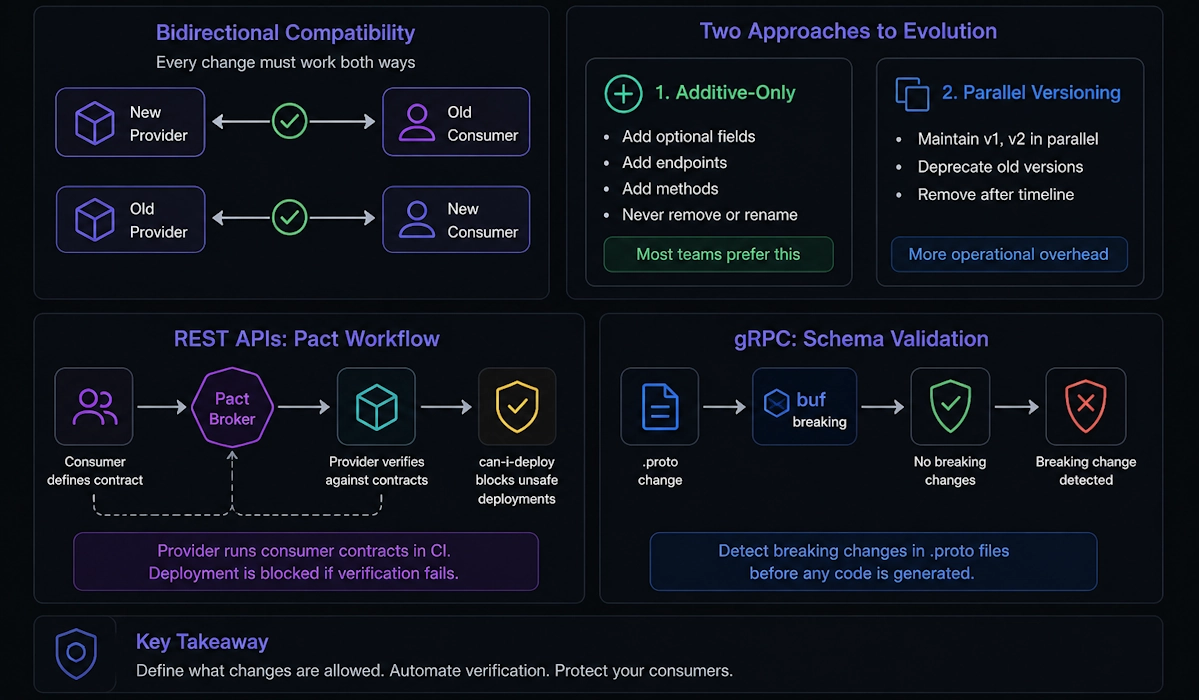
Evolving a contract means changing it without breaking existing consumers. The challenge is that consumers may deploy at different times than providers do, so any change must work in both directions: a new provider with an old consumer and an old provider with a new consumer. This is called bidirectional compatibility, and maintaining it requires discipline around what changes are allowed and automated verification that those rules are followed.
There are two fundamental approaches. The first is additive-only evolution: you can add new optional fields, endpoints, or methods, but you cannot remove or rename anything. The second is parallel versioning, where you maintain multiple versions of the contract simultaneously (v1, v2) and deprecate old versions over a defined timeline. Most teams prefer additive evolution because it avoids the operational overhead of running multiple API versions in parallel.
For REST APIs, the key safety mechanism is the Pact Broker's provider verification step combined with can-i-deploy checks. The provider runs the consumer's contract as part of CI, and the deployment is blocked if the verification fails. For gRPC, schema validation tools like buf breaking automatically detect breaking changes in .proto files before any code is even generated.
Provider verification in CI (Pact):
[Fact]
public void ProviderVerifiesAllConsumerContracts()
{
    var config = new PactVerifierConfig
    {
        Outputters = new List<IOutput> { new XUnitOutput(_output) },
        Verbose = true
    };

    new PactVerifier(config)
        .ServiceProvider("OrderService", "http://localhost:5000")
        .PactBroker("https://pact-broker.example.com",
            uriOptions: new PactUriOptions("token"))
        .Verify(); // fails CI if any consumer contract is broken
}
can-i-deploy check before production deployment:
# Check if OrderService v2.3.0 can be deployed to production
# based on whether all consumers have verified compatibility

pact-broker can-i-deploy \
  --pacticipant OrderService \
  --version 2.3.0 \
  --to-environment production

# Returns exit code 0 if safe, non-zero if blocked
Contract evolution rules:
Always safe:
- Adding a new optional field to a response
- Adding a new endpoint or gRPC method
- Adding a new optional query parameter or request field
- Making a required field optional (relaxing constraint)
Breaking changes:
- Removing a field that consumers depend on
- Renaming a field (even if semantically equivalent)
- Changing a field's type
- Changing a field number in protobuf
- Making an optional field required (tightening constraint)
What .NET engineers should know:
- 👼 Junior: Should understand that contracts can change over time, but that removing or renaming fields breaks existing clients. Know the difference between backward-compatible changes (safe to deploy) and breaking changes (require coordination). Understand that the provider must verify consumer contracts in CI, not just that consumers test against the provider.
- 🎓 Middle: Expected to implement automated provider verification in CI pipelines using Pact or
buf breaking, ensuring that no deployment can proceed if it breaks a consumer contract. Should know how to usecan-i-deploychecks to gate production deployments based on contract compatibility. Should understand the concept of provider states in Pact — the provider sets up test data before verifying the contract, so that the verification reflects realistic scenarios rather than an empty database. - 👑 Senior: Should design a contract evolution policy for the organization — defining what changes are allowed without coordination, what changes require a deprecation period, and how long old versions are supported. Understands the trade-offs between strict additive-only evolution (simple but constraining) versus parallel versioning (flexible but operationally expensive). Can implement sunset headers or deprecation warnings in API responses to signal to consumers that a field or endpoint will be removed, giving them time to migrate before the breaking change is deployed.
📚 Resources:
❓ What do contract tests miss, and how do you cover those gaps?
Contract tests verify that two services agree on the shape of their communication — the structure of requests and responses — but they deliberately ignore everything else. They do not test whether the data values are correct, whether the system performs under load, whether side effects happen in the right order, or whether the end-to-end business workflow actually works. Contract tests are fast and decoupled precisely because they sacrifice completeness for speed and isolation.
What contract tests miss:
- Semantic correctness: The response has the right shape but wrong data — for example, returning user 123's email when user 456 was requested
- State transitions: Multi-step workflows where the second request depends on side effects from the first — for example, creating an order, then updating it
- Error handling under real conditions: Network timeouts, database deadlocks, partial failures — none of these are exercised by contract tests
- Performance: Latency, throughput, memory usage, connection pooling behavior
- Cross-cutting concerns: Authentication flows, correlation ID propagation, distributed tracing, metrics emission
How to cover the gaps:
- Smoke tests in production: Deploy with feature flags, verify critical paths with synthetic transactions
- Integration tests: Test key workflows end-to-end in a staging environment with real dependencies
- Load tests: Use tools like k6, Gatling, or NBomber to verify performance under realistic traffic
- Chaos engineering: Inject failures (network partitions, pod restarts, dependency timeouts) and verify the system degrades gracefully
- Observability: Use logs, metrics, and traces to detect issues in production that tests cannot catch
What .NET engineers should know:
- 👼 Junior: Should understand that contract tests only verify the structure of requests and responses, not the correctness of the data or the behavior of the system as a whole. Know that integration tests and end-to-end tests are still necessary to verify that the system actually works in realistic scenarios.
- 🎓 Middle: Expected to design a testing strategy that uses contract tests for fast feedback on API changes, integration tests for verifying real service interactions, and end-to-end tests for critical user workflows. Should understand which bugs each test type catches and which it misses, and be able to explain why a failing contract test is cheaper to fix than a failing production incident, but does not replace other test types.
- 👑 Senior: Should establish clear boundaries between test types in the organization — contract tests catch breaking changes before deployment, integration tests catch configuration and infrastructure issues in staging, and smoke tests catch deployment problems in production. Understands that the testing pyramid is a guideline, not a rule, and that some systems (especially those with complex stateful workflows or strict performance requirements) need more end-to-end or load testing than others. Can identify when contract tests give false confidence — for example, when a provider passes all contract verifications but still has a subtle data corruption bug — and supplement with targeted integration or observability-driven testing.
📚 Resources: Testing Strategies in a Microservice Architecture
Distributed systems testing

❓ How do you test systems where each service can fail independently?
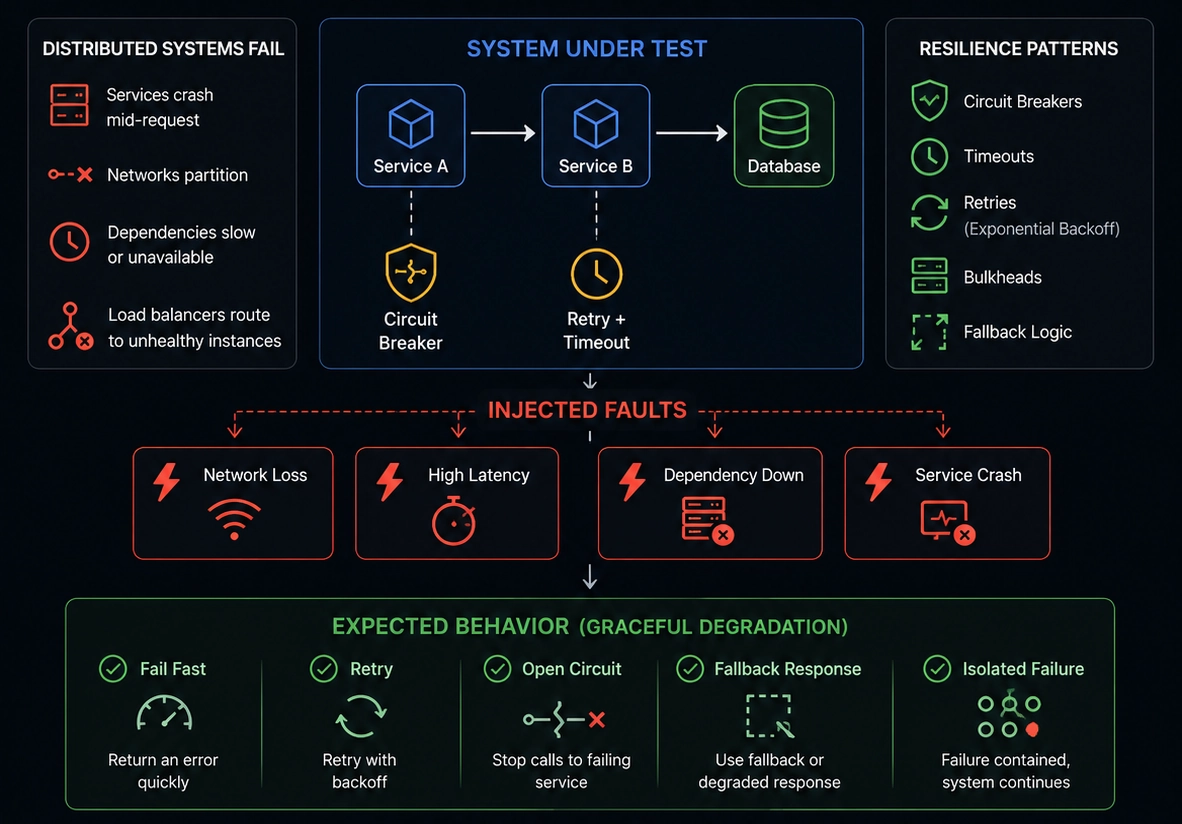
Distributed systems fail in ways monoliths do not — services crash mid-request, networks partition, dependencies become slow or unavailable, and load balancers route traffic to unhealthy instances. Testing for these failures requires deliberately breaking the system in controlled ways and verifying that it degrades gracefully rather than cascading into total failure. This is called chaos engineering or fault injection testing, and it shifts the question from "does it work?" to "what happens when it breaks?"

The goal is not to prevent failures — in a distributed system, failures are inevitable — but to contain them. A well-designed system isolates failures using circuit breakers, timeouts, retries with exponential backoff, bulkheads, and fallback logic. Testing these mechanisms means injecting faults at service boundaries and asserting that the system either recovers automatically or fails fast with a meaningful error, rather than hanging or corrupting data.
There are three levels of fault injection. At the lowest level, you can test individual components, such as circuit breakers or retry policies, in isolation using unit tests with controlled delays or exceptions. At the integration level, you can use test doubles that simulate slow or failing dependencies. At the system level, you can use tools like Polly, Simmy, or infrastructure-based fault injection tools such as Azure Chaos Studio or Chaos Mesh in Kubernetes to break real services in staging or even production under controlled conditions.
Below couple of examples:
Testing a circuit breaker in isolation:
[Fact]
public async Task CircuitBreaker_OpensAfterConsecutiveFailures()
{
    var breaker = Policy
        .Handle<HttpRequestException>()
        .CircuitBreakerAsync(3, TimeSpan.FromSeconds(10));

    var failingService = new FailingService(failCount: 5);

    // First 3 calls should fail and open the circuit
    for (int i = 0; i < 3; i++)
    {
        await Assert.ThrowsAsync<HttpRequestException>(() =>
            breaker.ExecuteAsync(() => failingService.CallAsync()));
    }

    // Circuit is now open — 4th call should fail immediately with BrokenCircuitException
    await Assert.ThrowsAsync<BrokenCircuitException>(() =>
        breaker.ExecuteAsync(() => failingService.CallAsync()));
}
Testing fallback behavior when dependency is unavailable:
[Fact]
public async Task GetUserProfile_WhenRecommendationServiceDown_ReturnsCachedData()
{
    var factory = _factory.WithWebHostBuilder(builder =>
    {
        builder.ConfigureServices(services =>
        {
            // Replace real service with one that always throws
            services.RemoveAll<IRecommendationService>();
            services.AddScoped<IRecommendationService>(_ =>
                new UnavailableRecommendationService());
        });
    });

    var client = factory.CreateClient();
    var response = await client.GetAsync("/users/123/profile");

    response.EnsureSuccessStatusCode();
    var profile = await response.Content.ReadFromJsonAsync<UserProfile>();

    // Should return profile without recommendations rather than fail completely
    Assert.NotNull(profile);
    Assert.Empty(profile.Recommendations);
}
Using Simmy to inject chaos into Polly policies:
var chaosPolicy = MonkeyPolicy.InjectFaultAsync(
    fault: new Exception("Simulated failure"),
    injectionRate: 0.1, // 10% of calls fail
    enabled: () => _testMode);

var pipeline = Policy.WrapAsync(retryPolicy, chaosPolicy);

await pipeline.ExecuteAsync(() => _httpClient.GetAsync("/data"));
What .NET engineers should know:
- 👼 Junior: Should understand that distributed systems fail differently than monoliths — services can be slow, unavailable, or return partial results — and that tests need to cover these scenarios. Know what a circuit breaker is conceptually (stops calling a failing dependency to prevent wasted retries) and why timeouts matter.
- 🎓 Middle: Expected to implement resilience patterns using Polly (retries, circuit breakers, timeouts, bulkheads) and write tests that verify each pattern behaves correctly under fault conditions. Should know how to use test doubles that simulate slow responses (
await Task.Delay) or failing responses (throw new HttpRequestException) to trigger fallback logic. Should also understand the difference between fail-fast and degrade gracefully. - 👑 Senior: Should design a fault injection testing strategy that progresses from unit tests of individual policies, to integration tests with simulated failures, to system-level chaos experiments in staging or production. Understands the blast radius concept — ensuring that when one service fails, it does not take down unrelated services — and designs bulkheads to enforce isolation. Can use observability to detect when the system is degrading and correlate it with specific fault injection experiments to prove the resilience mechanisms are working as designed.
📚 Resources:
❓ How do you test idempotency in message consumers (duplicate delivery, out-of-order, replay)?
Message-based systems guarantee at-least-once delivery, which means the same message can arrive multiple times — due to retries, network issues, or broker failovers. Testing idempotency means verifying that processing the same message twice produces the same result as processing it once, and that out-of-order messages do not corrupt state. This is not automatic — it requires deliberate design and explicit tests that simulate the messy reality of distributed messaging.
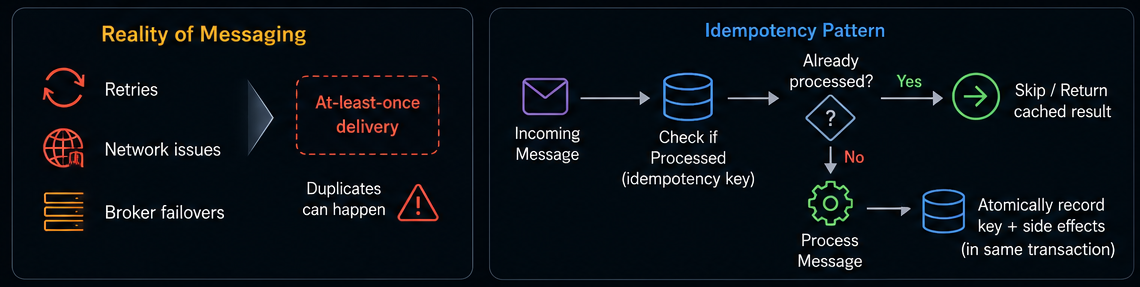
The standard pattern is to track processed messages using an idempotency key, typically a unique message ID or a business-level identifier, such as an order ID, combined with an operation type. Before processing, the consumer checks if the key has already been processed. If yes, it skips processing or returns the cached result. If not, it processes the message and atomically records the key, along with any side effects, typically within the same database transaction.
Duplicate delivery
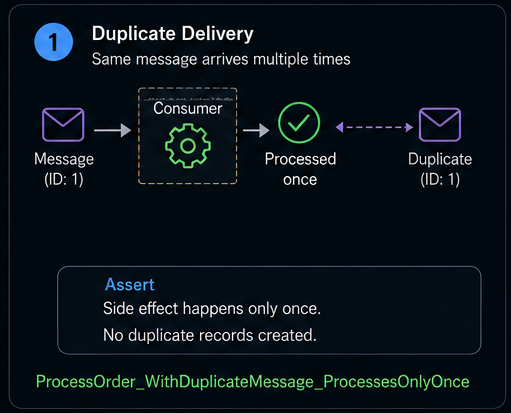
Testing idempotency requires three scenarios. First, sending the exact same message twice and asserting the side effect only happens once:
[Fact]
public async Task ProcessOrder_WithDuplicateMessage_ProcessesOnlyOnce()
{
    var consumer = CreateConsumer();
    var message = new OrderCreatedMessage
    {
        MessageId = Guid.NewGuid(),
        OrderId = 123,
        Total = 99.99m
    };

    await consumer.HandleAsync(message);
    await consumer.HandleAsync(message); // duplicate

    var orders = await _repository.GetOrdersByCustomerAsync(456);
    Assert.Single(orders);
}
Out-of-order
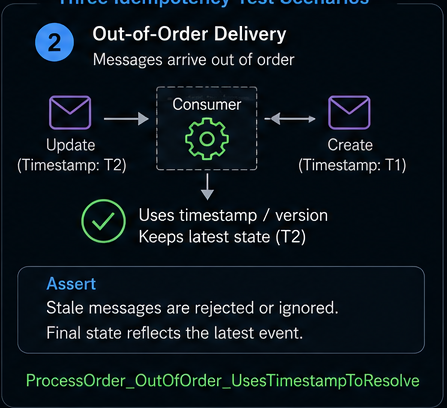
Second, sending messages out of order and verifying the system either rejects stale messages or processes them correctly using timestamps:
[Fact]
public async Task ProcessOrder_OutOfOrder_UsesTimestampToResolve()
{
    var updateMessage = new OrderUpdatedMessage
    {
        OrderId = 123,
        Status = "Shipped",
        Timestamp = DateTime.UtcNow.AddMinutes(5)
    };

    var createMessage = new OrderCreatedMessage
    {
        OrderId = 123,
        Status = "Pending",
        Timestamp = DateTime.UtcNow
    };

    await consumer.HandleAsync(updateMessage); // arrives first
    await consumer.HandleAsync(createMessage); // arrives second

    var order = await _repository.GetOrderAsync(123);
    Assert.Equal("Shipped", order.Status); // uses latest timestamp
}
Replay
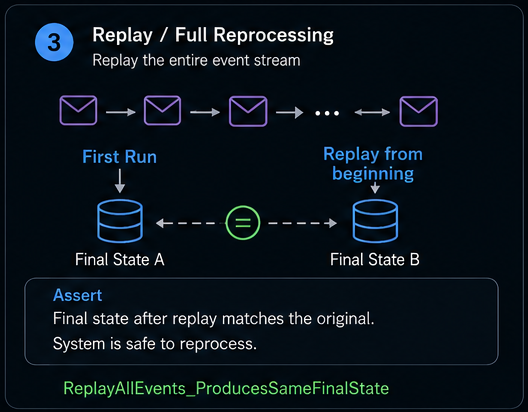
Third, replaying an entire event stream from the beginning and verifying the final state is identical to the original run — critical for event-sourced systems.
[Fact]
public async Task ReplayAllEvents_ProducesSameFinalState()
{
    var events = new[]
    {
        new OrderCreated { OrderId = 1, Total = 100 },
        new OrderShipped { OrderId = 1, TrackingNumber = "123" },
        new OrderCreated { OrderId = 2, Total = 200 }
    };

    // Process events first time
    var consumer1 = CreateConsumer();
    foreach (var evt in events)
        await consumer1.HandleAsync(evt);

    var state1 = await _repository.GetAllOrdersAsync();

    // Replay same events into fresh consumer
    await _repository.ClearAsync();
    var consumer2 = CreateConsumer();
    foreach (var evt in events)
        await consumer2.HandleAsync(evt);

    var state2 = await _repository.GetAllOrdersAsync();

    // Final state should be identical
    Assert.Equal(state1.Count, state2.Count);
    Assert.All(state1.Zip(state2), pair =>
    {
        Assert.Equal(pair.First.OrderId, pair.Second.OrderId);
        Assert.Equal(pair.First.Status, pair.Second.Status);
    });
}
What .NET engineers should know:
- 👼 Junior: Understand message queues deliver at-least-once, so duplicates are normal. Know what an idempotency key is and that it must be stored atomically with side effects.
- 🎓 Middle: Implement idempotency using a deduplication table or Redis to track processed message IDs. Write tests that send duplicate messages and verify side effects happen once. Handle out-of-order delivery using timestamps or version numbers.
- 👑 Senior: Design consumers with idempotency as first-class, using inbox/outbox patterns for exactly-once semantics. Test replay scenarios with real production event streams to verify historical events don't corrupt the current state.
📚 Resources:
- Pattern: Idempotent Consumer
- Transactional Inbox and Outbox Patterns: Practical Guide for Reliable Messaging
❓ How do you test message replay safely, including side effects (emails, payments, DB writes)?
Replaying messages in a distributed system is necessary to recover from failures, debug production issues, or rebuild projections in event-sourced systems. The danger is that replay can trigger real side effects — sending duplicate emails, charging customers twice, or corrupting databases. Testing replay safely means verifying that idempotency prevents duplicate side effects and that the replay process itself can be rolled back or isolated from production systems.
The core strategy is to separate deterministic state changes (writing to a database) from non-idempotent side effects (sending an email, charging a card). State changes should be idempotent by design, using the patterns already covered. Side effects should either be gated behind an idempotency check or deferred to a separate outbox process that can be disabled during replay.
For testing, you need three layers of protection. First, use a separate environment (staging or a local sandbox) where replaying messages does not affect production infrastructure. Second, use feature flags or configuration to disable side effects during replay while keeping state changes active. Third, write explicit tests that replay the same sequence of messages multiple times and verify that each side effect occurs only once, even though the state is rebuilt each time.
A practical approach is the outbox pattern: instead of sending an email directly from the message handler, you write an "email to send" record to the database in the same transaction as the business logic, and a separate process reads from the outbox and sends the emails. During replay, you disable the outbox processor so messages are replayed without triggering external side effects:
public async Task HandleOrderCreatedAsync(OrderCreatedMessage message)
{
    using var transaction = await _db.BeginTransactionAsync();

    // Idempotent state change
    if (await _deduplication.IsProcessedAsync(message.MessageId))
        return;

    var order = new Order { Id = message.OrderId, Total = message.Total };
    await _db.Orders.AddAsync(order);
    await _deduplication.MarkProcessedAsync(message.MessageId);

    // Defer side effect to outbox
    if (!_replayMode) // feature flag to disable during replay
    {
        await _outbox.AddAsync(new EmailOutboxEntry
        {
            To = message.CustomerEmail,
            Subject = "Order confirmed",
            Body = $"Order {message.OrderId} total: {message.Total}"
        });
    }

    await transaction.CommitAsync();
}
Testing this requires replaying a sequence of messages twice and asserting that the database state converges correctly but side effects only happen once:
[Fact]
public async Task ReplayMessages_RebuildsState_WithoutDuplicateSideEffects()
{
    var messages = new[]
    {
        new OrderCreatedMessage { OrderId = 1, Total = 100, CustomerEmail = "a@test.com" },
        new OrderCreatedMessage { OrderId = 2, Total = 200, CustomerEmail = "b@test.com" }
    };

    // First processing — normal mode
    var consumer = CreateConsumer(replayMode: false);
    foreach (var msg in messages)
        await consumer.HandleAsync(msg);

    var orders1 = await _db.Orders.ToListAsync();
    var emails1 = await _outbox.GetAllAsync();
    Assert.Equal(2, orders1.Count);
    Assert.Equal(2, emails1.Count);

    // Simulate replay — state cleared, replay mode enabled
    await _db.Orders.ExecuteDeleteAsync();
    await _deduplication.ClearAsync();

    var replayConsumer = CreateConsumer(replayMode: true);
    foreach (var msg in messages)
        await replayConsumer.HandleAsync(msg);

    var orders2 = await _db.Orders.ToListAsync();
    var emails2 = await _outbox.GetAllAsync();

    Assert.Equal(2, orders2.Count); // state rebuilt
    Assert.Equal(2, emails2.Count); // no new emails added during replay
}
For external systems like payment processors, you need test doubles that track call counts. During replay, the test verifies that the payment gateway was never called again:
[Fact]
public async Task ReplayPaymentMessages_DoesNotChargeCustomerTwice()
{
    var fakePaymentGateway = new FakePaymentGateway();
    var consumer = CreateConsumer(paymentGateway: fakePaymentGateway);

    var message = new PaymentRequested { OrderId = 1, Amount = 100 };

    await consumer.HandleAsync(message);
    Assert.Equal(1, fakePaymentGateway.ChargeCallCount);

    // Replay same message
    await consumer.HandleAsync(message);
    Assert.Equal(1, fakePaymentGateway.ChargeCallCount); // still 1
}
What .NET engineers should know:
- 👼 Junior: Understand that replaying messages can trigger dangerous side effects like duplicate emails or payments. Know that side effects should be separated from state changes and gated behind idempotency checks.
- 🎓 Middle: Implement the outbox pattern to defer side effects and disable them during replay using feature flags. Write tests that replay message sequences multiple times and verify that side effects occur only once, and that the state rebuilds correctly.
- 👑 Senior: Design replay-safe systems where all side effects flow through an outbox or event-driven process that can be paused during replay. Test replay scenarios using production-like data volumes to verify performance and memory usage. Implement replay observability: a tracking system that shows which messages were replayed, how long it took, and whether any failures occurred.
❓ How do you test poison messages and DLQ flow,s including reprocessing logic?
A poisoned message repeatedly fails to process and can block the entire queue if not handled correctly. Modern message brokers move these to a Dead Letter Queue (DLQ) after exhausting retries. I test three things: that bad messages reach the DLQ, that good messages continue to be processed, and that DLQ messages can be reprocessed after the issue is fixed.
The test deliberately creates messages that will fail — malformed JSON, invalid business rules, or exhausted transient retries — then verifies they land in the DLQ while other messages succeed:
[Fact]
public async Task PoisonMessage_MovedToDLQ_OtherMessagesSucceed()
{
    var consumer = CreateConsumer(maxRetries: 3);

    await consumer.HandleAsync(new Order { Id = 1, Total = 100 }); // succeeds
    await Assert.ThrowsAsync<ValidationException>(() =>
        consumer.HandleAsync(new Order { Id = 2, Total = -1 })); // poison
    await consumer.HandleAsync(new Order { Id = 3, Total = 200 }); // succeeds

    var processed = await _repository.GetAllOrdersAsync();
    Assert.Equal(2, processed.Count); // only 1 and 3

    var dlq = await _dlq.GetAllAsync();
    Assert.Single(dlq);
    Assert.Equal(2, dlq.First().Id);
}
For reprocessing, I fix the issue (code or data), pull from the DLQ, and verify the message now succeeds:
[Fact]
public async Task ReprocessDLQ_AfterFix_Succeeds()
{
    var message = new Order { Id = 99, Total = -1 };
    await Assert.ThrowsAsync<ValidationException>(() =>
        consumer.HandleAsync(message));

    var dlq = await _dlq.GetAllAsync();
    Assert.Single(dlq);

    // Fix and reprocess
    message.Total = 150;
    await consumer.HandleAsync(message);

    Assert.NotNull(await _repository.GetOrderAsync(99));
    Assert.Empty(await _dlq.GetAllAsync());
}
Testing transient failures means exhausting retries before moving to DLQ:
[Fact]
public async Task TransientFailure_ExhaustsRetries_MovesToDLQ()
{
    var fakeApi = new FailingExternalApi(failCount: 10);
    var consumer = CreateConsumer(fakeApi, maxRetries: 3);

    await consumer.HandleAsync(new Order { Id = 50 });

    Assert.Equal(3, fakeApi.CallCount); // tried 3 times
    Assert.Single(await _dlq.GetAllAsync());
}
What .NET engineers should know:
- 👼 Junior: Poison messages repeatedly fail and must be isolated via DLQ to avoid blocking the queue.
- 🎓 Middle: Test poison messages land in DLQ, other messages continue, and DLQ reprocessing works after fixing issues. Distinguish permanent failures from transient ones.
- 👑 Senior: Design DLQ monitoring/alerting and admin tools for inspection/reprocessing. Test poison messages don't cause memory leaks in long-running consumers.
❓ How do you validate message schema compatibility across versions?
Message schema compatibility ensures that old consumers can read new messages and new consumers can read old messages, preventing runtime deserialization errors when services are deployed at different times. The core rule is additive evolution: adding optional fields is safe; removing or renaming fields breaks compatibility. Testing this means verifying both directions: backward compatibility (new code reads old data) and forward compatibility (old code reads new data).
The most practical approach is golden file testing: serialize messages from each schema version to binary or JSON, commit them to the repository, and write tests to verify that the current code can deserialize messages from historical versions.
[Fact]
public void OrderMessageV2_CanDeserialize_V1GoldenFile()
{
    var v1Bytes = File.ReadAllBytes("TestData/order-v1-golden.json");
    var order = JsonSerializer.Deserialize<OrderMessageV2>(v1Bytes);

    Assert.Equal(123, order.OrderId);
    Assert.Equal(99.99m, order.Total);
    // V2 added optional Priority field — should default gracefully
    Assert.Equal(Priority.Normal, order.Priority);
}

[Fact]
public void OrderMessageV1_CanDeserialize_V2Message()
{
    var v2Message = new OrderMessageV2
    {
        OrderId = 456,
        Total = 150,
        Priority = Priority.Urgent // new field
    };

    var json = JsonSerializer.Serialize(v2Message);
    var v1Message = JsonSerializer.Deserialize<OrderMessageV1>(json);

    Assert.Equal(456, v1Message.OrderId);
    Assert.Equal(150, v1Message.Total);
    // V1 ignores Priority field — no exception thrown
}
For protobuf-based messaging, use buf breaking to automatically detect breaking changes in .proto files during CI:
# .github/workflows/ci.yml
- name: Check protobuf compatibility
  run: buf breaking --against '.git#branch=main'
Testing at runtime means sending messages between different schema versions and verifying that both deserialize correctly:
[Fact]
public async Task NewProducer_OldConsumer_HandlesUnknownFields()
{
    var newProducer = new ProducerV2();
    var oldConsumer = new ConsumerV1();

    var message = new OrderMessageV2
    {
        OrderId = 789,
        Total = 200,
        Priority = Priority.Urgent, // V1 doesn't know this field
        Tags = new[] { "express" } // V1 doesn't know this either
    };

    await newProducer.PublishAsync(message);
    var received = await oldConsumer.ReceiveAsync();

    Assert.Equal(789, received.OrderId);
    Assert.Equal(200, received.Total);
    // Old consumer simply ignores unknown fields
}
For schema registries like Confluent Schema Registry or Azure Schema Registry, compatibility rules are enforced server-side:
What .NET engineers should know:
- 👼 Junior: Understand adding optional fields is safe, removing or renaming fields breaks compatibility. Know that schema changes must be tested before deploying.
- 🎓 Middle: Implement golden file tests for historical message versions. Test both backward compatibility (new code reads old messages) and forward compatibility (old code reads new messages). Use schema validation tools like
buf breakingin CI. - 👑 Senior: Enforce schema compatibility through schema registries with compatibility modes (backward, forward, full). Design message evolution policies — how long old versions are supported, when breaking changes require new topics/queues. Test compatibility at scale with production-like message volumes.
📚 Resources:
❓ Describe the testing strategy for Saga workflows (orchestration vs choreography).
Saga workflows coordinate long-running transactions across multiple services by breaking them into steps that can each be independently committed and compensated if the workflow fails. There are two patterns: orchestration (a central coordinator sends commands and tracks state) and choreography (services react to events autonomously). The testing strategy differs fundamentally between them: orchestration centralizes logic, while choreography distributes it.
For orchestration, the saga orchestrator is a single component that can be tested in isolation. The test drives the orchestrator through a sequence of steps, using fakes for the downstream services, and verifies that it sends the correct commands in the correct order and triggers compensations when steps fail:
[Fact]
public async Task OrderSaga_WhenPaymentFails_CompensatesInventoryReservation()
{
    var fakeInventory = new FakeInventoryService();
    var fakePayment = new FakePaymentService(shouldFail: true);
    var orchestrator = new OrderSagaOrchestrator(fakeInventory, fakePayment);

    var result = await orchestrator.ExecuteAsync(new CreateOrderCommand
    {
        OrderId = 123,
        ProductId = 456,
        Amount = 100
    });

    Assert.False(result.Success);
    Assert.Equal(1, fakeInventory.ReserveCallCount);
    Assert.Equal(1, fakeInventory.ReleaseCallCount); // compensated
    Assert.Equal(1, fakePayment.ChargeCallCount);
}
Testing compensation order is critical — if a saga fails at step 3, steps 2 and 1 must be compensated in reverse order:
[Fact]
public async Task OrderSaga_CompensatesInReverseOrder()
{
    var compensationLog = new List<string>();
    var saga = new OrderSagaOrchestrator(
        inventory: new FakeInventory(onCompensate: () => compensationLog.Add("inventory")),
        shipping: new FakeShipping(onCompensate: () => compensationLog.Add("shipping")),
        payment: new FakePayment(shouldFail: true, onCompensate: () => compensationLog.Add("payment")));

    await saga.ExecuteAsync(new CreateOrderCommand());

    Assert.Equal(new[] { "payment", "shipping", "inventory" }, compensationLog);
}
For choreography, there is no central orchestrator — each service listens for events and publishes new ones. Testing means verifying the entire event chain executes correctly and that compensation events trigger when failures occur. This requires either running all services in an integration test or using contract tests to verify each service's event expectations:
[Fact]
public async Task OrderCreated_TriggersInventoryReservation_ThenPaymentCharge()
{
    var eventBus = new InMemoryEventBus();
    var inventoryService = new InventoryService(eventBus);
    var paymentService = new PaymentService(eventBus);

    await eventBus.PublishAsync(new OrderCreated { OrderId = 1, ProductId = 10 });
    await Task.Delay(100); // wait for async processing

    var events = eventBus.GetPublishedEvents();
    Assert.Contains(events, e => e is InventoryReserved);
    Assert.Contains(events, e => e is PaymentCharged);
}

[Fact]
public async Task PaymentFailed_TriggersInventoryReleaseCompensation()
{
    var eventBus = new InMemoryEventBus();
    var inventoryService = new InventoryService(eventBus);
    var paymentService = new PaymentService(eventBus);

    await eventBus.PublishAsync(new OrderCreated { OrderId = 2, ProductId = 20 });
    await eventBus.PublishAsync(new PaymentFailed { OrderId = 2 });
    await Task.Delay(100);

    var events = eventBus.GetPublishedEvents();
    Assert.Contains(events, e => e is InventoryReleased);
}
Testing idempotency in sagas is critical because retries or failures can cause duplicate compensation attempts:
[Fact]
public async Task CompensationEvent_ProcessedTwice_OnlyCompensatesOnce()
{
    var inventory = new InventoryService();
    var compensationEvent = new InventoryReleaseRequested { OrderId = 5 };

    await inventory.HandleAsync(compensationEvent);
    await inventory.HandleAsync(compensationEvent); // duplicate

    var stock = await inventory.GetStockAsync(productId: 100);
    Assert.Equal(10, stock); // only released once
}
For choreography, contract tests verify that each service publishes the events others expect and handles the events it subscribes to:
[Fact]
public void InventoryService_PublishesInventoryReserved_WhenOrderCreated()
{
    var contract = new EventContract
    {
        Trigger = new OrderCreated { OrderId = 1 },
        ExpectedEvent = new InventoryReserved { OrderId = 1, ProductId = 10 }
    };

    var service = new InventoryService();
    var published = service.SimulateHandling(contract.Trigger);

    Assert.Equal(contract.ExpectedEvent.GetType(), published.GetType());
}
What .NET engineers should know:
- 👼 Junior: Understand orchestration has a central coordinator while choreography relies on event chains. Know that both patterns require compensation logic when steps fail.
- 🎓 Middle: Test orchestrators in isolation with fakes for downstream services. Verify compensation happens in reverse order. For choreography, test each service's event handling and verify event chains execute correctly using an in-memory event bus.
- 👑 Senior: Design saga timeout and retry strategies and test them explicitly. Implement distributed tracing to visualize saga execution in tests. Test failure modes like partial compensation, duplicate events, and out-of-order events. Use contract tests for choreographed sagas to catch breaking changes to event schema.
❓ How do you test long-running workflows without waiting minutes in tests?
Long-running workflows often involve delays, polling intervals, scheduled tasks, or waiting for external events. Running these at real speed makes tests unbearably slow. The solution is to abstract time itself — replace direct calls to DateTime.UtcNow, Task.Delay, and Timer with a testable abstraction that can be advanced instantly in tests.
.NET 8+ includes TimeProvider as a built-in abstraction with FakeTimeProvider available in Microsoft.Extensions.TimeProvider.Testing. The workflow uses TimeProvider for all time operations:
public class OrderWorkflow
{
private readonly TimeProvider _timeProvider;
private readonly Dictionary<int, OrderState> _orders = new();
public OrderWorkflow(TimeProvider timeProvider)
{
_timeProvider = timeProvider;
}
public async Task StartAsync(int orderId)
{
_orders[orderId] = new OrderState
{
Status = OrderStatus.AwaitingPayment,
CreatedAt = _timeProvider.GetUtcNow()
};
}
public async Task ProcessScheduledTasksAsync()
{
var now = _timeProvider.GetUtcNow();
foreach (var (orderId, state) in _orders.ToList())
{
if (state.Status == OrderStatus.AwaitingPayment &amp;amp;amp;amp;amp;amp;amp;amp;amp;amp;amp;amp;amp;amp;amp;amp;amp;amp;amp;amp;amp;amp;amp;amp;amp;amp;amp;amp;amp;amp;amp;amp;amp;amp;amp;amp;amp;amp;amp;amp;amp;&amp;amp;amp;amp;amp;amp;amp;amp;amp;amp;amp;amp;amp;amp;amp;amp;amp;amp;amp;amp;amp;amp;amp;amp;amp;amp;amp;amp;amp;amp;amp;amp;amp;amp;amp;amp;amp;amp;amp;amp;amp;
now - state.CreatedAt > TimeSpan.FromMinutes(10))
{
state.Status = OrderStatus.Cancelled;
}
}
}
public OrderStatus GetStatus(int orderId) => _orders[orderId].Status;
}Testing becomes instantaneous by advancing the fake time provider:
[Fact]
public async Task OrderWorkflow_WaitsTenMinutes_ThenCancelsIfNotPaid()
{
    var fakeTime = new FakeTimeProvider();
    var workflow = new OrderWorkflow(fakeTime);

    await workflow.StartAsync(orderId: 123);

    Assert.Equal(OrderStatus.AwaitingPayment, workflow.GetStatus(123));

    // Jump forward 10 minutes instantly
    fakeTime.Advance(TimeSpan.FromMinutes(10));
    await workflow.ProcessScheduledTasksAsync();

    Assert.Equal(OrderStatus.Cancelled, workflow.GetStatus(123));
}
For workflows with delays, use TimeProvider.CreateTimer or the Delay method that accepts a TimeProvider:
public class ShipmentWorkflow
{
    private readonly TimeProvider _timeProvider;
    private readonly Dictionary<int, ShipmentState> _shipments = new();

    public ShipmentWorkflow(TimeProvider timeProvider)
    {
        _timeProvider = timeProvider;
    }

    public async Task StartAsync(int shipmentId)
    {
        _shipments[shipmentId] = new ShipmentState
        {
            Status = ShipmentStatus.InTransit,
            StartTime = _timeProvider.GetUtcNow()
        };

        // Schedule timeout check
        _ = Task.Run(async () =>
        {
            await Task.Delay(TimeSpan.FromHours(48), _timeProvider);
            CheckTimeout(shipmentId);
        });
    }

    private void CheckTimeout(int shipmentId)
    {
        if (_shipments[shipmentId].Status == ShipmentStatus.InTransit)
        {
            _shipments[shipmentId].Status = ShipmentStatus.Lost;
        }
    }

    public ShipmentStatus GetStatus(int shipmentId) => _shipments[shipmentId].Status;
}
Testing the timeout path:
[Fact]
public async Task ShipmentWorkflow_WhenNoUpdateAfter48Hours_MarksAsLost()
{
    var fakeTime = new FakeTimeProvider();
    var workflow = new ShipmentWorkflow(fakeTime);

    await workflow.StartAsync(shipmentId: 789);

    fakeTime.Advance(TimeSpan.FromHours(48));
    await Task.Delay(10); // give async task time to complete

    Assert.Equal(ShipmentStatus.Lost, workflow.GetStatus(789));
}
For background services using PeriodicTimer, inject TimeProvider:
public class OrderCleanupService : BackgroundService
{
    private readonly TimeProvider _timeProvider;
    private int _processedCount;

    public OrderCleanupService(TimeProvider timeProvider)
    {
        _timeProvider = timeProvider;
    }

    public int ProcessedCount => _processedCount;

    protected override async Task ExecuteAsync(CancellationToken ct)
    {
        var timer = _timeProvider.CreateTimer(_ =>
        {
            _processedCount++;
        }, null, TimeSpan.FromHours(1), TimeSpan.FromHours(1));

        await Task.Delay(Timeout.InfiniteTimeSpan, ct);
    }
}
Testing periodic execution:
[Fact]
public async Task BackgroundService_AdvancesTimeInstantly()
{
    var fakeTime = new FakeTimeProvider();
    var service = new OrderCleanupService(fakeTime);

    await service.StartAsync(CancellationToken.None);

    Assert.Equal(0, service.ProcessedCount);

    fakeTime.Advance(TimeSpan.FromHours(1));
    await Task.Delay(10); // allow timer callback to execute

    Assert.Equal(1, service.ProcessedCount);

    fakeTime.Advance(TimeSpan.FromHours(1));
    await Task.Delay(10);

    Assert.Equal(2, service.ProcessedCount);
}
What .NET engineers should know:
- 👼 Junior: Understand that real delays make tests slow. Use
TimeProviderabstraction that can be advanced instantly in tests withFakeTimeProvider. - 🎓 Middle: Inject
TimeProviderinto workflows and useGetUtcNow()instead ofDateTime.UtcNow,CreateTimer()instead ofnew Timer(). Write tests usingFakeTimeProvider.Advance()to skip time instantly. Test both success within timeout and failure when timeout expires. - 👑 Senior: Design workflows with testable time from the start — never call
DateTime.UtcNoworTask.Delaydirectly. Test complex timing scenarios, such as scheduled retries, exponential backoff, and sliding-window timeouts. Verify that advancing time does not cause race conditions in concurrent workflows.
📚 Resources: System.TimeProvider
❓ Describe the testing strategy for Event Sourced workflows.
Event Sourcing stores state as a sequence of events rather than a current snapshot. Testing event-sourced workflows means verifying three things: that commands produce the correct events, that replaying events rebuilds state correctly, and that projections/read models remain consistent with the event stream. The key insight is that events are facts — they never change — so tests focus on deterministic event production and replay rather than mutable state transitions.
The most important test type is the command-event test — given a current state (represented as past events) and a command, verify that the correct new events are produced:
[Fact]
public void PlaceOrder_WithValidItems_ProducesOrderPlacedEvent()
{
    var aggregate = new OrderAggregate();
    var command = new PlaceOrderCommand
    {
        OrderId = 123,
        CustomerId = 456,
        Items = new[] { new OrderItem { ProductId = 1, Quantity = 2 } }
    };

    var events = aggregate.Handle(command);

    var evt = Assert.Single(events);
    var orderPlaced = Assert.IsType<OrderPlacedEvent>(evt);
    Assert.Equal(123, orderPlaced.OrderId);
    Assert.Equal(456, orderPlaced.CustomerId);
}

[Fact]
public void CancelOrder_WhenAlreadyShipped_ProducesCancellationRejectedEvent()
{
    var aggregate = new OrderAggregate();
    // Replay past events to establish state
    aggregate.Apply(new OrderPlacedEvent { OrderId = 123 });
    aggregate.Apply(new OrderShippedEvent { OrderId = 123 });

    var command = new CancelOrderCommand { OrderId = 123 };
    var events = aggregate.Handle(command);

    var evt = Assert.Single(events);
    Assert.IsType<OrderCancellationRejectedEvent>(evt);
}
Testing event replay verifies that applying the same events in sequence always produces the same state:
[Fact]
public void ReplayEvents_RebuildsCorrectState()
{
    var events = new Event[]
    {
        new OrderPlacedEvent { OrderId = 1, Total = 100 },
        new PaymentReceivedEvent { OrderId = 1, Amount = 100 },
        new OrderShippedEvent { OrderId = 1, TrackingNumber = "123" }
    };

    var aggregate = new OrderAggregate();
    foreach (var evt in events)
        aggregate.Apply(evt);

    Assert.Equal(OrderStatus.Shipped, aggregate.Status);
    Assert.Equal("123", aggregate.TrackingNumber);
    Assert.Equal(100, aggregate.Total);
}
Testing idempotency means replaying the same events multiple times produces an identical state:
[Fact]
public void ReplayEvents_Twice_ProducesSameState()
{
    var events = new Event[]
    {
        new OrderPlacedEvent { OrderId = 1, Total = 100 },
        new OrderShippedEvent { OrderId = 1 }
    };

    var aggregate1 = new OrderAggregate();
    foreach (var evt in events)
        aggregate1.Apply(evt);

    var aggregate2 = new OrderAggregate();
    foreach (var evt in events)
        aggregate2.Apply(evt);

    Assert.Equal(aggregate1.Status, aggregate2.Status);
    Assert.Equal(aggregate1.Total, aggregate2.Total);
}
Testing projections (read models) means verifying they correctly update when events arrive:
[Fact]
public async Task OrderSummaryProjection_WhenOrderPlaced_UpdatesReadModel()
{
    var projection = new OrderSummaryProjection(_db);

    await projection.HandleAsync(new OrderPlacedEvent
    {
        OrderId = 456,
        CustomerId = 789,
        Total = 250
    });

    var summary = await _db.OrderSummaries.FindAsync(456);
    Assert.NotNull(summary);
    Assert.Equal(789, summary.CustomerId);
    Assert.Equal(250, summary.Total);
    Assert.Equal("Placed", summary.Status);
}

[Fact]
public async Task OrderSummaryProjection_WhenOrderShipped_UpdatesStatus()
{
    await _db.OrderSummaries.AddAsync(new OrderSummary { OrderId = 456, Status = "Placed" });
    await _db.SaveChangesAsync();

    var projection = new OrderSummaryProjection(_db);
    await projection.HandleAsync(new OrderShippedEvent { OrderId = 456 });

    var summary = await _db.OrderSummaries.FindAsync(456);
    Assert.Equal("Shipped", summary.Status);
}
What .NET engineers should know:
- 👼 Junior: Understand events are immutable facts. Commands produce events, events rebuild the state. Test that commands produce expected events, and replaying events rebuilds the correct state.
- 🎓 Middle: Write command-event tests for all aggregate commands. Test that projections update correctly when events arrive. Verify event replay is idempotent — same events always produce the same state. Test event versioning — old events still work after schema changes.
- 👑 Senior: Design event upcasters for backward compatibility when event schemas evolve. Test projections are rebuilt against production event streams to verify consistency. Implement snapshot testing to optimize replay performance and test that snapshot restoration produces the correct state. Test concurrent command handling with optimistic concurrency checks.
❓ How do you test projections/read models and eventual consistency without sleeps?
Eventual consistency means the read model updates asynchronously after writes, creating a timing gap in which the write succeeds but the projection has not yet caught up. Using Task.Delay or Thread.Sleep to wait for projections makes tests slow and flaky — the delay might be too short on slow CI machines or unnecessarily long on fast ones. The solution is to poll with a timeout, waiting for the expected state to appear rather than guessing how long it will take.
The standard approach uses a polling helper that repeatedly checks a condition until it succeeds or times out:
public static async Task<T> WaitForAsync<T>(
    Func<Task<T>> query,
    Func<T, bool> condition,
    TimeSpan? timeout = null)
{
    timeout ??= TimeSpan.FromSeconds(5);
    var deadline = DateTime.UtcNow + timeout.Value;

    while (DateTime.UtcNow < deadline)
    {
        var result = await query();
        if (condition(result))
            return result;
        await Task.Delay(50);
    }

    throw new TimeoutException($"Condition not met within {timeout.Value.TotalSeconds}s");
}
Testing projections becomes deterministic:
[Fact]
public async Task OrderEvents_EventuallyUpdateReadModel()
{
var orderId = Guid.NewGuid();
// Write events
await _eventStore.AppendAsync(new OrderPlacedEvent { OrderId = orderId, Total = 100 });
// Wait for projection to catch up
var order = await WaitForAsync(
() => _readModel.GetOrderAsync(orderId),
o => o?.Status == "Placed" &amp;amp;amp;amp;amp;amp;amp;amp;amp;amp;amp;amp;amp;amp;amp;amp;amp;amp;amp;amp;amp;amp;amp;amp;amp;amp;amp;amp;amp;amp;amp;amp;amp;amp;amp;amp;amp;amp;amp;amp;&amp;amp;amp;amp;amp;amp;amp;amp;amp;amp;amp;amp;amp;amp;amp;amp;amp;amp;amp;amp;amp;amp;amp;amp;amp;amp;amp;amp;amp;amp;amp;amp;amp;amp;amp;amp;amp;amp;amp;amp; o?.Total == 100);
Assert.Equal(100, order.Total);
// Update and verify projection updates again
await _eventStore.AppendAsync(new OrderShippedEvent { OrderId = orderId });
order = await WaitForAsync(
() => _readModel.GetOrderAsync(orderId),
o => o?.Status == "Shipped");
Assert.Equal("Shipped", order.Status);
}For aggregated projections across multiple entities:
[Fact]
public async Task MultipleOrders_AggregateIntoCustomerStats()
{
var customerId = 456;
await _eventStore.AppendAsync(new OrderPlacedEvent
{ OrderId = Guid.NewGuid(), CustomerId = customerId, Total = 100 });
await _eventStore.AppendAsync(new OrderPlacedEvent
{ OrderId = Guid.NewGuid(), CustomerId = customerId, Total = 200 });
var stats = await WaitForAsync(
() => _readModel.GetCustomerStatsAsync(customerId),
s => s?.TotalSpent >= 300 &amp;amp;amp;amp;amp;amp;amp;amp;amp;amp;amp;amp;amp;amp;amp;amp;amp;amp;amp;amp;amp;amp;amp;amp;amp;amp;amp;amp;amp;amp;amp;amp;amp;amp;amp;amp;amp;amp;amp;amp;&amp;amp;amp;amp;amp;amp;amp;amp;amp;amp;amp;amp;amp;amp;amp;amp;amp;amp;amp;amp;amp;amp;amp;amp;amp;amp;amp;amp;amp;amp;amp;amp;amp;amp;amp;amp;amp;amp;amp;amp; s?.OrderCount == 2);
Assert.Equal(300, stats.TotalSpent);
}An alternative for controlled environments is exposing synchronization from the projection:
public class OrderProjection
{
    private readonly SemaphoreSlim _sync = new(0);

    public async Task HandleAsync(Event evt)
    {
        await UpdateReadModelAsync(evt);
        _sync.Release();
    }

    public Task WaitForProcessingAsync(TimeSpan timeout) => _sync.WaitAsync(timeout);
}

[Fact]
public async Task WithExplicitSync_NoPollingNeeded()
{
    await _eventStore.AppendAsync(new OrderPlacedEvent { OrderId = 1, Total = 100 });
    await _projection.WaitForProcessingAsync(TimeSpan.FromSeconds(2));

    var order = await _readModel.GetOrderAsync(1);
    Assert.Equal(100, order.Total);
}
What .NET engineers should know:
- 👼 Junior: Projections update asynchronously. Use polling with a timeout instead of
Task.Delay. Eventual consistency means there's a brief window during which a write succeeds but the read model hasn't updated yet. - 🎓 Middle: Implement reusable polling helpers. Test projections handle events in the correct order. Verify that out-of-order scenarios are handled gracefully.
- 👑 Senior: Design projections with observable checkpoints. Implement idempotent handlers that safely replay events. Test the projection lag under load and monitor it for any exceedances of acceptable thresholds.
❓ How do you test microservices with shadow traffic or dark reads, and what do you compare?
Shadow traffic (also called dark traffic or mirroring) sends production requests to both the current and new versions of a service simultaneously, but only the current version's response is returned to the user. The new version processes the request in parallel, allowing comparison of behavior, performance, and correctness without affecting production users. This catches bugs that only appear with real production data patterns, edge cases, and load characteristics that are impossible to replicate in staging.
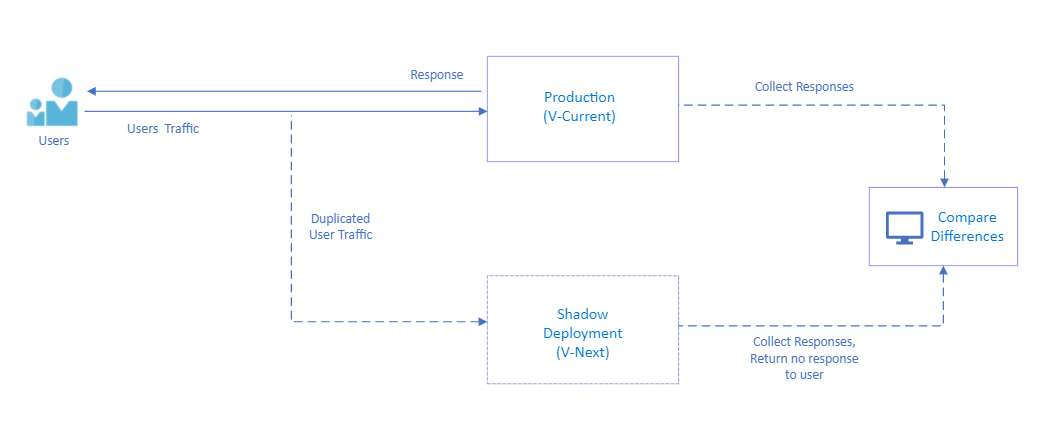
The key is to instrument both versions to capture requests, responses, latency, errors, and resource usage, then compare them to detect differences. A difference might indicate a bug in the new version or reveal an intentional behavior change that needs validation.
What .NET engineers should know:
- 👼 Junior: Shadow traffic duplicates production requests to test new versions without affecting users. Only the primary response is returned. Differences are logged for investigation.
- 🎓 Middle: Implement shadow traffic using proxies or service mesh. Compare status codes, response bodies, and latency. Handle semantic equivalence — ignore timestamps, UUIDs, or acceptable differences. Log mismatches for investigation without alerting on expected differences.
- 👑 Senior: Design shadow traffic with sampling (mirror 1-10% of traffic to avoid overloading the shadow). Implement semantic comparison for complex responses. Use metrics to track mismatch rates and alert when they exceed thresholds. Test canary deployments using shadow traffic before full rollout.
Resilience and fault testing

❓ How do end-to-end integration tests work when an API Gateway is in front?
Yes, they work, but the strategy shifts. When an API Gateway (like Ocelot, YARP, Kong, or Azure API Management) is in the mix, you have to decide whether you are testing the Internal Microservice or the User-Facing Product.
Here is how you handle the three most common architectural setups:
The "Sandbox" Approach (True E2E)
In this scenario, you treat the Gateway and the Microservices as a single unit. You point your tests at the Gateway URL, and it routes traffic to real services.
- When to use: For "Smoke Tests" or final verification in a staging environment.
- Challenge: It is hard to mock dependencies because the Gateway is routing to "real" internal services.
- The Solution: Use Testcontainers to spin up the Gateway and the Microservice together in a Docker network.
The "Gateway-Bypass" Approach (Service Testing)
You bypass the Gateway and call the microservice directly.
- When to use: When you want to verify the business logic and database persistence of a single service without worrying about Gateway timeouts or auth configuration.
- Risk: You might miss bugs caused by the Gateway (e.g., the Gateway stripping a critical header or failing to handle a large payload).
Testing the Gateway Itself
Sometimes the Gateway is the logic (e.g., it handles authentication, rate limiting, or request transformation).
To test this in .NET, you can use WebApplicationFactory to host the Gateway in-memory and use WireMock.Net to "fake" the backend microservices.
What .NET engineers should know:
- 👼 Junior: API Gateway is part of the integration test path. Tests send requests through the gateway to verify routing, auth, and transformations work end-to-end.
- 🎓 Middle: Configure test gateway instances with relaxed rate limits and test-specific auth keys. Test both happy paths (correct routing, successful auth) and failure paths (invalid tokens, rate limiting, backend failures). Verify request/response transformations happen correctly.
- 👑 Senior: Design gateway tests that run in CI against ephemeral test instances or in-memory gateways. Test gateway resilience patterns (circuit breakers, retries, caching). Monitor gateway metrics in tests to catch performance regressions. Use contract tests to verify that the gateway configuration matches the backend API contracts.
❓ How do you cover policy-enforced code paths in sidecar/proxy logic (auth, routing, rate limits)?
Policy-enforced paths in sidecar/proxy logic — auth middleware, rate limiters, routing rules — are undertested because they sit at infrastructure boundaries rather than inside application logic. The key is to treat each policy as an independent, testable unit by wrapping it in an interface or middleware delegate, then driving it through a test host rather than relying on the integration environment's behavior.
In ASP.NET Core, WebApplicationFactory combined with HttpClient gives you a fast in-process test host where you can inject fake policy state (authenticated vs anonymous, rate limit counters, feature flags) and assert on HTTP responses — status codes, headers, redirect targets. Auth can be faked with a custom AuthenticationHandler, rate-limit counters backed by an in-memory store, and swapped at test time.
public class TestAuthHandler : AuthenticationHandler<AuthenticationSchemeOptions>
{
    public TestAuthHandler(IOptionsMonitor<AuthenticationSchemeOptions> options,
        ILoggerFactory logger, UrlEncoder encoder)
        : base(options, logger, encoder) { }

    protected override Task<AuthenticateResult> HandleAuthenticateAsync()
    {
        var claims = new[] { new Claim(ClaimTypes.Role, "admin") };
        var identity = new ClaimsIdentity(claims, "Test");
        var ticket = new AuthenticationTicket(new ClaimsPrincipal(identity), "Test");
        return Task.FromResult(AuthenticateResult.Success(ticket));
    }
}

// In test setup
builder.ConfigureTestServices(services =>
{
    services.AddAuthentication("Test")
            .AddScheme<AuthenticationSchemeOptions, TestAuthHandler>("Test", _ => { });
});
For rate limiting, replace the backing store with a controllable fake that lets you pre-seed the exhausted state, then assert that the endpoint returns 429 Too Many Requests with the correct Retry-After header. Routing logic is best tested by asserting which downstream mock received the request using MockHttpMessageHandler or a stub HttpClient factory.
[Fact]
public async Task RateLimitedEndpoint_Returns429_WhenLimitExceeded()
{
    // Arrange — seed exhausted state in fake store before request
    _fakeRateLimitStore.SetExhausted("/api/orders", clientId: "test-client");

    // Act
    var response = await _client.GetAsync("/api/orders");

    // Assert
    Assert.Equal(HttpStatusCode.TooManyRequests, response.StatusCode);
    Assert.True(response.Headers.Contains("Retry-After"));
}
What .NET engineers should know:
- 👼 Junior: Know that auth and rate limit paths need explicit tests — a green happy-path test does not prove the policy is enforced.
- 🎓 Middle: Use WebApplicationFactory with injected fake auth handlers and swappable rate limit stores to test each policy branch as a real HTTP interaction.
- 👑 Senior: Design policy middleware to depend on abstractions (stores, clock, identity) that are injectable, enabling deterministic tests for edge cases — exhausted limits, clock-based windows, role escalation, and partial-match routing rules — without spinning up real infrastructure.
📚 Resources:
❓ How do you test request/response transformations (headers, claims, body rewriting) without brittle assertions?
Testing transformations means verifying that the logic correctly alters the state of a request or response without creating tests that break on every minor change to a JSON property. Brittle assertions often occur when tests check the entire serialized string or exact header counts. Instead, the test verifies specific behavioral outcomes using JSON Schema validation, partial object matching, or specialized header assertions that ignore irrelevant metadata.
In .NET, the test verifies transformations by inspecting the HttpRequestMessage or HttpResponseMessage within a DelegatingHandler or a custom middleware. Using libraries like FluentAssertions enables structural matching, in which the test asserts only on the existence and values of the transformed fields, ignoring the rest of the payload.
// Verifies claim-to-header transformation without checking the whole request
[Fact]
public async Task Transform_UserClaim_AddsInternalHeader()
{
    var handler = new TransformationHandler();
    var request = new HttpRequestMessage(HttpMethod.Get, "/api/data");
    request.Options.Set(new HttpRequestOptionsKey<ClaimsPrincipal>("User"), adminUser);

    var response = await handler.SendAsync(request, CancellationToken.None);

    // Assert only the delta: the specific header we expect
    request.Headers.Should().ContainKey("X-Internal-Role")
        .WhoseValue.Should().Contain("Admin");

    // For body rewrites, use structural matching rather than string comparison
    var content = await request.Content.ReadAsAsync<dynamic>();
    ((string)content.status).Should().Be("processed");
}
Testing complex body rewriting, such as converting a legacy XML response to JSON, requires focusing on data-mapping integrity. The test verifies that critical fields are mapped correctly across types while allowing the rest of the structure to evolve. This is often achieved by deserializing into a "Test DTO" that contains only the fields relevant to the transformation logic, rather than the full production model.
What .NET engineers should know:
- 👼 Junior: Avoid
Assert.Equal(string1, string2)for JSON; useJsonDocumentorJObjectto verify that specific properties exist. - 🎓 Middle: Use custom
DelegatingHandlerimplementations in your test suite to intercept and inspect transformed requests before they hit a mocked backend. - 👑 Senior: Implement "Contract Tests" for transformations to ensure that changes in the transformation logic don't violate the expectations of downstream services.
📚 Resources:
❓ How do you validate observability propagation across the gateway and services (trace headers, correlation IDs)?
Observability propagation — W3C traceparent, X-Correlation-Id, baggage headers — is easy to implement and easy to silently break. A middleware refactor or a missing HttpClient factory registration can drop trace context entirely, and no functional test will catch it because the feature still works. Testing propagation means asserting that the right headers flow outbound from the gateway to downstream services on every request, and that the same trace context is preserved across hops.
The cleanest approach is to intercept outbound calls with a MockHttpMessageHandler, capture the headers on each downstream request, and assert that the trace context headers are present and structurally valid — not that they match a specific value, since trace IDs are generated per request. For W3C tracing, validate that traceparent follows the expected format; for correlation IDs, validate that the same ID received inbound appears outbound:
[Fact]
public async Task Gateway_PropagatesTraceParent_ToDownstreamService()
{
    // Arrange — capture outbound downstream requests
    HttpRequestMessage? captured = null;
    var mockHandler = new MockHttpMessageHandler((req, ct) =>
    {
        captured = req;
        return Task.FromResult(new HttpResponseMessage(HttpStatusCode.OK));
    });

    // Act — send inbound request with trace context
    var response = await _client.SendAsync(new HttpRequestMessage(HttpMethod.Get, "/api/orders")
    {
        Headers = { { "traceparent", "00-4bf92f3577b34da6a3ce929d0e0e4736-00f067aa0ba902b7-01" } }
    });

    // Assert — downstream received a valid traceparent
    Assert.NotNull(captured);
    Assert.True(captured!.Headers.Contains("traceparent"));
    var traceparent = captured.Headers.GetValues("traceparent").Single();
    Assert.Matches(@"^00-[0-9a-f]{32}-[0-9a-f]{16}-[0-9a-f]{2}$", traceparent);
}
For correlation ID propagation, the assertion is stricter — the same ID that arrived inbound must appear outbound unchanged. This verifies not just presence but identity, which is the actual contract correlation IDs enforced.
[Fact]
public async Task Gateway_PreservesCorrelationId_AcrossHop()
{
    var correlationId = Guid.NewGuid().ToString();
    HttpRequestMessage? captured = null;
    var mockHandler = new MockHttpMessageHandler((req, ct) =>
    {
        captured = req;
        return Task.FromResult(new HttpResponseMessage(HttpStatusCode.OK));
    });

    await _client.SendAsync(new HttpRequestMessage(HttpMethod.Get, "/api/orders")
    {
        Headers = { { "X-Correlation-Id", correlationId } }
    });

    var propagated = captured!.Headers.GetValues("X-Correlation-Id").Single();
    Assert.Equal(correlationId, propagated);
}
For Activity-based tracing with System.Diagnostics: validate propagation by checking that ActivityContext flows correctly through the pipeline using an ActivityListener in tests — this catches cases where HttpClient bypasses the propagator because it was constructed manually rather than via IHttpClientFactory.
// Verify Activity is started and carries the right trace ID
using var listener = new ActivityListener
{
    ShouldListenTo = source => source.Name == "MyGateway",
    Sample = (ref ActivityCreationOptions<ActivityContext> _) => ActivitySamplingResult.AllData,
    ActivityStarted = activity =>
        Assert.Equal("4bf92f3577b34da6a3ce929d0e0e4736", activity.TraceId.ToHexString())
};
ActivitySource.AddActivityListener(listener);
What .NET engineers should know:
- 👼 Junior: Understand that trace headers must be explicitly forwarded — they do not propagate automatically unless middleware or IHttpClientFactory is wired correctly.
- 🎓 Middle: Use MockHttpMessageHandler to capture outbound requests and assert trace header presence and format; use regex for W3C traceparent validation and strict equality for correlation IDs.
- 👑 Senior: Validate propagation at the Activity level using ActivityListener to catch misconfigured propagators and manually constructed HttpClients that silently drop trace context; treat propagation as a contract test, not an afterthought.
❓ How do you test “policy as code” changes so that a config tweak doesn't break production?
Policy as code — OPA rules, ASP.NET Core authorization policies, rate-limit configs, and routing rules defined in YAML or JSON — creates a specific failure mode: a one-line config change can silently alter who can access what, which routes resolve to where, or which requests get dropped. Functional tests stay green because the application still runs; it's the policy contract that breaks. The solution is a dedicated policy contract test suite that runs directly against the policy engine, treating each policy rule as a testable unit with known inputs and expected decisions.
The most effective approach is Policy Unit Testing, using the policy engine’s native CLI (such as OPA/Rego) or a custom C# validation suite. The test verifies that given a specific input (e.g., a JWT with "User" role), the policy produces the expected effect ("Deny" for admin routes). This ensures that a "config tweak" is treated with the same rigor as a code change.
// Verifying a policy transformation or validation in C#
[Theory]
[InlineData("Admin", "/api/admin", true)]
[InlineData("User", "/api/admin", false)]
public void Policy_Enforces_RoleBasedAccess(string role, string path, bool expectedResult)
{
    var policy = new JsonPolicyEvaluator("auth-policy.json");
    var context = new PolicyContext { UserRole = role, RequestPath = path };

    var result = policy.Evaluate(context);

    Assert.Equal(expectedResult, result.Allowed);
}
Beyond unit tests, Shadow Testing is used for production-level validation. Testing means deploying the new policy alongside the old one, in which the new policy evaluates traffic and logs its decision without actually enforcing it. Comparing the "Expected" vs. "Actual" outcomes in your observability stack allows you to catch regressions under real-world traffic patterns before flipping the switch.
What .NET engineers should know:
- 👼 Junior: Understand that config changes are code changes — a modified threshold or role name requires the same test coverage as a code edit.
- 🎓 Middle: Test authorization policies directly via IAuthorizationService with parameterized inputs covering all roles and edge cases; load config from production appsettings files to eliminate drift.
- 👑 Senior: Treat policy definitions as versioned contracts with their own test suite — separate from functional tests — that runs in CI on every config change, catches boundary regressions, and validates the policy engine integration end-to-end before any deployment reaches production.
📚 Resources:
❓ How do you mock or test Polly-based policies and circuit-breakers?
Testing resilience policies means verifying that your application responds correctly to state changes such as a circuit opening or a retry sequence exhausting, without necessarily testing Polly's internal logic. Testing ensures that your configuration (retry counts, break durations) aligns with business requirements. Since Polly v8+, the library provides a Polly.Testing package specifically for inspecting the composition of a resilience pipeline, allowing you to verify that the correct strategies are registered without executing them.
To test the behavior of stateful policies like Circuit Breakers, testing means using a ResiliencePipeline with a CircuitBreakerManualControl. This allows a test to manually trip the circuit into an Open or Isolated state, then verify that the application immediately throws a BrokenCircuitException or returns a fallback response without attempting the underlying call.
[Fact]
public async Task Service_ReturnsFallback_WhenCircuitIsIsolated()
{
// Arrange: Use ManualControl to manipulate circuit state
var manualControl = new CircuitBreakerManualControl();
var pipeline = new ResiliencePipelineBuilder()
.AddCircuitBreaker(new CircuitBreakerStrategyOptions { ManualControl = manualControl })
.Build();
await manualControl.IsolateAsync(); // Manually force the circuit open
// Act &amp;amp;amp;amp;amp;amp;amp;amp;amp;amp;amp;amp;amp;amp;amp;amp;amp;amp;amp;amp;amp;amp;amp;amp;amp;amp;amp;amp;amp;amp;amp;amp;amp;amp;amp; Assert: The call should fail fast without hitting the 'backend'
var actionCalled = false;
await Assert.ThrowsAsync<IsolatedCircuitException>(() =>
pipeline.ExecuteAsync(async _ => { actionCalled = true; }));
Assert.False(actionCalled);
}For Retry policies, testing means verifying the "Outcome" of multiple attempts. By using a mocked HttpClient or a delegate that fails N times before succeeding, the test verifies that the pipeline completes the operation only after the expected number of retries. You can also use the GetPipelineDescriptor() extension from the testing package to assert that the retry strategy is configured with the correct MaxRetryAttempts and BackoffType during startup.
What .NET engineers should know:
- 👼 Junior: Avoid mocking the
ResiliencePipelineinterface itself; instead, mock the dependencies wrapped by the pipeline to trigger retries or circuit breaks naturally. - 🎓 Middle: Use the
Polly.Testingpackage to inspect pipeline descriptors in unit tests, ensuring that DI-registered pipelines actually contain the expected resilience strategies. - 👑 Senior: Implement "Chaos Engineering" tests using Simmy (Polly’s chaos tool) to inject faults like latency or specific exceptions into production-like environments to validate system recovery.
📚 Resources:
❓ How do you test concurrency limits and bulkheads in request pipelines?
Concurrency limits are only “tested” when the test proves two things: the pipeline never exceeds MaxConcurrentRequests, and overflow requests are rejected or queued exactly as designed. The trick is to make in-flight work deterministic, so the test can hold N requests inside the bulkhead, then observe what happens to request N+1 without using sleeps.
A practical pattern is a fake handler/middleware that blocks on a TaskCompletionSource while it increments an inFlight counter. The test fires many requests at once, asserts that peakInFlight never goes above the limit, and asserts that overflow requests return a known rejection signal (HTTP 429, custom status, or a specific exception).
using System.Net;
using System.Threading.Channels;

[Fact]
public async Task Bulkhead_Never_Exceeds_Limit_And_Rejects_Overflow()
{
    var limit = 3;
    var gate = new TaskCompletionSource();
    var inFlight = 0; var peak = 0;

    async Task<HttpResponseMessage> HandleAsync()
    {
        var now = Interlocked.Increment(ref inFlight);
        Interlocked.Exchange(ref peak, Math.Max(peak, now));
        await gate.Task; // keep requests inside bulkhead deterministically
        Interlocked.Decrement(ref inFlight);
        return new(HttpStatusCode.OK);
    }

    var bulkhead = new SemaphoreSlim(limit, limit);
    async Task<HttpResponseMessage> CallAsync()
    {
        if (!await bulkhead.WaitAsync(0)) return new(HttpStatusCode.TooManyRequests);
        try { return await HandleAsync(); }
        finally { bulkhead.Release(); }
    }

    var calls = Enumerable.Range(0, 10).Select(_ => CallAsync()).ToArray();
    await Task.Delay(10); // tiny yield so tasks enter; avoid long sleeps
    Assert.Equal(limit, peak);

    gate.SetResult();
    var results = await Task.WhenAll(calls);
    Assert.Contains(results, r => r.StatusCode == HttpStatusCode.TooManyRequests);
}
If the design is “queue, not reject”, the same structure works: replace WaitAsync(0) with WaitAsync(timeout) and assert that the extra requests complete only after the gate is released, plus that peakInFlight still respects the limit. The test stays stable because it asserts concurrency invariants, not timing.
What .NET engineers should know:
- 👼 Junior: The test must prove “max in-flight never exceeds the limit” and “overflow behavior is correct”.
- 🎓 Middle: Use deterministic blocking (TaskCompletionSource) and track
peakInFlightwith atomics, not sleeps. - 👑 Senior: Validate queue vs reject semantics, timeouts/cancellation behavior, and isolate bulkheads per dependency to prevent noisy-neighbor failures.
📚 Resources: Rate limiting middleware in ASP.NET Core
❓ What is chaos engineering, and what failures can it uncover that normal tests miss?
Chaos engineering is the discipline of experimenting with a system to build confidence in its ability to withstand turbulent conditions in production. While unit and integration tests verify that code works under "happy path" or "expected failure" conditions (such as a known API error), chaos engineering uncovers systemic weaknesses that emerge only when multiple unpredictable factors collide. Testing with chaos involves injecting artificial turbulence—such as network latency, server crashes, or disk saturation—to observe how the system recovers.
Normal testing often misses failures related to cascading effects and timeout storms. For example, a service might pass all unit tests, but under chaos (like a 2-second delay in a downstream dependency), it might exhaust its connection pool because its internal timeout is set to 5 seconds. Chaos engineering uncovers these "zombie" states where a service is technically alive but practically useless, or where a secondary system (like logging) accidentally brings down the primary business logic due to a shared resource.
// Using Simmy (Polly's chaos tool) to inject a 10% chance of a 5-second delay
var latencyOptions = new LatencyStrategyOptions
{
    Latency = TimeSpan.FromSeconds(5),
    InjectionRate = 0.1, // 10% of requests
    EnabledGenerator = args => ValueTask.FromResult(true)
};

var pipeline = new ResiliencePipelineBuilder()
    .AddChaosLatency(latencyOptions) // Inject chaos
    .AddTimeout(TimeSpan.FromSeconds(2)) // The policy we are testing
    .Build();

// This test verifies the system handles a 'timeout storm' gracefully
var result = await pipeline.ExecuteAsync(async token =>
    await _httpClient.GetAsync("https://api.internal/data", token));
Chaos experiments verify the "Steady State" of a system. Instead of asserting a specific return value, testing means monitoring high-level business metrics (e.g., "99.9% of checkouts must succeed") while a service is being throttled or a database node is taken offline. It shifts the focus from "does the code work?" to "does the system survive?"
❓ What .NET engineers should know:
- 👼 Junior: Chaos engineering is not about "breaking things" randomly; it is a controlled experiment to see if the application's error handling actually works in the real world.
- 🎓 Middle: Use the Simmy library to integrate chaos into your resilience pipelines, allowing you to simulate dependency failures without actually touching the infrastructure.
- 👑 Senior: Define and monitor "SLIs/SLOs" (Service Level Indicators) as the baseline for chaos experiments; if an experiment causes a metric to drop, you have discovered a resilience gap that requires an architectural change.
📚 Resources: Simmy
UI and E2E automation testing
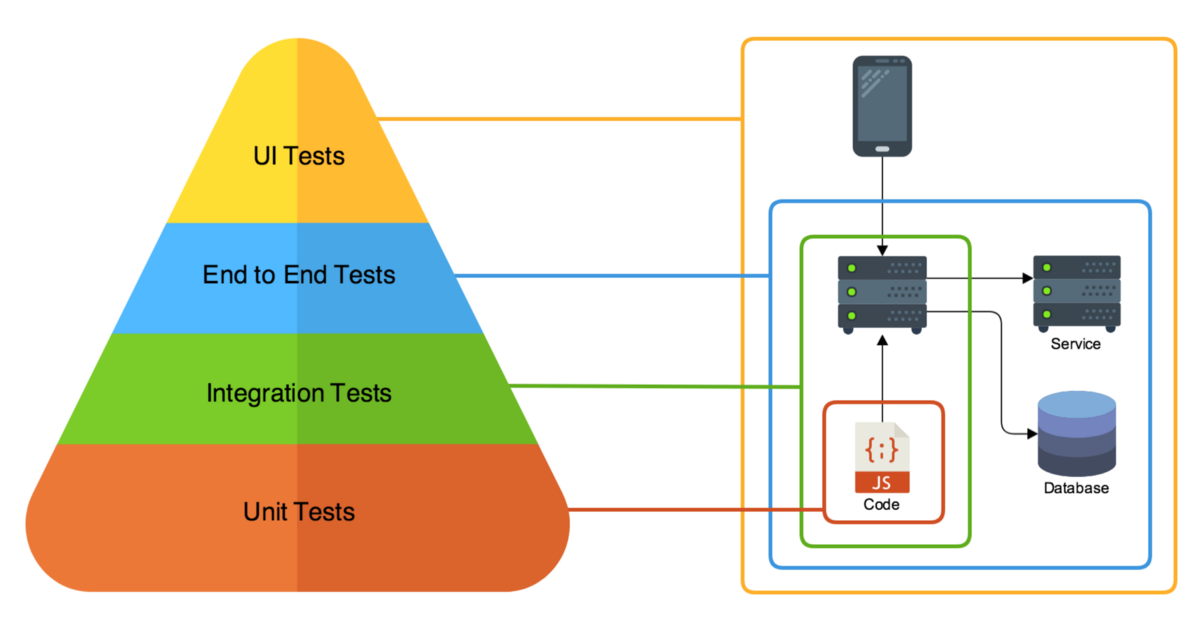
❓ What’s the difference between E2E UI tests and API-level E2E tests, and when do you pick each?
E2E UI tests exercise the full stack through the browser: UI > API > DB > external services. They verify that the user can actually complete a workflow. API-level E2E tests bypass the browser and interact with the system via HTTP, validating the backend stack end-to-end without frontend behavior. The key difference is surface area: UI tests validate rendering, JavaScript logic, and integration between frontend and backend. API E2E tests validate contracts, orchestration, persistence, and integration with downstream systems.
For example, a checkout flow in UI E2E might automate logging in, adding items to the cart, and clicking “Buy,” and assert that the confirmation is visible. An API-level E2E test would call POST /ordersThen, verify the DB state and emitted events.
// API-level E2E example (using WebApplicationFactory)
[Fact]
public async Task Create_Order_Persists_And_Returns_201()
{
    var client = _factory.CreateClient();

    var response = await client.PostAsJsonAsync("/orders", new { productId = 1, qty = 2 });
    response.EnsureSuccessStatusCode();

    var order = await response.Content.ReadFromJsonAsync<OrderDto>();
    Assert.NotNull(order);
    Assert.Equal(1, order!.ProductId);
}
UI E2E would validate that the button triggers the correct API call and the confirmation is rendered. API E2E would validate that the backend correctly processes and persists the request regardless of the frontend behavior.
When to pick each depends on risk and feedback cost:
- UI E2E is slower and more brittle, but it validates real user journeys.
- API E2E is faster, more stable, and better at catching backend regressions early.
A healthy test strategy usually has many API-level E2E tests and a small, focused set of UI E2E tests that cover only critical business paths.
What .NET engineers should know:
- 👼 Junior: Understand that UI tests validate the browser rendering pipeline while API tests validate service contracts and data flow — they are not interchangeable, they cover different failure modes.
- 🎓 Middle: Default to API-level E2E for cross-service workflow validation and reserve Playwright UI tests for critical user journeys where client-side rendering, redirects, or JavaScript behavior are part of the contract being tested.
- 👑 Senior: Design the E2E layer as a deliberate portfolio — API tests as the broad cross-service safety net, UI tests as targeted smoke tests for the highest-risk user journeys — and enforce that both run against a production-like staging environment with real infrastructure, not mocked dependencies, to catch integration and deployment issues before release.
📚 Resources:
❓ When do you choose Playwright over Selenium, and why?
Choosing between Playwright and Selenium in 2026 often comes down to a trade-off between modern developer ergonomics and legacy ecosystem reach. Playwright is the preferred choice for modern web applications because its architecture uses a persistent WebSocket connection directly to the browser (via the Chrome DevTools Protocol or equivalent). This eliminates the middle-man "WebDriver" layer used by Selenium, resulting in faster execution, native network interception, and built-in "auto-waiting" that dramatically reduces flaky tests.
Testing with Playwright means leveraging Browser Contexts, which allow a single browser instance to run multiple isolated, incognito-like sessions. This is significantly more resource-efficient than Selenium's "one driver, one browser" model, allowing you to run hundreds of tests in parallel on a single machine. You choose Playwright when your priorities are speed, low CI/CD infrastructure costs, and a "web-first" API that supports dynamic SPAs (React, Vue, Angular) without manual sleep statements.
// Playwright: No manual waits needed; the locator handles it.
[Fact]
public async Task Playwright_AutoWaits_ForElement()
{
    using var playwright = await Playwright.CreateAsync();
    await using var browser = await playwright.Chromium.LaunchAsync();
    var page = await browser.NewPageAsync();

    await page.GotoAsync("https://api.example.com/login");

    // Playwright automatically waits for the element to be visible and enabled
    await page.GetByRole(AriaRole.Button, new() { Name = "Submit" }).ClickAsync();
}

// Selenium: Requires explicit WebDriverWait to avoid flakiness.
public void Selenium_Requires_ManualWait()
{
    var driver = new ChromeDriver();
    driver.Navigate().GoToUrl("https://api.example.com/login");

    var wait = new WebDriverWait(driver, TimeSpan.FromSeconds(10));
    var element = wait.Until(d => d.FindElement(By.Id("submit-btn")));
    element.Click();
}
Selenium remains the choice when you must support legacy browsers (like IE11 or older versions of Safari) or when your team relies on established enterprise infrastructure built around Selenium Grid and Appium for native mobile testing. While Selenium 4+ has modernized significantly, its synchronous, blocking API is often seen as a generation behind for teams building high-frequency deployment pipelines.
What .NET engineers should know:
- 👼 Junior: Playwright auto-waits for elements to be ready before interacting — this alone eliminates most of the flakiness that makes Selenium suites hard to maintain.
- 🎓 Middle: Use Playwright's network interception to test error states and slow responses directly in browser tests without a separate mock server; use parallel browser contexts to run tests concurrently without spinning up multiple browser instances.
- 👑 Senior: Choose Playwright for greenfield UI test suites and migrate Selenium suites incrementally when flakiness cost exceeds migration cost; evaluate the tradeoff against existing Selenium Grid infrastructure and whether cross-browser coverage of legacy browsers is a real requirement or an inherited assumption.
📚 Resources:
❓ How do you design selectors to avoid brittleness (roles, accessible names, data-testid)?
Brittle selectors are the primary reason UI test suites become unmaintainable. A selector that targets div.container > ul:nth-child(2) > li:first-child > span.label breaks on every CSS refactor, every layout change, every component library upgrade — none of which change application behavior. The selector couples the test to implementation details rather than to the user-facing contract that the test is supposed to protect.
The selector hierarchy that produces stable tests goes from most to least preferred: accessible roles and names, data-testid attributes, semantic HTML attributes, CSS classes or structure as a last resort. The guiding principle is that a selector should break only when the thing it represents actually changes — when a button is removed, when a form field changes purpose, not when a developer renames a CSS class or restructures a layout.
Role-based selectors via GetByRole are the most resilient because they query the accessibility tree rather than the DOM structure. A button identified by role and accessible name survives any CSS or structural changes as long as the button still exists and says the same thing, which is exactly the contract the test should enforce.
// Brittle — breaks on CSS refactor, layout change, or class rename
await Page.Locator("div.checkout-panel > button.btn-primary").ClickAsync(); // ❌

// Stable — role + accessible name, survives any structural change
await Page.GetByRole(AriaRole.Button, new() { Name = "Place Order" }).ClickAsync(); // ✅

// Stable — label-associated input, queries by what the user sees
await Page.GetByLabel("Email address").FillAsync("user@example.com"); // ✅

// Stable — explicit test contract, intentionally decoupled from styling
await Page.Locator("[data-testid='order-submit']").ClickAsync(); // ✅
data-testid attributes are the right fallback when no semantic role or label exists — custom components, icon-only buttons, non-interactive elements that need to be asserted on. The contract is explicit: the attribute exists purely for testing, survives any visual refactor, and signals to developers that removing it breaks tests. The weakness is that data-testid attributes require frontend discipline — they must be added intentionally and maintained as the component evolves.
// data-testid for elements without natural semantic roles
await Expect(Page.Locator("[data-testid='order-confirmation-number']"))
    .ToHaveTextAsync("ORD-00123");

// Combine role + data-testid for complex components
await Page.Locator("[data-testid='product-card']")
          .GetByRole(AriaRole.Button, new() { Name = "Add to cart" })
          .ClickAsync();
Text-based selectors — GetByText, GetByPlaceholder — sit between roles and data-testid in stability. They survive structural changes but break on copy changes, localization, and A/B tests on button labels. Use them for asserting on content that is part of the functional contract ("Order confirmed" appearing after checkout) but avoid them for interaction selectors where a copy change should not break a test.
// Acceptable — asserting on confirmation copy is part of the contract
await Expect(Page.GetByText("Your order has been placed")).ToBeVisibleAsync();

// Fragile for interaction — breaks if copy changes, even trivially
await Page.GetByText("Click here to continue").ClickAsync(); // ❌ prefer GetByRole
What .NET engineers should know:
- 👼 Junior: Never use CSS structure or nth-child selectors in tests — use GetByRole, GetByLabel, or data-testid attributes that survive visual refactors without breaking.
- 🎓 Middle: Prefer GetByRole and GetByLabel as the primary selector strategy since they query the accessibility tree and validate accessibility implicitly; fall back to data-testid for custom components without natural roles, and establish a team convention for where and how data-testid attributes are applied.
- 👑 Senior: Treat selector strategy as an architecture decision — enforce role-first selection in code review, add data-testid as a build-time requirement for interactive components via lint rules or component templates, and use selector brittleness as a signal that either the test or the component's accessibility model needs fixing.
📚 Resources:
❓ How do you handle dynamic UI (spinners, async rendering) without sleeps?
Playwright's auto-wait is the first line of defense. Every ClickAsync, FillAsync, and Expect call automatically waits for the target element to be attached, visible, stable, and enabled before acting. This handles the majority of async rendering cases — after a button click triggers an API call, asserting on the result element will wait for it to appear rather than checking immediately and failing.
// No sleep needed — Playwright waits for element to appear automatically
await Page.GetByRole(AriaRole.Button, new() { Name = "Load Orders" }).ClickAsync();

// Waits up to the configured timeout for the element to be visible
await Expect(Page.Locator("[data-testid='orders-list']")).ToBeVisibleAsync();

// Also works for disappearance — waits for spinner to be gone
await Expect(Page.Locator("[data-testid='loading-spinner']")).Not.ToBeVisibleAsync();
When the UI has no visible loading indicator — a silent background fetch, a debounced search — use WaitForResponseAsync to anchor the assertion to the network event rather than guessing at timing. This is deterministic: the test waits for the specific API call to complete, then asserts on the rendered result.
// Anchor assertion to network completion — no sleep, no guessing
var responseTask = Page.WaitForResponseAsync("**/api/search*");
await Page.GetByRole(AriaRole.Searchbox).FillAsync("laptop");
await responseTask; // deterministic — waits for the actual API response

await Expect(Page.Locator("[data-testid='search-results']"))
    .Not.ToBeEmptyAsync();
What .NET engineers should know:
- 👼 Junior: Replace every Thread.Sleep and Task.Delay in UI tests with an Expect assertion — Playwright polls automatically until the condition is met or the timeout expires.
- 🎓 Middle: Use spinner disappearance assertions to explicitly model loading states, and WaitForResponseAsync to anchor assertions to network events when there is no visible loading indicator — both are deterministic, where sleep is probabilistic.
- 👑 Senior: Treat any sleep in a UI test as a bug to fix, not a workaround to accept — audit the underlying cause (missing loading indicator, no network anchor, untestable async state) and fix it at the source; establish timeout values as explicit documented assumptions about system SLAs rather than arbitrarily large numbers added to stop flakiness.
❓ How do you structure E2E tests (page objects vs screenplay vs raw flows), and what trade-offs exist?
Structuring E2E tests means choosing a design pattern that balances code reuse with readability. Page Objects (POM) is the classic industry standard; it encapsulates the UI of a specific page (selectors and actions) into a class, shielding tests from DOM changes. Screenplay is a more advanced, actor-centric pattern that breaks actions into "Tasks" and "Interactions," promoting high composability. Raw Flows involve writing sequential commands directly in the test method, which is often the fastest way to prototype, but becomes a maintenance nightmare as the suite grows.
Testing with Page Objects is best for small-to-medium suites where pages have distinct identities. However, for complex SPAs where components are reused across many views, POM can lead to massive "God Objects." The Screenplay Pattern solves this by focusing on "What the user does" rather than "What the page looks like," making it easier to share logic across different test scenarios.
// Page Object: Encapsulates the Login Page
public class LoginPage(IPage page)
{
    private readonly ILocator _user = page.GetByLabel("Username");
    private readonly ILocator _pass = page.GetByLabel("Password");
    private readonly ILocator _submit = page.GetByRole(AriaRole.Button, new() { Name = "Login" });

    public async Task LoginAsync(string u, string p)
    {
        await _user.FillAsync(u);
        await _pass.FillAsync(p);
        await _submit.ClickAsync();
    }
}

// Test Flow using POM
[Fact]
public async Task ValidUser_CanLogin()
{
    var loginPage = new LoginPage(Page);
    await loginPage.LoginAsync("admin", "p@ssword");
    await Expect(Page).ToHaveURLAsync(new Regex("dashboard"));
}
What .NET engineers should know:
- 👼 Junior: Start with Page Objects; it is the most common pattern you will encounter in professional .NET environments and keeps your tests organized.
- 🎓 Middle: Use "Component Objects" within your Page Objects to represent reusable UI elements like Navbars or Modals, preventing code duplication.
- 👑 Senior: Evaluate the Screenplay pattern if your Page Objects are becoming too large or if you need to run the same business "Tasks" across different platforms (Web, Mobile, API).
❓ How do you test accessibility (keyboard nav, focus order, screen-reader-friendly names) as part of E2E?
Accessibility testing (a11y) in E2E sits at the intersection of functional correctness and inclusive design. The goal is not to replace manual screen reader testing or specialist accessibility audits — it is to catch regressions automatically: a button that loses its aria-label after a refactor, a modal that traps focus incorrectly, a form that becomes unreachable by keyboard after a component update. Automated accessibility tests catch these regressions in CI before they reach users.
Axe-core via Playwright.Axe (the Deque.AxeCore.Playwright package) is the standard entry point. A single AnalyzeAsync() call against a rendered page runs hundreds of WCAG rules and returns violations with element references, rule descriptions, and impact levels. Run it as a baseline assertion on every critical page — not just accessibility-specific tests — so regressions surface immediately rather than accumulating silently.
// Install: dotnet add package Deque.AxeCore.Playwright
[Fact]
public async Task CheckoutPage_HasNoAxeViolations()
{
    await Page.GotoAsync("https://staging.example.com/checkout");
    await Page.WaitForLoadStateAsync(LoadState.NetworkIdle);

    var results = await Page.RunAxe();

    // Filter to critical and serious violations only — avoid noise from informational
    var serious = results.Violations
        .Where(v => v.Impact is "critical" or "serious")
        .ToList();

    Assert.Empty(serious);
}
Keyboard navigation tests are written as sequential key interactions — Tab to move focus, Enter or Space to activate, Escape to dismiss. The test drives the keyboard the way a real keyboard user would and asserts that focus lands on the expected element after each action. The key is asserting the identity of the focused element, not just that something received focus.
[Fact]
public async Task CheckoutForm_KeyboardNavigation_ReachesSubmitButton()
{
    await Page.GotoAsync("https://staging.example.com/checkout");

    // Tab through form fields in expected order
    await Page.Keyboard.PressAsync("Tab"); // focus: first name
    await Expect(Page.GetByLabel("First name")).ToBeFocusedAsync();

    await Page.Keyboard.PressAsync("Tab"); // focus: last name
    await Expect(Page.GetByLabel("Last name")).ToBeFocusedAsync();

    await Page.Keyboard.PressAsync("Tab"); // focus: email
    await Expect(Page.GetByLabel("Email address")).ToBeFocusedAsync();

    // Eventually reaches submit without mouse interaction
    await Page.Keyboard.PressAsync("Tab");
    await Expect(Page.GetByRole(AriaRole.Button, new() { Name = "Place Order" }))
        .ToBeFocusedAsync();
}
Focus trap testing is critical for modals and dialogs — a modal that prevents focus from escaping to background content is a WCAG failure and a usability failure for keyboard and screen reader users. Test that the Tab key cycles through the modal and that Escape closes it, returning focus to the trigger element.
[Fact]
public async Task ConfirmationModal_TrapsFocus_AndRestoresOnClose()
{
    await Page.GetByRole(AriaRole.Button, new() { Name = "Cancel Order" }).ClickAsync();

    // Modal open — focus should be inside
    var modal = Page.GetByRole(AriaRole.Dialog);
    await Expect(modal).ToBeVisibleAsync();

    // Tab should cycle within modal — not escape to background
    await Page.Keyboard.PressAsync("Tab");
    var focused = Page.Locator(":focus");
    await Expect(modal.Locator(":focus")).ToBeAttachedAsync();

    // Escape closes modal and returns focus to trigger
    await Page.Keyboard.PressAsync("Escape");
    await Expect(modal).Not.ToBeVisibleAsync();
    await Expect(Page.GetByRole(AriaRole.Button, new() { Name = "Cancel Order" }))
        .ToBeFocusedAsync();
}
Accessible name testing is where role-based selectors pay an additional dividend — GetByRole with a Name parameter only matches elements with that accessible name, so a test that finds and interacts with a button by name is implicitly asserting the name exists. For cases where the accessible name is not obvious from content — icon buttons, image links, custom components — assert on aria-label or aria-labelledby explicitly.
[Fact]
public async Task IconButtons_HaveAccessibleNames()
{
    await Page.GotoAsync("https://staging.example.com/orders");

    // Icon-only buttons must have aria-label — GetByRole enforces this
    await Expect(Page.GetByRole(AriaRole.Button, new() { Name = "Delete order" }))
        .ToBeVisibleAsync();

    await Expect(Page.GetByRole(AriaRole.Button, new() { Name = "Edit order" }))
        .ToBeVisibleAsync();

    // Explicit aria-label check for custom components
    var shareButton = Page.Locator("[data-testid='share-button']");
    var ariaLabel = await shareButton.GetAttributeAsync("aria-label");
    Assert.NotNull(ariaLabel);
    Assert.NotEmpty(ariaLabel);
}
❓ What .NET engineers should know:
- 👼 Junior: Add an axe-core assertion to every critical page test — one line catches hundreds of WCAG violations automatically and costs nothing once the package is installed.
- 🎓 Middle: Write explicit keyboard navigation tests for all interactive flows — forms, modals, dropdowns — and assert on focused element identity after each Tab press; use GetByRole with Name to implicitly validate accessible names as part of normal interaction tests.
- 👑 Senior: Treat accessibility as a regression contract — run axe on every page in CI, maintain a zero-tolerance policy for critical and serious violations, write focus trap and keyboard nav tests for all modal and dialog components, and combine automated coverage with scheduled manual screen reader testing for flows where automation cannot fully substitute for human judgment.
📚 Resources:
Performance, load, and release gates
❓ Load vs stress vs soak: what does each prove?
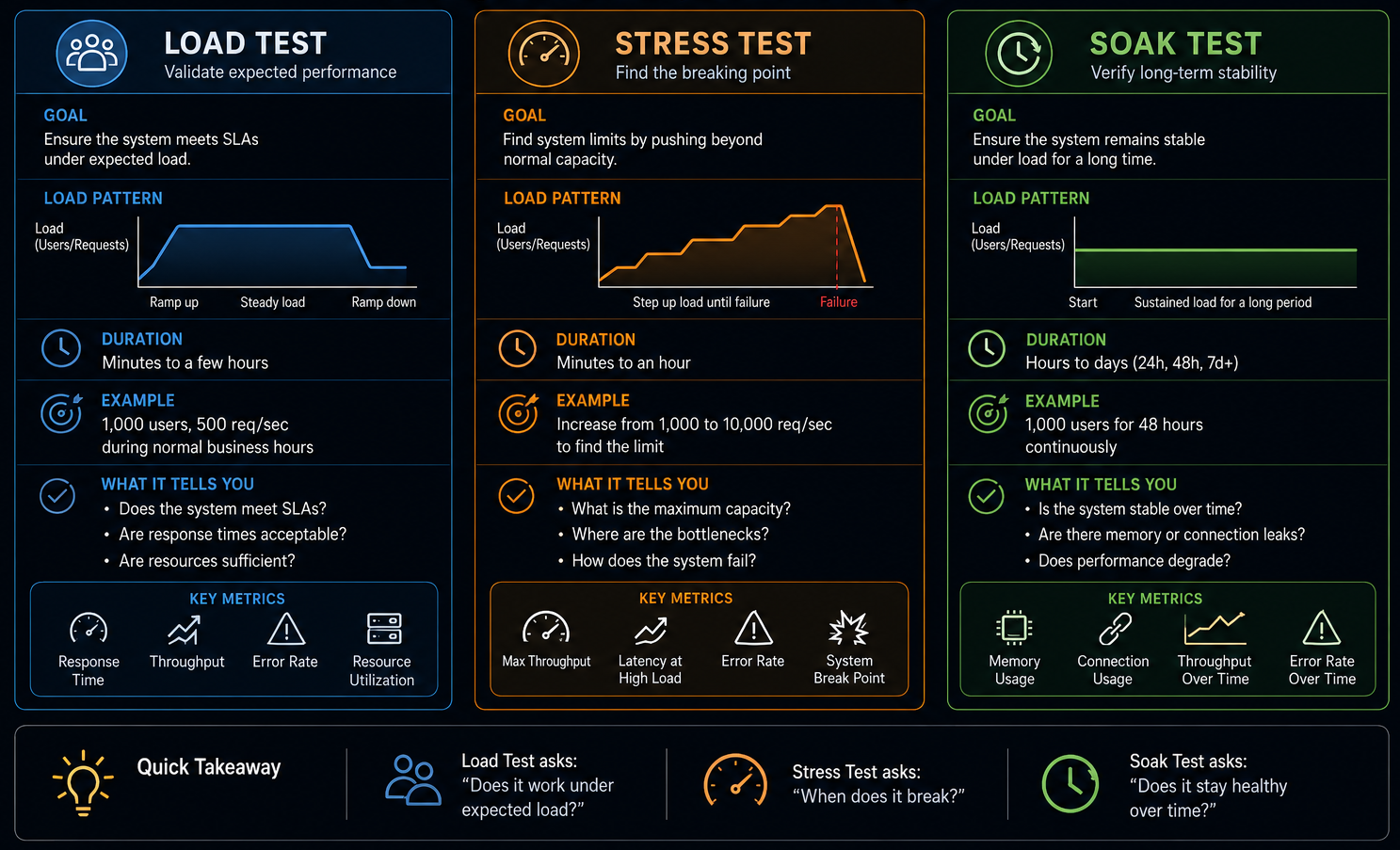
Load, stress, and soak testing are three distinct experiments that answer three distinct questions about system behavior under pressure. Using the wrong test type for the question being asked produces misleading results — a system that passes a load test can still fail a soak test, and a system that survives stress can still degrade under sustained normal load. Each test type isolates a specific failure mode.
Load testing answers: Does the system meet its performance SLAs under expected production traffic? It runs a realistic, sustained traffic profile — the volume you actually expect in normal and peak operation — and measures throughput, latency percentiles, and error rates against defined targets. A load test that shows a p99 latency of 800ms when the SLA is 500ms is a failure, regardless of whether the system stayed up. In k6 or NBomber, a load test ramps to target concurrency and holds it for long enough to reach steady state — typically 10 to 30 minutes.
// NBomber load test — holds target concurrency for steady-state measurement
var scenario = Scenario.Create("order_api_load", async context =>
{
    var response = await httpClient.GetAsync("/api/orders");
    return response.IsSuccessStatusCode ? Response.Ok() : Response.Fail();
})
.WithLoadSimulations(
    Simulation.RampingInject(rate: 50, interval: TimeSpan.FromSeconds(1),
        during: TimeSpan.FromMinutes(2)),   // ramp to 50 req/s
    Simulation.Inject(rate: 50, interval: TimeSpan.FromSeconds(1),
        during: TimeSpan.FromMinutes(10))   // hold steady state
);

NBomberRunner.RegisterScenarios(scenario)
    .WithReportingInterval(TimeSpan.FromSeconds(10))
    .Run();
Stress testing answers the question: where does the system break, and does it recover? It pushes load beyond the expected maximum — deliberately past the point of degradation — to find the breaking point and observe failure behavior. The valuable output is not that it broke (it will) but how it broke: does it degrade gracefully as latency increases, or does it collapse with cascading errors? Does it recover when the load drops, or does it stay degraded? A system that degrades gracefully under 3x load and recovers cleanly is far more production-worthy than one that fails hard at 1.5x and requires a restart.
// NBomber stress test — pushes beyond breaking point, then backs off
var scenario = Scenario.Create("order_api_stress", async context =>
{
    var response = await httpClient.PostAsJsonAsync("/api/orders",
        new { ProductId = "SKU-001", Quantity = 1 });
    return response.IsSuccessStatusCode ? Response.Ok() : Response.Fail();
})
.WithLoadSimulations(
    Simulation.RampingInject(rate: 200, interval: TimeSpan.FromSeconds(1),
        during: TimeSpan.FromMinutes(5)),   // ramp aggressively past expected max
    Simulation.Inject(rate: 200, interval: TimeSpan.FromSeconds(1),
        during: TimeSpan.FromMinutes(5)),   // hold at breaking point
    Simulation.RampingInject(rate: 0, interval: TimeSpan.FromSeconds(1),
        during: TimeSpan.FromMinutes(3))    // back off — does system recover?
);
Soak testing answers: Does the system remain stable over an extended time at normal load? It runs a realistic traffic profile for hours or days — not minutes — and looks for failure modes that only manifest with time: memory leaks, connection pool exhaustion, log file growth, database index fragmentation, certificate expiry, and accumulated state in caches. A service that passes a 10-minute load test can have a memory leak that causes an OOM crash after 6 hours in production. Soak tests catch these before they become 3 am incidents.
// NBomber soak test — normal load, extended duration
var scenario = Scenario.Create("order_api_soak", async context =>
{
    var response = await httpClient.GetAsync("/api/orders");
    return response.IsSuccessStatusCode ? Response.Ok() : Response.Fail();
})
.WithLoadSimulations(
    Simulation.Inject(rate: 20, interval: TimeSpan.FromSeconds(1),
        during: TimeSpan.FromHours(8))  // normal load for a full working day
);

// Capture memory and GC metrics throughout — not just at the end
NBomberRunner.RegisterScenarios(scenario)
    .WithReportingInterval(TimeSpan.FromMinutes(5)) // trend matters, not snapshots
    .Run();
The three tests are complementary and sequential in practice. Run load tests first to establish the baseline performance profile. Run stress tests to find the breaking point and validate graceful degradation. Run soak tests to validate stability over time once the system has passed load and stress testing. Skipping any one leaves a category of production failure undetected.
What .NET engineers should know:
- 👼 Junior: Load tests validate SLAs under expected traffic, stress tests find the breaking point, soak tests catch time-dependent failures like memory leaks — each answers a different question and none substitutes for the others.
- 🎓 Middle: Design load tests against documented SLA targets (p95, p99 latency thresholds, error rate budgets) so results are pass/fail rather than subjective; run stress tests with a recovery phase to validate the system returns to normal after load drops.
- 👑 Senior: Treat soak tests as mandatory pre-production gates for any service with stateful resources — connection pools, caches, background workers — since time-dependent failures are invisible to short-duration tests and reliably surface only after hours of sustained operation; integrate all three test types into CI/CD at appropriate cadences: load on every release, stress on major changes, soak on a weekly schedule.
📚 Resources: NBomber
❓ What do you measure besides averages (p95/p99, error rate, saturation, queue depth)?
Averages are the most misleading metric in performance testing. A p50 latency of 200ms looks healthy, while a p99 of 8 seconds means one in a hundred users waits 8 seconds — and in high-traffic systems, that is thousands of users per hour. Averages smooth over the tail behavior that causes real user pain and masks the saturation signals that precede system collapse. The metrics that actually matter are the ones averages hide.
Percentile latency — p95, p99, p999 — measures the experience of the worst-affected users rather than the median user. p95 means 95% of requests completed within that time; p99 means 99% did. The gap between p50 and p99 is the health signal: a small gap indicates consistent performance; a large gap indicates high variance — some requests are hitting slow paths, lock contention, GC pauses, or cold caches. In NBomber and k6, always assert on percentiles, not means.
// NBomber — assert on percentiles, not average
NBomberRunner.RegisterScenarios(scenario)
    .Run();

// In assertions after run
var stats = scenario.Stats.Ok.Latency;
Assert.True(stats.Percent95 < 500,  $"p95 {stats.Percent95}ms exceeds 500ms SLA");
Assert.True(stats.Percent99 < 1000, $"p99 {stats.Percent99}ms exceeds 1000ms SLA");
Assert.True(scenario.Stats.Ok.Request.RPS > 100, "Throughput below minimum RPS");
Error rate is the fraction of requests that failed — 5xx responses, timeouts, and connection resets. A system under load that maintains low latency but produces a 2% error rate is silently failing 1 in 50 requests. Error rate should be tracked as a time series, not a total, because a spike in errors at minute 8 of a 10-minute test is invisible in aggregate numbers but signals a specific failure threshold being crossed — a connection pool exhausting, a circuit breaker opening, a thread pool saturating.
Saturation metrics measure how close resources are to their limits. CPU and memory are the obvious ones, but the more revealing saturation signals in .NET services are thread pool queue depth, connection pool utilization, GC pause frequency and duration, and async task queue length. A service can show acceptable latency percentiles while its thread pool is saturated and requests are queuing — latency will collapse suddenly when the queue fills, rather than degrading gradually.
// Capture .NET runtime metrics during load test
var metrics = new PerformanceMetricsCollector();

// Sample at regular intervals during test run
Timer.Periodic(TimeSpan.FromSeconds(5), () =>
{
    metrics.Record(new RuntimeSnapshot
    {
        ThreadPoolQueueDepth   = ThreadPool.PendingWorkItemCount,
        ThreadPoolThreadCount  = ThreadPool.ThreadCount,
        Gen0Collections        = GC.CollectionCount(0),
        Gen1Collections        = GC.CollectionCount(1),
        Gen2Collections        = GC.CollectionCount(2),
        AllocatedMemoryBytes   = GC.GetTotalMemory(false),
        ActiveConnections      = connectionPool.ActiveCount,
        QueuedConnections      = connectionPool.QueuedCount
    });
});
Queue depth is the leading indicator for latency percentiles. When a downstream service slows down, requests start queuing in front of it before latency numbers climb. Monitoring queue depth — HTTP client request queues, message bus consumer lag, database connection wait queue — gives an earlier warning of approaching saturation than waiting for p99 to spike. In distributed systems, consumer lag on a message queue is often the first visible signal that a processing service is falling behind under load.
// Assert queue depth stays bounded throughout load test
Assert.True(metrics.Max(m => m.ThreadPoolQueueDepth) < 100,
    "Thread pool queue depth exceeded threshold — saturation likely");

Assert.True(metrics.Max(m => m.QueuedConnections) < 10,
    "Connection pool queue backed up — downstream bottleneck");

// GC pressure during load — Gen2 collections indicate memory pressure
Assert.True(metrics.Sum(m => m.Gen2Collections) < 5,
    "Excessive Gen2 GC during load test — probable memory leak or oversized allocations");
Throughput — requests per second — completes the picture alongside latency. A system can maintain low p99 latency by throttling throughput: if the server is processing fewer requests than arrive, latency looks fine for the requests that get through, while the rest queue or time out. Always measure RPS alongside latency percentiles to detect this pattern.
What .NET engineers should know:
- 👼 Junior: Never report average latency as the primary performance metric — always report p95 and p99, and always report error rate alongside latency so the two can be read together.
- 🎓 Middle: Track saturation metrics — thread pool queue depth, connection pool utilization, GC gen2 collections — as time series during load tests; a spike in queue depth at a specific load level identifies the saturation threshold before latency percentiles visibly degrade.
- 👑 Senior: Design performance test assertions as a multi-dimensional contract: latency percentiles at target RPS, error rate below budget, saturation metrics bounded, and queue depth stable — a test that passes on latency alone while connection pools are at 95% utilization is passing on luck, not on margin.
📚 Resources:
❓ How do you handle flaky tests operationally?
Handling flaky tests means treating "non-deterministic" failures as a specialized form of technical debt. If a test fails 1 out of 10 times without a code change, it erodes the team's trust in the CI/CD pipeline. Operationally, the goal is to protect the "Green Build" while systematically eradicating flakes rather than perpetually ignoring them.
The most robust operational framework is the Quarantine Pipeline. When a test is identified as unstable, it is tagged and removed from the "Merge-Blocking" suite. It still runs, but its failure won't stop a deployment. This preserves developer velocity while keeping the "flaky" signal visible for remediation.
The Three Operational Pillars
Detection (Rerun Rules):
- Configure CI to retry failed tests automatically (N=2).
- Logic: If a test fails once but passes on retry, it's flagged as Flaky (Amber). If it fails all attempts, it's a Hard Failure (Red).
- Only Red failures should block the PR; Amber failures should trigger a notification to the owner.
Quarantine (The "Penalty Box"):
- Tests that hit a "Flakiness Threshold" (e.g., failing >5% of runs) are moved to a
[Quarantine]category. - These run in a separate, non-blocking CI job. This prevents a single unstable test from blocking 50 engineers from merging their work.
Root-Cause Discipline:
- No Ticket, No Quarantine: A test cannot stay in the penalty box without an active bug report.
- Fix Verification: Before returning to the main suite, a test must "earn" its way back by passing a Stress Loop (e.g., 50-100 consecutive successful runs in the CI environment).
What .NET engineers should know:
- 👼 Junior: Never rerun a failing test manually and push if it passes — report it as flaky, tag it, and raise a ticket; a test that passes on retry is still a broken test.
- 🎓 Middle: Implement quarantine as a formal category with CI exclusion, a separate tracking run, and a resolution deadline; instrument retries as metrics so flakiness rate per test is visible on a dashboard rather than buried in CI logs.
- 👑 Senior: Treat flakiness rate as a suite health metric with an explicit budget — for example, less than 1% of runs produce a retry — and enforce root-cause resolution over suppression; a culture that tolerates quarantined tests with no deadlines will accumulate a shadow suite of ignored tests that provides false confidence in coverage.
📚 Resources: Manage flaky tests
📖 Future reading
- Part 1: Core Language & Platform Fundamentals
- Part 2: Types and Type Features
- Part 3: Collections and Data Structures
- Part 4: Async & Parallel Programming
- Part 5: Design Patterns
- Part 6: ASP.NET Core
- Part 7: SQL Database
- Part 8: NoSQL Databases
- Part 9: Microservices and Distributed Systems
- Part 11: Desktop Development
- Part 12: Mobile Development
- Part 13: AI
- Part 14: Agile & Scrum