

A query that runs fast on your laptop can take seconds in production. Your laptop has a thousand rows, production has millions, and the database now reads all of them to find the ten you asked for. The usual fix is "add an index". Sometimes it works. Sometimes the query stays slow because the index has the right columns in the wrong order. And sometimes reads get faster while every insert gets slower.
Most indexing advice I find is a list of rules. I wanted one guide that starts from the query and ends with the index.
In this article, I explain how an index finds a row, then cover eleven index types in SQL Server, PostgreSQL, and MySQL: when to use each one and what goes wrong when you add it in the wrong place. At the end, I show how to find missing and unused indexes and what every index costs.
What is a database index, and how does it work?
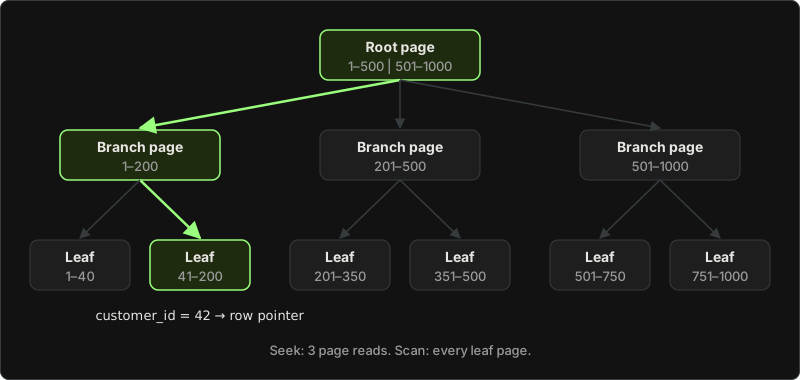
Without an index, the database has one way to answer WHERE customer_id = 42: read every row of the table and check each one. This is a full table scan. On a small table, it's fine. On a table with 50 million orders, it's the slow query from the intro.
An index is a separate structure that keeps the values of one or more columns in sorted order, with a pointer to the row next to each value. It works like the index at the back of a book: you look up "B-tree", find "page 212", and go straight there instead of reading from page one.
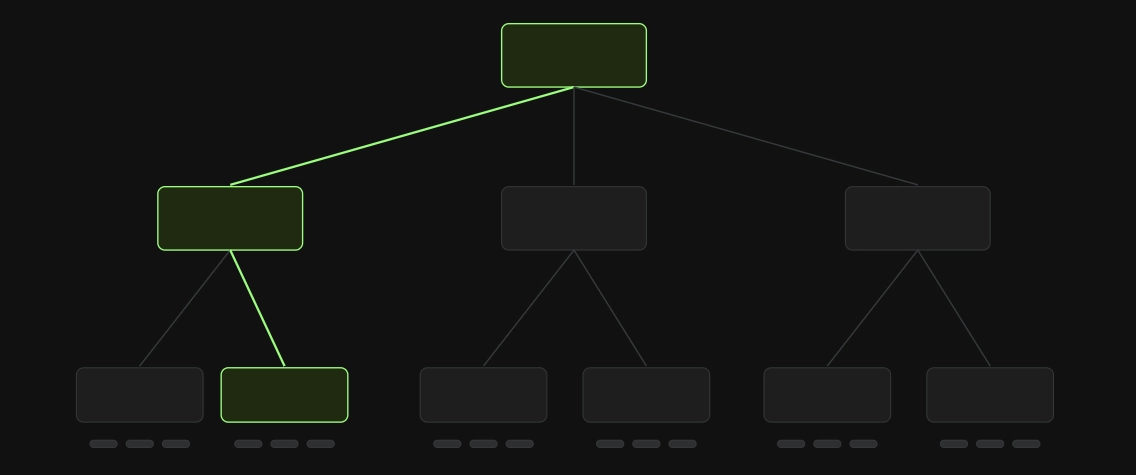
Most indexes are B-trees. A B-tree stores the sorted values in pages (small fixed-size blocks on disk). The top page, the root, says which page to read next for each range of values. Branch pages narrow the range further, and leaf pages hold the values and the row pointers. Each page holds hundreds of entries, so even a large table needs only a few page reads to get from the root to the right leaf
The same CREATE INDEX statement works in all three databases:
CREATE INDEX ix_orders_customer_id ON orders (customer_id);

SELECT id, created_at, total
FROM orders
WHERE customer_id = 42;
In PostgreSQL, CREATE INDEX builds a B-tree by default. InnoDB, the default MySQL engine, supports only B-trees for regular indexes, and SQL Server's regular indexes are B-trees too.
How to read an execution plan: seek, scan, and lookup
Having an index doesn't mean the database uses it. The execution plan shows what the database actually did. You get it with "Include Actual Execution Plan" in SQL Server Management Studio, with EXPLAIN ANALYZE in PostgreSQL, and with EXPLAIN in MySQL.
When a query is slow, I check the execution plan for an Index Seek or an Index Scan before I add anything. Each database uses its own names, but they describe the same four cases:
| What happened | SQL Server | PostgreSQL | MySQL (EXPLAIN) |
|---|---|---|---|
| Read the whole table | Table Scan, Clustered Index Scan | Seq Scan | type: ALL |
| Used the index to find rows | Index Seek | Index Scan, Bitmap Heap Scan | type: ref or range |
| Answered from the index alone | Index Seek, no lookup | Index Only Scan | Extra: Using index |
| Found rows in the index, then read the table for more columns | Key Lookup | Index Scan (reads the heap) | no Using index |
A seek is what you want for a query that returns a few rows. A scan isn't always bad: if the query needs most of the table, reading everything in order is cheaper than jumping around. The PostgreSQL docs show this on a 10,000-row table. WHERE unique1 = 42 uses an Index Scan, unique1 < 100 uses a Bitmap Heap Scan, and unique1 < 7000 goes back to a Seq Scan, even though the index exists.
A common reason the plan ignores your index is a function on the column. As I wrote in SQL Best Practices, a function on an indexed column turns a seek into a scan. The index stores created_at, not YEAR(created_at), so WHERE YEAR(created_at) = 2025 can't use it. Write WHERE created_at >= '2025-01-01' AND created_at < '2026-01-01' instead.
Database index types: when to use each one and when to avoid it
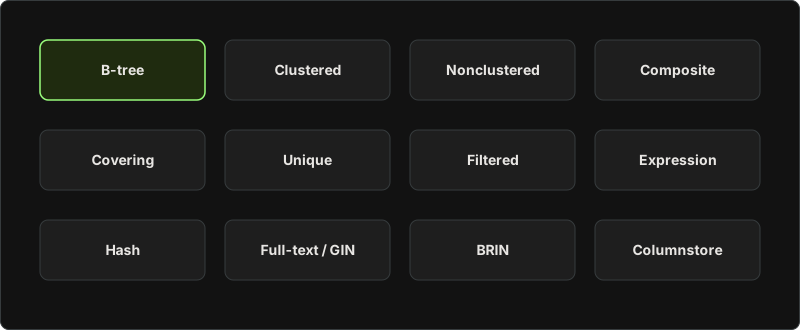
Not every index type exists in every database. Here's what you get where:
| Index type | SQL Server | PostgreSQL | MySQL (InnoDB) |
|---|---|---|---|
| Clustered | Yes, one per table | No, rows live in a heap | Always the primary key |
| Nonclustered (secondary) | Yes | Yes (every index) | Yes |
| Composite | Yes | Yes | Yes |
Covering with INCLUDE | Yes | Yes | No INCLUDE: add the columns to the key |
| Unique | Yes | Yes | Yes |
| Filtered / partial | Filtered index | Partial index | No |
| Expression | Index on a computed column | Expression index | Functional key part |
| Hash | Memory-optimized tables only | Yes | MEMORY and NDB engines only |
| Full-text / inverted | Full-text index | GIN (Generalized Inverted Index) | FULLTEXT |
| BRIN | No | Yes | No |
| Columnstore | Yes | No | No |
My default is a plain B-tree index. I switch to another type only when the query needs it.
All examples below use one table:
CREATE TABLE orders (
    id          bigint PRIMARY KEY,
    customer_id bigint NOT NULL,
    status      varchar(20) NOT NULL,
    created_at  timestamp NOT NULL,   -- datetime2 in SQL Server
    total       decimal(19,4) NOT NULL
);
(In SQL Server, timestamp means something else entirely, a row version, so use datetime2 there.)
1. Clustered index (the primary key)
A clustered index is the table itself, stored in the order of the index key. In SQL Server, "the clustered index stores all rows and all columns of a table", and a table can have only one, because rows can sit in only one order. In MySQL, InnoDB always stores the table as a clustered index on the primary key. If you don't define a primary key, InnoDB uses the first UNIQUE index whose columns are all NOT NULL, and if there isn't one, it creates a hidden key. PostgreSQL has no clustered index: the table is a heap (rows in no particular order), and every index points into it.
-- SQL Server: the primary key is clustered by default
CREATE TABLE orders (id bigint IDENTITY PRIMARY KEY, ...);

-- MySQL
CREATE TABLE orders (id bigint AUTO_INCREMENT PRIMARY KEY, ...);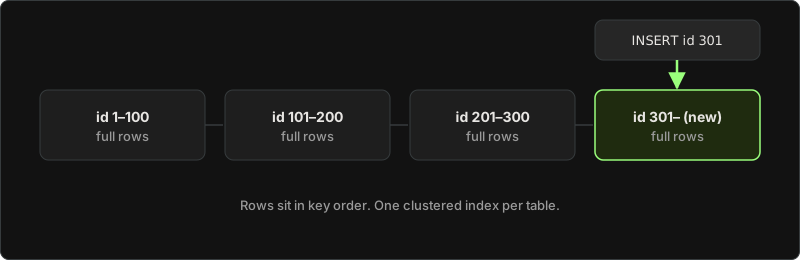
When to use a clustered index
Every table in SQL Server and MySQL needs a clustered key you choose on purpose, because every other index on the table stores a copy of it. For a new table, I'd pick a short, ever-increasing key, like an int or bigint identity, for the clustered index. New rows then always go to the last page.
When to avoid a clustered index
Don't use a wide or random value as the clustered key, such as a random GUID from NEWID() in SQL Server or UUID() in MySQL. Two things go wrong:
- Every secondary index gets bigger. In MySQL, each secondary index record contains the primary key columns. In SQL Server, each nonclustered index stores the clustered key. A
uniqueidentifiertakes 16 bytes instead of 4 forintor 8 forbigint, and you pay for it in every index on the table. - Inserts land in the middle of the index instead of at the end. Microsoft's design guide says an ever-increasing key "avoids page splits in the middle of the index, which reduce page density and decrease performance". A random key gives you those page splits.
Also avoid a clustered key that changes. When the key value changes, the row moves, and every index that stores the key changes with it. If you need a GUID as a public ID, keep it in its own column with a unique nonclustered index, and leave the clustered key short.
2. Nonclustered (secondary) index
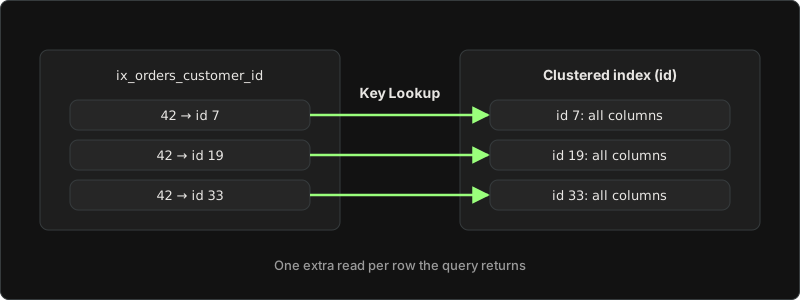
A nonclustered index is a separate sorted copy of a few columns plus a pointer to the full row. In SQL Server and MySQL, the pointer is the clustered key. In PostgreSQL, it's the row's location in the heap. A table can have many of these.
CREATE INDEX ix_orders_customer_id ON orders (customer_id);When the query asks for columns that aren't in the index, the database finds the rows in the index and then reads the table for each one. SQL Server shows this as a Key Lookup. For 10 rows, that costs nothing noticeable. For 100,000 rows, it's 100,000 extra reads, and the planner may switch to a full scan instead.
When to use a nonclustered (secondary) index:
Use it for columns you filter, join, or sort by in frequent queries: foreign keys like customer_id, lookup columns like email. EF Core creates an index on every foreign key by convention, so check your migrations before you add a second one.
When to avoid a nonclustered (secondary) index:
I don't add an index on a column like status or is_deleted by itself. It has too few distinct values to help. If status = 'paid' matches 70% of the rows, the planner reads the whole table anyway (in the PostgreSQL example above, the plan went back to a Seq Scan at 7,000 of 10,000 rows), and you still pay for the index on every write. Also skip indexes on small lookup tables that fit in a few pages and are cheap to scan, and on tables you mostly write to and rarely read, like log tables.
3. Composite index (multiple columns)
A composite index has more than one column. It's sorted by the first column, then by the second inside each value of the first, and so on. A phone book sorted by last name, then by first name, works the same way.
Column order decides which queries can use it. Take this query:
SELECT id, total
FROM orders
WHERE customer_id = @customerId
  AND status = 'paid'
  AND created_at >= @from
ORDER BY created_at;
The index that fits it:
CREATE INDEX ix_orders_customer_status_created
    ON orders (customer_id, status, created_at);
For a composite index, I put the equality columns first, then the range column, and I add INCLUDE columns only for the queries that run the most. Here, customer_id and status are equality filters, so all the matching rows sit next to each other in the index, already sorted by created_at. The database reads one continuous slice and doesn't need to sort. The PostgreSQL docs state the rule: equality conditions on the leading columns, plus a range condition on the next column, limit the part of the index the database has to read.
Flip the order to (created_at, customer_id, status), and the database starts at @from and reads every order after that date, from every customer, then throws most of them away. Same columns, much more work.
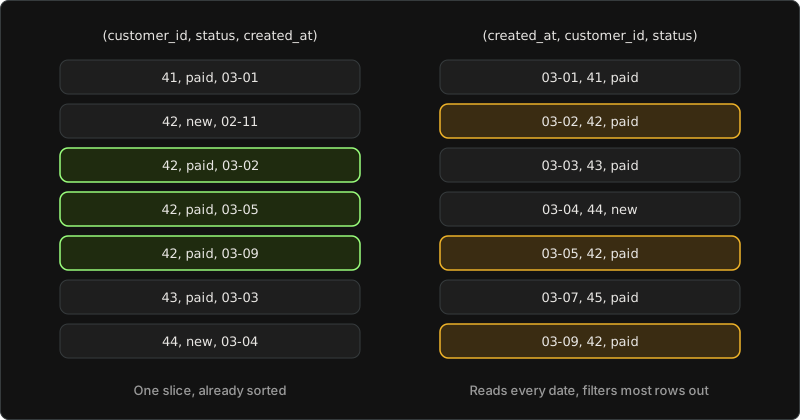
The index on (customer_id, status, created_at) also serves queries that filter on customer_id alone, or on customer_id and status, because they use the leftmost columns. So you rarely need a separate index on customer_id. Keyset pagination needs exactly this kind of index on the sort columns. Read more about it in Pagination Strategies.
When to use a composite index:
Reach for it when a frequent query filters on two or more columns, or filters on one column and sorts on another.
When to avoid a composite index:
Don't use a column order that your queries don't start from. The MySQL docs give the classic example: an index on (last_name, first_name) can't help WHERE first_name = 'John', and it can't help WHERE last_name = 'Jones' OR first_name = 'John', because neither condition starts from the leftmost column alone. Also avoid a stack of overlapping indexes like (a), (a, b), and (a, b, c). The last one already serves the first two, and each extra one only adds write cost.
4. Covering index (INCLUDE)
A covering index holds every column the query needs, so the database never reads the table. In SQL Server and PostgreSQL, you add the extra columns with INCLUDE. They're stored in the leaf pages, but they aren't part of the sort key:
-- SQL Server and PostgreSQL
CREATE INDEX ix_orders_customer_status_created
    ON orders (customer_id, status, created_at)
    INCLUDE (total);
MySQL has no INCLUDE, so you add the column to the end of the key instead: (customer_id, status, created_at, total). When MySQL answers from the index alone, EXPLAIN shows Using index in the Extra column.
In EF Core, the same index looks like this. The SQL Server provider and Npgsql both support IncludeProperties:
modelBuilder.Entity<Order>()
    .HasIndex(o => new { o.CustomerId, o.Status, o.CreatedAt })
    .IncludeProperties(o => new { o.Total });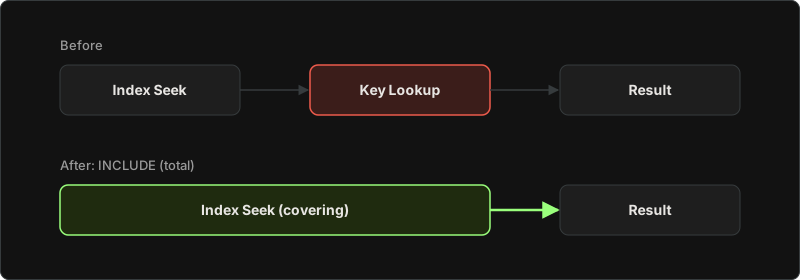
When to use a covering index
Add one when a frequent query returns a few columns, and the plan shows a Key Lookup in SQL Server, or an Index Scan that reads the heap in PostgreSQL. Microsoft's rule: if the query returns a column but doesn't filter, aggregate, or sort on it, add it as an included column, not as a key column.
When to avoid a covering index
Don't try to cover everything. Each included column is a second copy of that data, and the database updates it on every write. Microsoft's missing-index docs warn that SQL Server "performs no cost-benefit analysis regarding the size of the resulting index when a large number of included columns are suggested." An index that includes half the table's columns is a second table you pay for on every insert. PostgreSQL has one more catch: an Index Only Scan skips the table only for pages marked all-visible. For pages with recent changes, PostgreSQL still reads the table, and then "no performance advantage is gained over a standard index scan." So on a table with a lot of updates, a covering index helps less than you'd expect.
5. Unique index
A unique index guarantees that no two rows have the same key value. A primary key or a unique constraint creates one for you. You add your own for business rules, like one account per email:
CREATE UNIQUE INDEX ux_users_email ON users (email);In EF Core, that's .HasIndex(u => u.Email).IsUnique().
When to use a unique index
Any rule where a duplicate would be a bug: emails, order numbers, IDs from an external system. The database blocks the duplicate even when two requests insert at the same moment, which a "check, then insert" in application code can't promise.
When to avoid a unique index
Skip it when the data isn't unique in practice. As Microsoft's design guide says, a unique index "is only possible when uniqueness is a characteristic of the data itself." If the rule has exceptions, for example, two accounts may share an email; once one is soft-deleted, inserts start failing in production. In SQL Server and PostgreSQL, a unique filtered or partial index on the active rows handles that case (see the next type).
6. Filtered and partial index
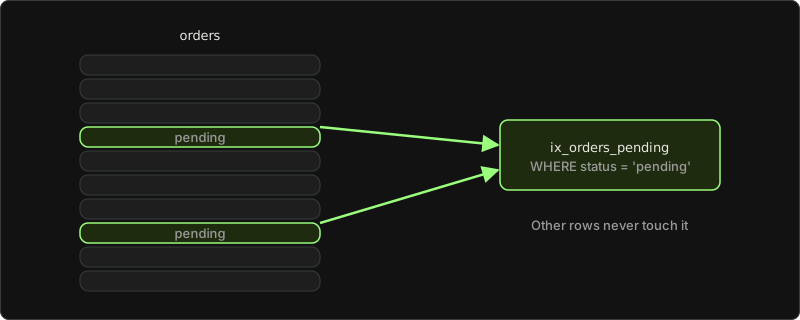
A filtered index (SQL Server) or partial index (PostgreSQL) covers only the rows that match a WHERE condition. Say your app keeps asking for pending orders, and pending orders are a small share of the table. Index only them:
-- SQL Server and PostgreSQL
CREATE INDEX ix_orders_pending
    ON orders (created_at)
    WHERE status = 'pending';
The index is small, so it's cheap to read and cheap to keep up to date: a row that never becomes pending never touches it. MySQL has no WHERE clause in CREATE INDEX, so this type doesn't exist there. In EF Core, add .HasFilter("status = 'pending'") to the HasIndex call.
When to use a filtered and partial index:
Pending jobs, active users, rows where a column IS NOT NULL: any small, well-known subset that your queries ask for again and again.
When to avoid a filtered and partial index:
If the filter keeps most of the table, a filtered index doesn't pay off. Microsoft's guide warns that a filtered index that "includes most of the rows in the table" can cost more to maintain than a full-table index. The query's WHERE also has to fall inside the index filter: a query for status = 'shipped' can't use an index filtered on status = 'pending'.
7. Expression (functional) index
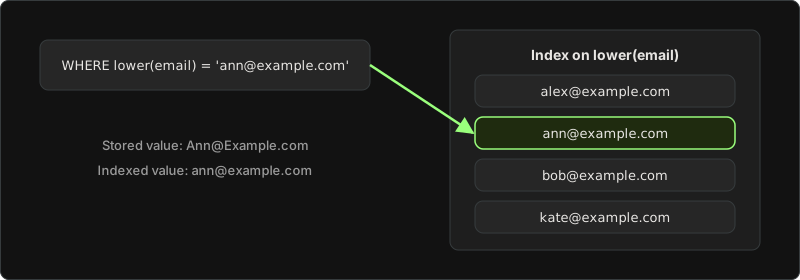
An expression index stores the result of an expression instead of the raw column value. It fixes the "function on a column" problem from the plan section when you can't rewrite the query. Case-insensitive email search is the typical case:
-- PostgreSQL
CREATE INDEX ix_users_email_lower ON users (lower(email));

-- MySQL: a functional key part, note the double parentheses
CREATE INDEX ix_users_email_lower ON users ((lower(email)));

-- SQL Server: index a computed column
ALTER TABLE users ADD email_lower AS lower(email);
CREATE INDEX ix_users_email_lower ON users (email_lower);
Now WHERE lower(email) = 'ann@example.com' can seek.
When to use an Expression (functional) index:
Use it when a frequent query filters on the same expression every time, and you can't change the query, for example because an ORM or a reporting tool generates it.
When to avoid Expression (functional) index:
If the queries vary, the index sits unused. It helps only a query with the exact same expression; an index on lower(email) doesn't help upper(email) or a plain email = .... It also costs more on writes. The PostgreSQL docs say expression indexes "are relatively expensive to maintain", because the database computes the expression on every insert and on most updates. Often the simpler fix is to store the data the way you search it, for example, to save emails in lowercase.
8. Hash index
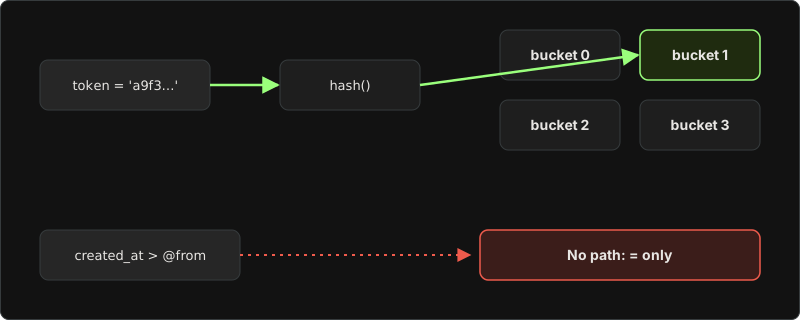
A hash index stores a hash of each value instead of the sorted value. It answers "equals" and nothing else.
-- PostgreSQL
CREATE INDEX ix_sessions_token ON sessions USING hash (token);
In MySQL, only the MEMORY and NDB storage engines let you create a hash index. InnoDB tables use B-trees, but InnoDB can build an adaptive hash index in memory when it sees queries that would benefit. In SQL Server, hash indexes exist only on memory-optimized tables.
When to use a hash index:
Use it only for a column you compare with = and nothing else, like a session token, and only after you've measured that it beats a B-tree on your data.
When to avoid a hash index:
Avoid it for almost everything else. The PostgreSQL docs say hash indexes "support only the = operator", so a range like created_at > @from can't use one. The MySQL docs add that the optimizer can't use a hash index to speed up ORDER BY. In PostgreSQL, a hash index also can't be unique and can't have more than one column. A B-tree handles = too, plus ranges, sorting, and uniqueness. That's why it's the default.
9. Full-text and GIN index (inverted index)
A B-tree can find email = 'x', but it can't find every product description that contains the word "wireless". An inverted index can. It maps each word, or each element of an array or JSON document, to the rows that contain it.
-- MySQL
CREATE FULLTEXT INDEX ft_products_description ON products (description);
SELECT id, name FROM products WHERE MATCH(description) AGAINST('wireless');

-- PostgreSQL: GIN on a jsonb column (it also works for arrays and tsvector)
CREATE INDEX ix_products_attributes ON products USING gin (attributes);
SELECT id, name FROM products WHERE attributes @> '{"color": "black"}';
SQL Server has its own full-text indexes, which you query with CONTAINS and FREETEXT. I only touch full-text here, and I left out vector indexes. Each one deserves its own post.
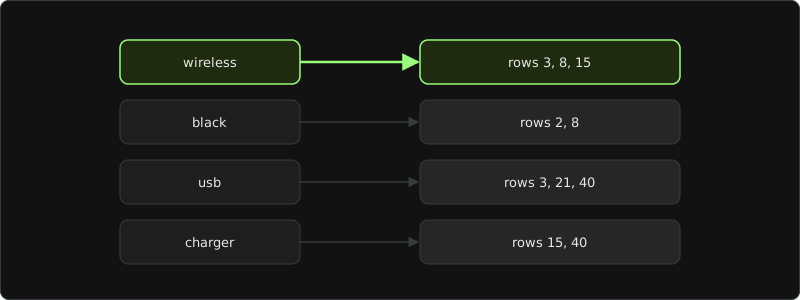
When to use it. Search inside text, tags stored as arrays, and filters on keys inside JSON.
When to avoid it. Don't use it on tables with heavy writes to the indexed column. A row with 200 distinct words adds 200 index entries. The PostgreSQL docs say "updating a GIN index tends to be slow", because inserting or updating one row "can cause many inserts into the index". MySQL describes the same problem: many small inserts into its full-text index tables make them "a point of contention". MySQL also doesn't shrink a full-text index when you delete rows. You have to run OPTIMIZE TABLE with innodb_optimize_fulltext_only=ON to clean it up. And in PostgreSQL, a GIN index can't do index-only scans.
10. BRIN index (PostgreSQL)
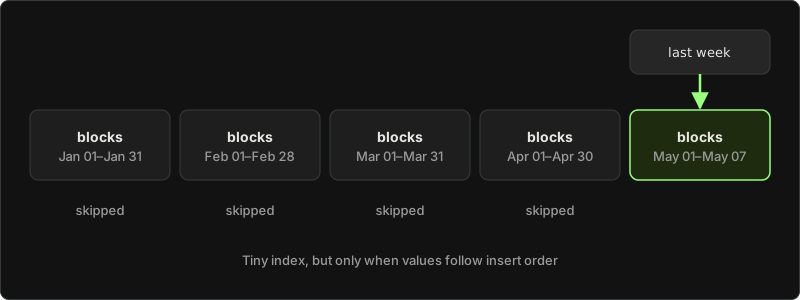
A BRIN (Block Range INdex) doesn't store every value. It stores a short summary, such as the minimum and maximum value, for each range of table blocks. A query for last week's events reads the summaries, skips every block range that can't contain last week, and checks only the rest.
CREATE INDEX ix_events_created_brin ON events USING brin (created_at);Because it stores so little, a BRIN index is tiny next to a B-tree on the same column.
When to use a BRIN index:
Use it on large tables where the column follows the physical order of the rows: event logs, metrics, and audit tables that only grow by time. The PostgreSQL docs describe BRIN as designed for "very large tables in which certain columns have some natural correlation with their physical location within the table."
When to avoid a BRIN index:
Scattered values break it: random IDs, rows updated or backfilled out of order, or any column that doesn't grow with insert order. Then every block range covers almost every value, nothing gets skipped, and the query reads the whole table plus the index. BRIN is also lossy: it finds candidate blocks, and PostgreSQL rechecks every row in them. For "find this one row" queries, use a B-tree.
11. Columnstore index (SQL Server)
A columnstore index stores data by column instead of by row, and compresses each column. A report that sums total over 100 million rows reads only the total column, not the full rows.
CREATE NONCLUSTERED COLUMNSTORE INDEX ncci_orders
    ON orders (customer_id, created_at, total);
Microsoft says a columnstore gives "gains up to 10 times the query performance" in a data warehouse compared with row storage. Read "up to" as the best case.
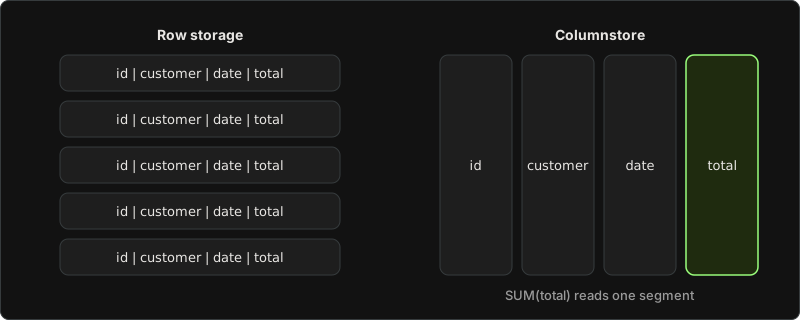
When to use a columnstore index:
Analytics: large scans SUM, COUNT, and GROUP BY over many rows. Microsoft calls columnstore "the preferred data storage format for data warehousing and analytics workloads". A nonclustered columnstore index also lets you run analytics on an operational table in real time.
When to avoid a columnstore index:
Don't use it for the typical app query that reads or updates one row by ID. Microsoft's guidance: "Use rowstore indexes with transactional workloads because they tend to require mostly table seeks instead of table scans." Writes are expensive too: SQL Server runs each update in a columnstore as a delete plus an insert. I'd keep columnstore for reporting tables, not for the tables the app writes to every second. For heavy reporting, I'd start one step earlier: separate the operational and analytical workloads with an ETL pipeline into a reporting store, then add indexes there.
How to find missing and unused indexes in SQL Server, PostgreSQL, and MySQL
Start from a slow query, not from a list of tables. Get its plan, look for a scan or a lookup on a big table, and design one index for that query with the rules above. If you use EF Core, turn on SQL logging first, so you see the SQL the database actually runs. 18 Entity Framework Core Mistakes shows how.
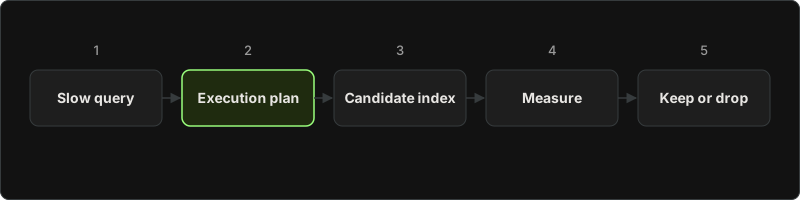
Then use what the database already tracks.
Missing indexes in SQL Server. The optimizer records the indexes it wished it had in a dynamic management view (DMV), sys.dm_db_missing_index_details, with the equality columns, the inequality columns, and the included columns:
SELECT d.statement AS table_name,
       d.equality_columns,
       d.inequality_columns,
       d.included_columns,
       s.user_seeks,
       s.avg_user_impact
FROM sys.dm_db_missing_index_details d
JOIN sys.dm_db_missing_index_groups g ON g.index_handle = d.index_handle
JOIN sys.dm_db_missing_index_group_stats s ON s.group_handle = g.index_group_handle
ORDER BY s.user_seeks * s.avg_user_impact DESC;
I treat the missing-index DMV as a list of hints, not a to-do list. It knows nothing about write cost. Microsoft's own docs say the suggestions "aren't prescriptions to create indexes exactly as suggested". They don't give a column order, they never suggest unique or filtered indexes, two suggestions can overlap, and the list resets when the server restarts.
Unused indexes in SQL Server. sys.dm_db_index_usage_stats counts reads (user_seeks, user_scans, user_lookups) and writes (user_updates) for each index. An index with many updates and no reads costs you on every write and gives nothing back:
SELECT OBJECT_NAME(s.object_id) AS table_name,
       i.name AS index_name,
       s.user_seeks, s.user_scans, s.user_lookups, s.user_updates
FROM sys.dm_db_index_usage_stats s
JOIN sys.indexes i ON i.object_id = s.object_id AND i.index_id = s.index_id
WHERE s.database_id = DB_ID()
  AND s.user_seeks + s.user_scans + s.user_lookups = 0
ORDER BY s.user_updates DESC;
These counters also reset when the server restarts, so check them after the server has run through a full business cycle, including the month-end reports.
Unused indexes in PostgreSQL. pg_stat_user_indexes has an idx_scan column with the number of index scans on each index:
SELECT relname AS table_name,
       indexrelname AS index_name,
       idx_scan,
       pg_size_pretty(pg_relation_size(indexrelid)) AS index_size
FROM pg_stat_user_indexes
WHERE idx_scan = 0
ORDER BY pg_relation_size(indexrelid) DESC;
Don't drop a unique index just because idx_scan is zero. It still enforces a rule on every insert.
Unused indexes in MySQL. The sys schema has a ready-made view:
SELECT object_schema, object_name, index_name
FROM sys.schema_unused_indexes;
The MySQL docs warn that the view means something only when the server has run long enough for its workload to be representative.
Before you drop an index, test what happens without it. In MySQL, if I'm not sure an index is still used, I'd make it invisible for a while before I drop it. The optimizer ignores an invisible index, but MySQL still updates it on writes, so you can switch it back on right away if a query slows down:
ALTER TABLE orders ALTER INDEX ix_orders_status INVISIBLE;
-- if a query slows down:
ALTER TABLE orders ALTER INDEX ix_orders_status VISIBLE;
How to add an index without blocking writes
On a small table, CREATE INDEX finishes before anyone notices. On a big production table, a plain index build can block writes for minutes, and your app's inserts queue up behind it. Each database has an option for this.
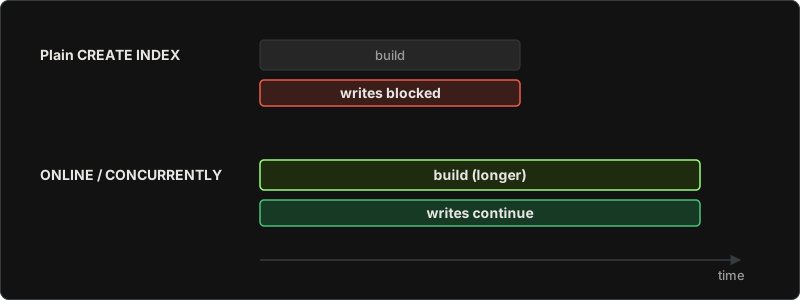
PostgreSQL: CREATE INDEX CONCURRENTLY. A standard build "locks out writes (but not reads)" until it's done. With CONCURRENTLY, inserts, updates, and deletes keep running. The price: it "requires more total work" and "takes significantly longer"; it can't run inside a transaction, and if it fails, for example on a deadlock or a duplicate value in a unique index, it leaves an INVALID index that you have to drop and build again.
CREATE INDEX CONCURRENTLY ix_orders_customer_id ON orders (customer_id);

-- find indexes left INVALID by a failed build
SELECT indexrelid::regclass FROM pg_index WHERE NOT indisvalid;
On a big PostgreSQL table in production, I'd create indexes with CONCURRENTLY and check for an INVALID index afterward. With EF Core and Npgsql, .IsCreatedConcurrently() on the HasIndex call generates the concurrent version in the migration. Npgsql's docs ask you not to turn it on before you understand what a concurrent build implies.
SQL Server: WITH (ONLINE = ON). It lets reads and writes continue while the index builds:
CREATE INDEX ix_orders_customer_id ON orders (customer_id) WITH (ONLINE = ON);In SQL Server 2022, online index builds are an Enterprise edition feature (Developer edition has it too, for testing). On Standard edition, plan big index builds for a quiet window.
MySQL: online DDL. InnoDB adds a secondary index in place, and "the table remains available for read and write operations while the index is being created." The catch: CREATE INDEX "only finishes after all transactions that are accessing the table are completed", so one long-running transaction can hold it up.
What indexes cost: writes, storage, and maintenance
Every index is a copy of some data that the database keeps in sync with the table. When you insert a row, the database adds an entry to every index on the table. When you update a column, every index that contains that column changes too. Microsoft's design guide: "A large number of indexes on a table affect the performance of INSERT, UPDATE, DELETE, and MERGE statements."
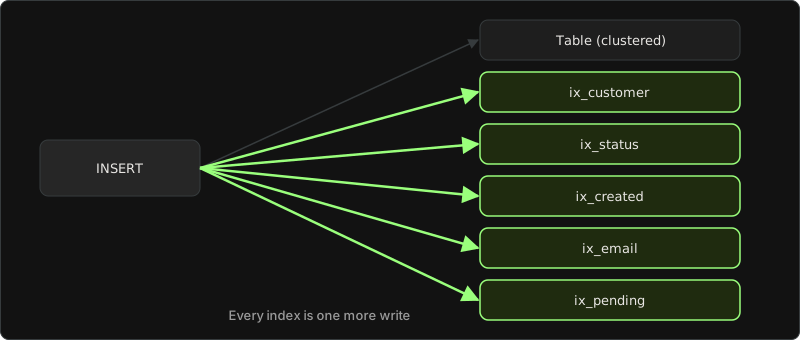
The first index costs the most. In Markus Winand's SQL Performance Explained, adding one index to a table with no indexes made inserts about 100 times slower on the book's test. Real tables always have a primary key index, so you won't see that exact jump. The direction holds, though: the number of indexes is the biggest factor in insert speed.
PostgreSQL has one more cost. It can do a cheap HOT (heap-only tuple) update that skips index changes, but only when "the update does not modify any columns referenced by the table's indexes," and the page has free space. Index a column like last_seen_at that changes on every request, and every one of those updates now writes new index entries too.
Indexes also take disk space and memory. Microsoft's docs list it in one line: each nonclustered index "takes up space, adds overhead for inserts, updates, and deletes, and might require maintenance."
About maintenance: don't rebuild indexes only because fragmentation passed a fixed percentage. Microsoft's current guidance says maintenance decisions "shouldn't be based on fixed fragmentation or page density thresholds alone", and if a rebuild seems to help, to "try replacing it with updating statistics". I don't schedule index rebuilds on a fragmentation percentage. I'd update statistics first and measure:
UPDATE STATISTICS orders;   -- SQL Server
ANALYZE orders;             -- PostgreSQL
ANALYZE TABLE orders;       -- MySQL
AI Prompt for SQL Database Index Review and Optimization
Below is the AI prompt that you can use with your agent to analyze the codebase:
### AI Prompt: Database Index Review and Optimization

Act as a senior database performance engineer specializing in SQL Server, PostgreSQL, and MySQL.

Review my database schema, existing indexes, SQL queries, and execution plans. Identify indexing problems and recommend improvements based on actual query patterns.

**Your objectives**

1. Identify missing indexes for frequently executed queries.
2. Find unused, redundant, and overlapping indexes.
3. Review composite indexes for incorrect column order, considering equality filters, range conditions, and sorting.
4. Identify expensive table scans, index scans, key lookups, and unnecessary sorting operations.
5. Check whether covering indexes or included columns would reduce table lookups.
6. Evaluate opportunities for filtered, partial, unique, expression, full-text, BRIN, hash, or columnstore indexes where supported.
7. Identify non-SARGable predicates, including functions applied to indexed columns, implicit conversions, and leading-wildcard searches.
8. Review clustered and primary key choices, including wide keys, random GUIDs, and frequently updated keys.
9. Evaluate index maintenance costs, including storage, insert/update/delete overhead, page splits, and write amplification.
10. Identify indexes on frequently updated columns, especially where PostgreSQL HOT updates might be affected.
11. Check index recommendations against existing primary key, unique, and foreign key indexes.
12. Review database-specific online or concurrent index creation options and deployment risks.

**Analysis rules**

- Identify the database engine and version before recommending engine-specific features.
- Base recommendations on the actual SQL queries, execution plans, table sizes, row counts, and available index statistics.
- Do not assume every table scan is a problem. Evaluate selectivity and the percentage of rows returned.
- Do not recommend an index solely because a missing-index DMV or monitoring view suggests one.
- Check whether an existing index already supports the query before recommending a new index.
- Consider the leftmost-prefix rules and optimizer behavior for the specific database engine.
- Do not assume an index with zero recorded reads is safe to remove. Check statistics reset periods, business cycles, and constraint enforcement.
- Consider the impact on INSERT, UPDATE, and DELETE operations.
- Distinguish confirmed issues from hypotheses requiring more evidence.
- Never invent execution plans, statistics, benchmark results, or performance improvements.
- Prefer query rewrites over additional indexes when appropriate.
- Do not execute schema changes automatically.

**For each identified issue, provide:**

- Affected table and query.
- Current index or missing index.
- Explanation of the performance problem.
- Recommended solution and reasoning.
- Complete SQL statement for the detected database engine, where enough information exists.
- Expected effect on read performance.
- Expected effect on write performance and storage.
- Risk level: Low, Medium, or High.
- Validation steps using execution plans and runtime metrics.

**Output format**

Start with a short assessment of the current indexing strategy.

Then provide a table:

| Priority | Table | Issue | Recommendation | Expected benefit | Trade-off |
|---|---|---|---|---|---|

Follow with proposed SQL changes and an explanation for each recommendation.

End with a prioritized action plan covering:

1. Changes worth testing first.
2. Indexes worth consolidating or removing.
3. Queries worth rewriting.
4. Changes requiring production-like load testing.
5. Metrics to compare before and after changes.

**Important:** If the provided information is insufficient, explain which SQL queries, execution plans, schema definitions, index statistics, or workload metrics are missing. Do not present speculative recommendations as confirmed problems.

I will provide my database schema, existing indexes, representative queries, execution plans, and workload information for analysis.
Conclusion
Indexes are not a collection of columns you add when a query becomes slow. They are part of the query design.
Start with the query. Check what it filters, how many rows it returns, how it sorts data, and which columns it needs. Then read the execution plan and decide whether the problem is a scan, a lookup, a bad column order, or something else.
A good index gives the database a shorter path to the data. A bad index adds storage, memory pressure, and work to every insert, update, and delete without improving the queries that matter.
So the process will be as follows:
- Find the slow query.
- Read its execution plan.
- Design the smallest index that matches the query.
- Measure the result.
- Keep the index only if the read improvement is worth its write cost.
The goal is not to have more indexes. The goal is to make important queries cheaper without making the rest of the workload more expensive.
The practice game
To practice and improve knowledge, you can use our learning game: Index Surgeon
Comments (0)