
What is Developer Experience (DX): Why it's hurting your team's productivity and how to fix it

TL;DR
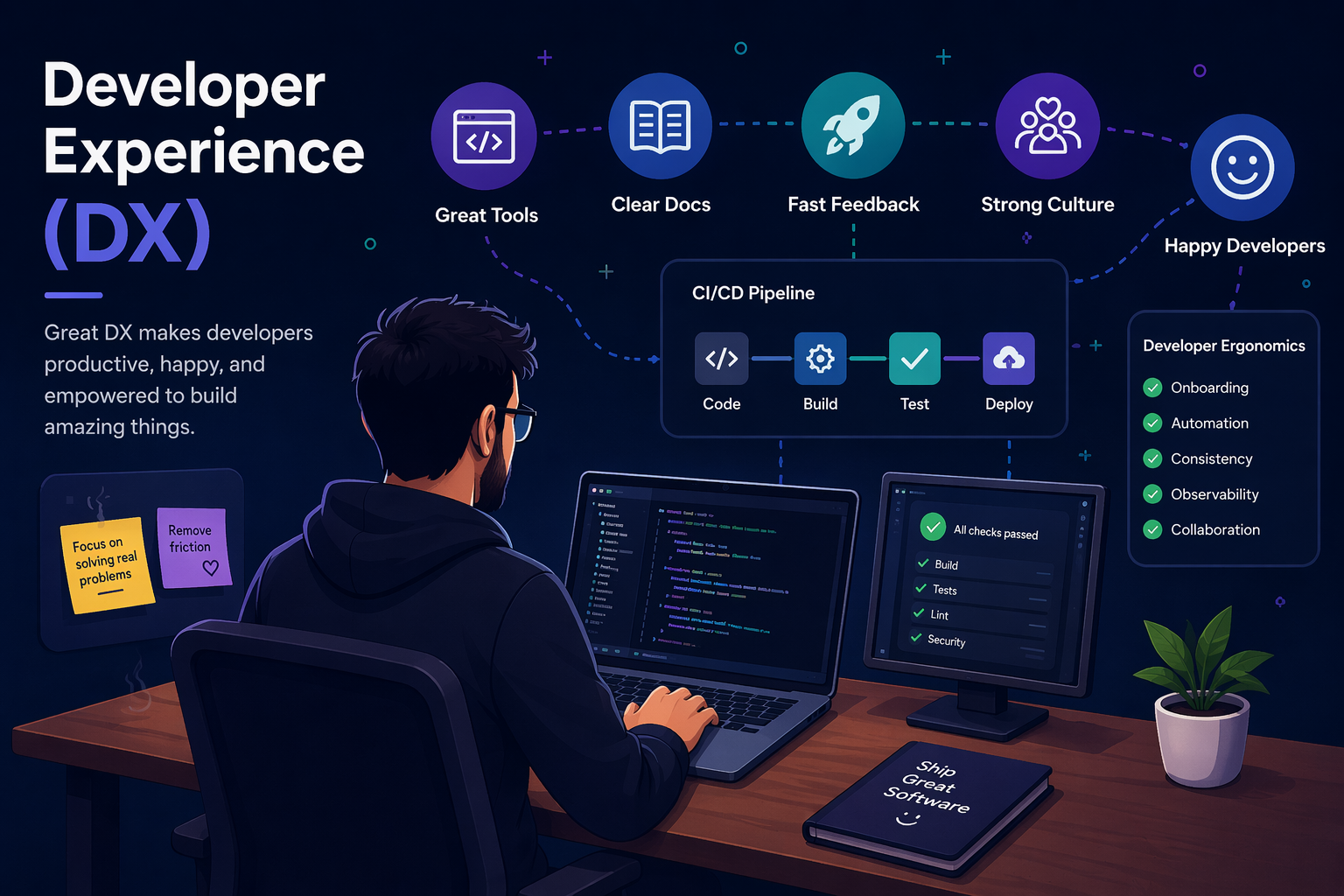
- Developer Experience, or DX, is how easy or painful it is for developers to build, test, ship, and debug software on your team.
- Bad DX looks like slow builds, flaky tests, broken setup, missing docs, mystery deployment steps, and tribal knowledge nobody wrote down.
- Good DX means faster delivery, fewer mistakes, smoother onboarding, less frustration, and a team that spends more time solving real problems instead of fighting the system.
- And that is the important part: DX is not a nice bonus. It shapes productivity, quality, and retention.
A small story before we start
10+ years ago, my first "dev environment" was Visual Studio, and an FTP client that I used to drag .dll or .exe files directly onto production.
Nobody called it "Developer Experience" back then. We just called it Tuesday. Things broke. We fixed them. We went home and pretended everything was fine.
Fast-forward to now. Teams have CI/CD, Kubernetes, observability stacks that cost more than my first car, and AI copilots that finish your sentences. And yet I still watch brilliant engineers waste half their day waiting for a build, hunting for a messager thread from 2023, or trying to figure out which of the seven internal tools they're supposed to open first.
And still, I see smart engineers lose hours every week because:
- The build takes forever
- The docs lie
- The local setup works only on one laptop
- Nobody knows which internal tool to open first
- Production errors tell you nothing useful
- Deploying a tiny change still feels like summoning a demon
That is DX.
Not the conference-talk version of DX. The real version.
The day-to-day experience of being a developer on your team.
What is Developer Experience?
Developer Experience is how easy it is for engineers to build, test, ship, change, and understand software without fighting the system around them.
That includes:
- How fast does your laptop boot the project
- Whether the README actually works
- If the tests pass on your machine (and only your machine, suspiciously)
- How long does it take to ship a one-line change
- Whether you need to ask three messenger channels before deploying anything
- If the error messages are helpful or cryptic haikus from hell
UX (User Experience) is about how users feel using your product. DX is about how developers feel while building that product. Same idea. Different audience.
Think of DX as a pipeline of friction points. Every one of these slows your team down:
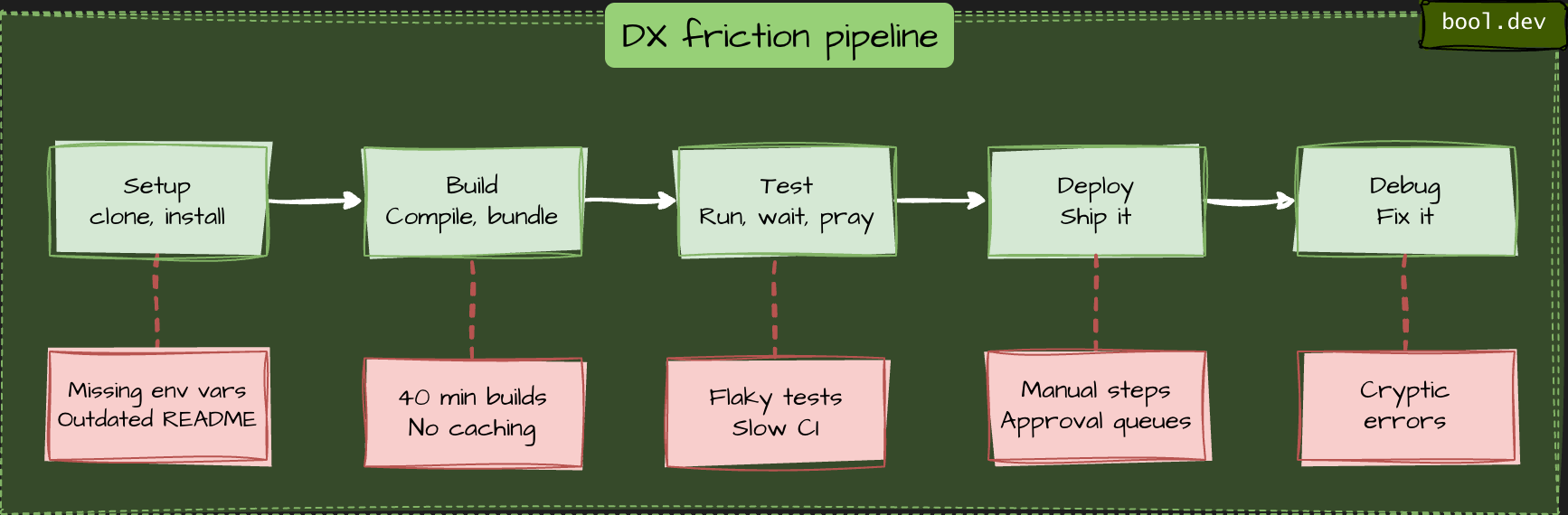
If any single step is painful, the whole pipeline suffers. Juniors feel this first because they don't have the tribal knowledge to shortcut the pain.
DX is not just tooling
A lot of teams hear “DX” and immediately think:
- Let’s buy a portal
- Let’s install a new build tool
- Let’s add AI
- Let’s make a prettier dashboard
That can help. But DX is not only about tools.
It is also about:
- defaults
- process
- ownership
- discoverability
- feedback loops
- How much hidden knowledge does your system depend on
You can have modern tooling and still have terrible DX if every useful answer lives in Slack, every deployment needs heroics, and nobody knows who owns a service.
Good DX is not “we bought a platform.”
Good DX is “a normal engineer can get normal work done without unnecessary pain.”
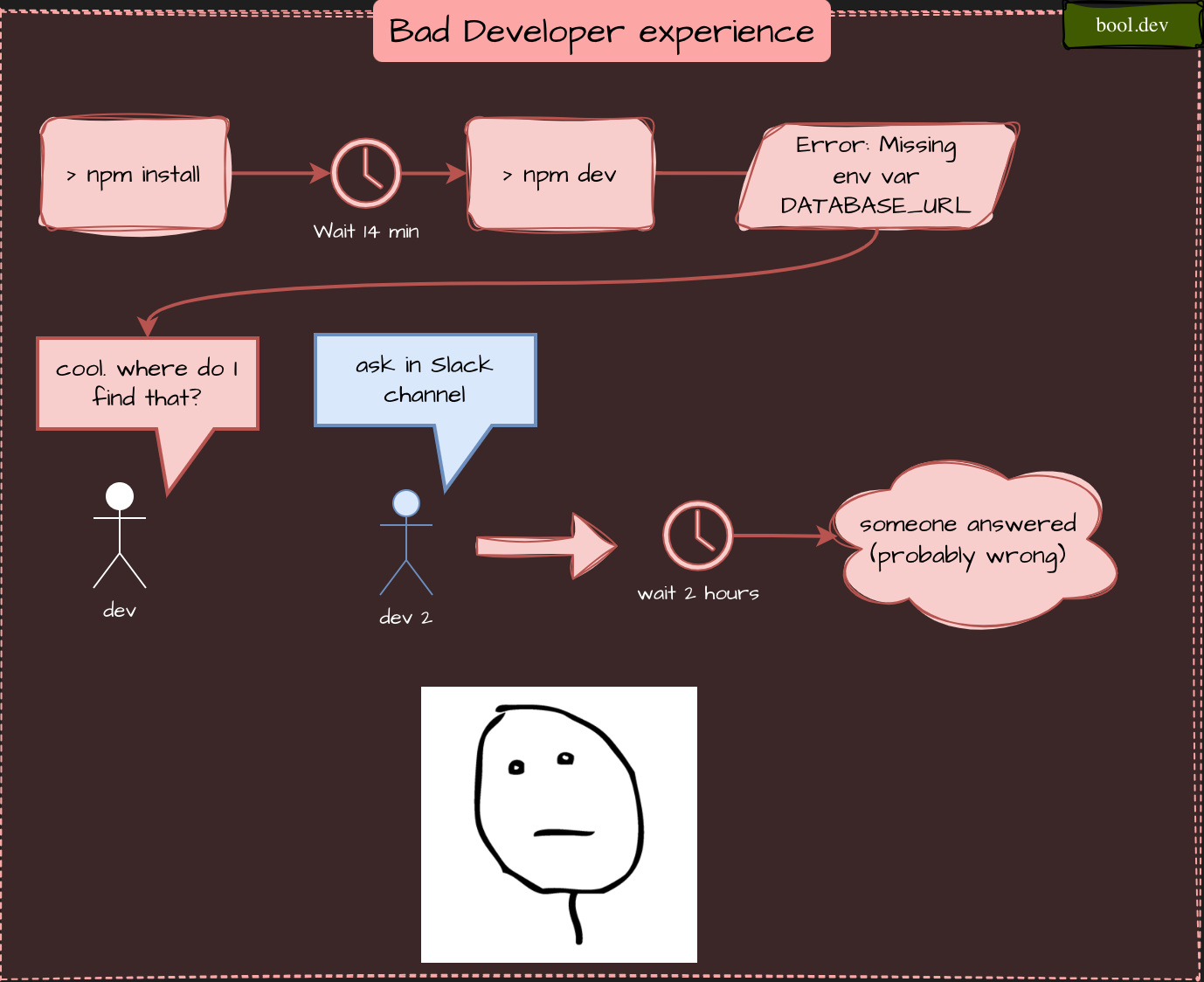
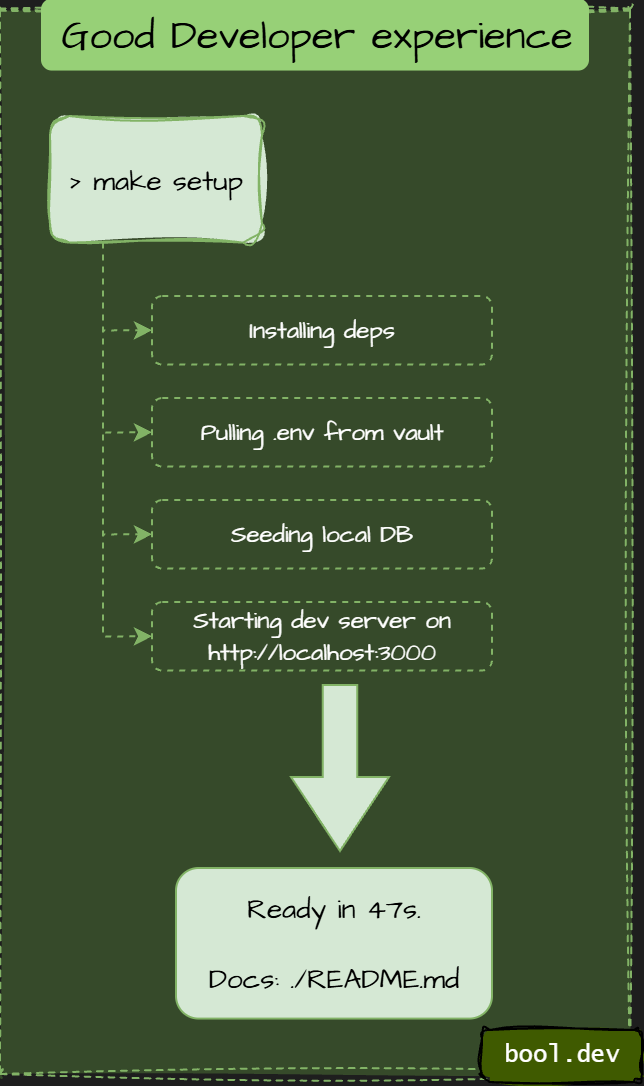
Quick example
Bad DX:
Good DX:
Why bad DX quietly kills your productivity

Most engineering time is not lost on difficult computer science problems. It is lost on stupid problems.
Waiting. Guessing. Re-running. Searching. Context switching. Asking around. Undoing friction that should not exist in the first place.
Here are a few common ways that happen.
Example: the slow build tax
Imagine your CI build takes 20 minutes. Sounds fine, right?
Do the math. A developer commits 5 times a day. That's 100 minutes of waiting. Multiply by 10 developers. That's almost 17 hours of idle time per day. Every day.
And "idle" is generous. What really happens is context switching. Dev kicks off a build, flips to Slack, gets pulled into a thread, and forgets what they were doing. By the time CI fails, they need 10 minutes just to reload the mental context.
Slow builds don't just cost time. They cost focus. And focus is the whole job.
Example: the onboarding tax
A new hire's first week is the purest DX stress test you can run. They don't have tribal knowledge. They can't "just ask Alex." They literally need the docs to work.
If a new engineer can't run the project locally on day one, one of these things is broken:
- The README is outdated
- Setup requires secret env vars nobody documented
- A required service runs on someone's laptop and isn't in the repo
- The install script only works on macOS, and the new hire is on Linux
Every one of these costs the team real money. Onboarding time is a measurable DX signal, and it shows up in retention data too. New hires who flounder in week one tend to become unhappy hires by month three.
Example: flaky tests and the broken window effect
"Flaky tests" are tests that sometimes pass and sometimes fail for no clear reason. Maybe a timing issue. Maybe a shared database. Doesn't matter.
What matters is what they do to the team's habits.
Once engineers learn that "red CI doesn't mean broken," they start ignoring red CIs. Then real bugs slip through because nobody trusts the signal anymore. This is the classic broken window problem from urban policing theory, applied to code: small visible disorder encourages bigger disorder.
A single flaky test doesn't just cost you re-runs. It erodes your safety net.
Example: tribal knowledge
Watch for this phrase in your team's chat:
"Oh yeah, you have to talk to Mark about that."
Every time this happens, Mark is a single point of failure. When Mark is on vacation, everything involving "that" stops. When Mark quits, three months of productivity go with him.
Good DX turns tribal knowledge into written knowledge. Not perfect docs. Just enough docs that the next person doesn't need to find Mark.
Example: environment mismatch
This is one of the most common DX problems and one of the least glamorous.
- Locally, the app runs with mocked services and SQLite.
- In CI, it runs against a containerized Postgres.
- In staging, it uses cloud storage, real auth flows, and feature flags.
- In production, it is a completely different beast again.
So now the developer is not just writing code.
They are debugging the gap between environments. This is how you get “works on my machine” culture.
Not because developers are careless, but because the system behaves differently depending on where you touch it. Good DX reduces that gap. It does not need perfect parity, but it does need predictable enough behavior that developers can trust what they are testing.
Example: ticket-driven platform work
Here is another silent productivity killer.
A developer wants to create a new service, add a queue, set up secrets, or configure monitoring.
Instead of doing it directly, they need to:
- Find the right wiki page
- Ask in chat
- Create a ticket
- Wait for another team
- Copy a config from an old service
- Hope it still reflects reality
Now compare that with a team that has a clear golden path:
- Use the service template
- follow one documented setup
- register the service
- Get deployment, dashboards, and ownership metadata by default
That difference is DX.
How to improve DX on your team
Let's talk about fixes:
1. Run a "papercuts" survey
Ask your team:
"What's the one thing that makes you swear the most this week?"
Not big architectural stuff. Small papercuts.
- “The dev DB is painfully slow.”
- “The linter runs twice.”
- “Nobody knows what half the environment variables do.”
- “Deploys require copying commands from old chat messages.”
Collect ten of these. Fix two per sprint. You'll be shocked at the impact.
2. Treat local setup like a product
Your local setup is not an internal side quest.
It is the front door to engineering work.
A good standard is simple:
Can a developer clone the repo and get the app running in under 10 minutes on a fresh machine?
If not, fix that before you add another internal tool.
A good setup experience usually means:
- copy-pasteable commands
- obvious prerequisites
- minimal hidden dependencies
- clear failure recovery steps
- scripts that work on supported environments
If the local setup is fragile, every other improvement sits on top of sand.
3. Maintain a README.md
A README does not need to be beautiful.
It needs to be useful.
At minimum, it should answer:
- What this repo does
- How to run it locally
- How to run tests
- What environment variables are required
- How to build and deploy
- Where to look when something breaks
- Who owns the service
The best docs are not the longest docs.
They are the docs that save someone from having to ask in chat.
4. Invest in golden paths
A "golden path" is the boring, obvious, recommended way to do a thing. New service? There's a template. New deploy? There's a script. New env var? There's a place.
The principle is simple: the secure option should be the fastest. If the right way is harder than the wrong way, guess which way people pick.
5. Kill flaky tests ruthlessly
Flaky tests aren't "just flaky." They're a broken window. Once your team learns to ignore a red CI, they'll ignore all red CIs. Delete them or fix them. No middle ground.
6. Measure the boring stuff
Track:
- Time from
git cloneto running app (aim: under 10 minutes) - Time from commit to deploy
- How often CI fails for infrastructure reasons vs real bugs
- Onboarding time for new hires
You can't improve what you don't measure. And you don't need fancy tools — a spreadsheet is fine to start.
7. Make production easier to debug
A lot of teams invest in shipping and forget about understanding.
Do not stop at deployment.
Make sure developers can answer:
- what failed
- where it failed
- when it started
- Which release changed the behavior
- What downstream systems were affected
Good logs, good metrics, useful traces, and clear alerts are not just “ops concerns.”
They are part of the developer experience.
Because developers are the ones trying to fix the thing at 4 PM on a Friday.
8. Reduce handoffs where possible
Every handoff adds delay, misunderstanding, and waiting time.
If a developer needs another team for every small action, delivery slows down even when everybody is competent.
Not every dependency can disappear, of course.
But many common workflows can become self-service with:
- templates
- automation
- standard permissions
- documented defaults
- better internal tooling
The goal is “no platform team.”
The goal is “normal work should not require a ceremony.”
A simple DX health check
Here is a lightweight way to assess your team.
Score each from 1 to 5.
| Area | Question | Score |
|---|---|---|
| Setup | Can a new hire run the app on day one? | |
| Build | Is feedback fast enough to preserve focus? | |
| Tests | Can the team trust red CI? | |
| Docs | Are the first-step docs up to date and useful? | |
| Ownership | Is it obvious who owns each service? | |
| Deploys | Can a normal dev deploy safely without asking around? | |
| Observability | Can engineers debug production issues without guessing? | |
| Platform | Can common tasks be done self-service? | |
| Feedback | Does the team have a clear way to report DX pain? |
If the total is low, that does not mean your team is bad. It means friction has piled up and compounds.
Key takeaways
- DX is how easy it is for developers to build, test, ship, and debug software
- Bad DX is usually a pile of small frictions, not one giant failure
- Slow builds, flaky tests, poor onboarding, tribal knowledge, weak observability, and ticket-driven workflows are all DX problems
- DX is not just tooling; it is also process, defaults, ownership, and discoverability
- AI can help, but it does not fix a broken engineering system
- The best way to improve DX is to fix recurring papercuts consistently